
Text to Image
Character Emotional Performance Grid — AI Image Prompt
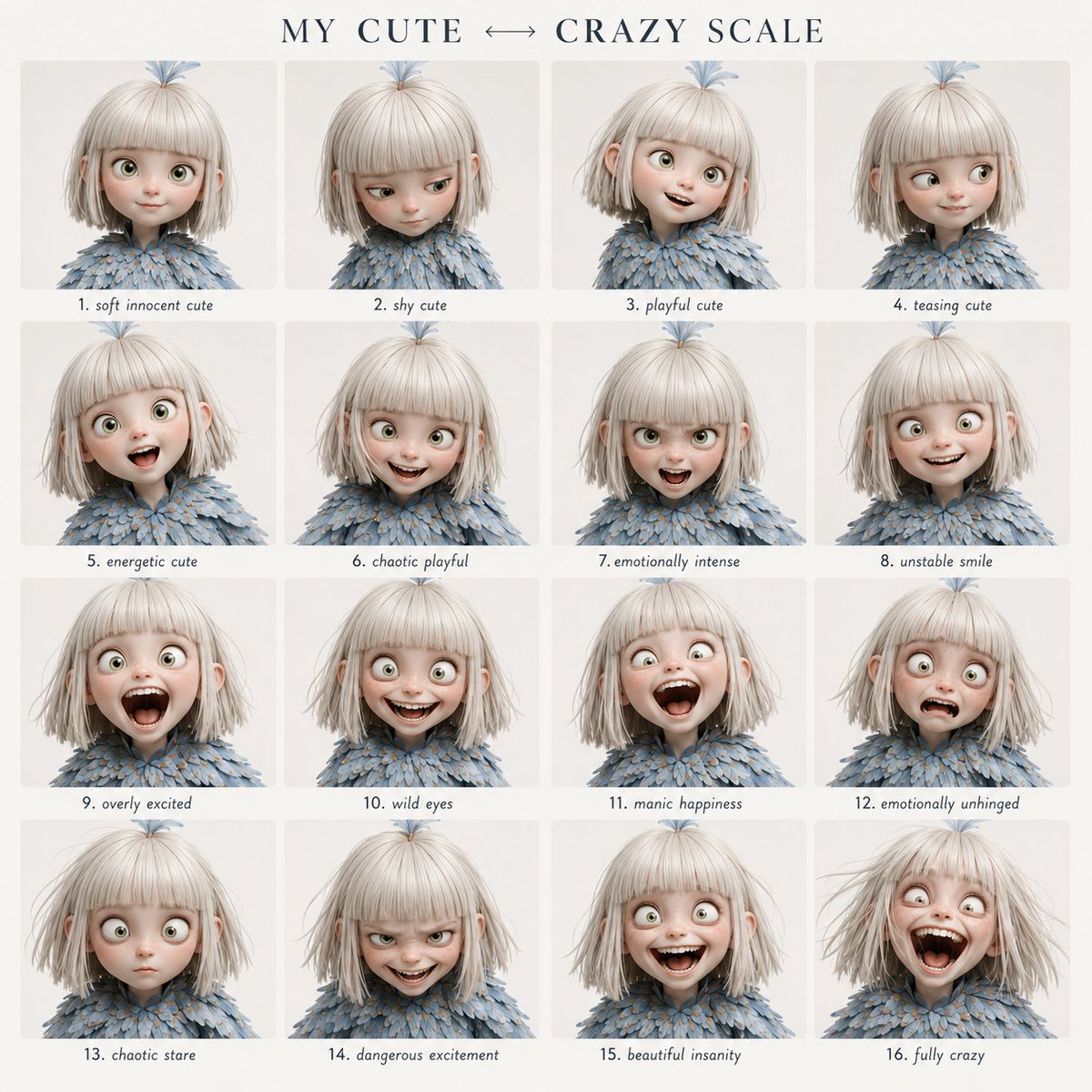
A highly structured prompt for generating a 4x4 grid of character expressions, transitioning from cute to crazy while maintaining perfect facial identity. - AIPinMaker
Prompt
Create a clean 4x4 emotional performance grid using the provided character as the fixed identity reference.

Visual style:
Clean modern graphic design layout. Elegant serif header at the top, soft off-white background, even spacing, small readable handwritten-style labels centered below each panel.

Header text:
“{argument name="grid title" default="MY CUTE ↔ CRAZY SCALE"}”

Preserve strict facial identity consistency across all 16 panels.

Follow the exact emotional progression from top-left to bottom-right.
Do not randomize expressions or intensity.

GRID ORDER:

Row 1:
1. soft innocent cute
2. shy cute
3. playful cute
4. teasing cute

Row 2:
5. energetic cute
6. chaotic playful
7. emotionally intense
8. unstable smile

Row 3:
9. overly excited
10. wild eyes
11. manic happiness
12. emotionally unhinged

Row 4:
13. chaotic stare
14. dangerous excitement
15. beautiful insanity
16. fully crazy

Format:
4x4 grid, {argument name="style" default="cinematic portrait photography"} style, neutral background, tight close-up framing, shallow depth of field, no watermark.3a:T43Prompt breakdown
- Subject
- Anime character fixed identity across 16 panels progressing from soft innocent cute, shy cute, playful cute, teasing cute, energetic cute, chaotic playful, emotionally intense, unstable smile, overly excited, wild eyes, manic happiness, emotionally unhinged, chaotic stare, dangerous excitement, beautiful insanity to fully crazy
- Style
- Clean modern graphic design layout with cinematic portrait photography, elegant serif header, soft off-white background, and centered handwritten-style labels
- Composition
- 4x4 grid format, tight close-up framing, neutral background, even spacing, shallow depth of field
- Mood
- Methodical shift from endearing cuteness through manic intensity to unhinged insanity
Remix ideas
- Replace the default header with a custom phrase such as 'SANITY SLIDER' while keeping the 4x4 structure
- Swap the final four panels for milder unhinged variants to create a less extreme arc
- Change the photography style to soft anime cel-shading but retain the serif header and label placement
Reference images
How to use this AI Image prompt template
 1
1Copy the prompt — grab this template’s prompt and negative prompt.  2
2Pick a model — choose a recommended AI model for the best match.  3
3Generate — open the studio with one click and create your result.
Related templates

3D Chibi Doodle Portrait
Create a portrait image of 3d Chibi Doodle Portrait. Style: photorealistic. Composition: balanced and well-framed. Lighting: natural with cinematic mood. Category: portrait. Reference: 3d-chibi-doodle-portrait-18035.

Ethereal Data Portrait for Astronomers
2x2 grid, do this for 4 famous astronomers: class ethereal_data_portrait: def __init__(self, subject="[visionary_name] (astronomer name)", field="[field_of_study] (field of study)"): self.background = "absolute pitch black void" self.layout = "high-end scientific documentary poster, 16:9 aspect ratio" def generate_visuals(self): # ai inference: deduce the elemental material based on the field elemental_matter = f"ai_infer(glowing, ethereal particles representing {self.field}, e.g., cosmic dust, bioluminescence, or electrical plasma)" # the portrait portrait = f"a side-profile portrait of {self.subject}, looking upward. their face and shoulders are not flesh, but physically composed entirely of the {elemental_matter}." # the data overlay technical_ui = f"crisp, thin gold and white vector lines. ai_infer(mathematical diagrams, orbits, or schematics specific to {self.subject}'s discoveries) overlaying the portrait." return [portrait, technical_ui, self.background] # execute: high contrast. the glowing elemental face must illuminate the thin vector lines of the technical ui.

3D Caricature Meme Portrait
Create a portrait image of 3d Caricature Meme Portrait. Style: photorealistic. Composition: balanced and well-framed. Lighting: natural with cinematic mood. Category: portrait. Reference: 3d-caricature-meme-portrait-22110.

Stylized X-Frame Portrait Design
Create a portrait image of Stylized X Frame Portrait Design. Style: photorealistic. Composition: balanced and well-framed. Lighting: natural with cinematic mood. Category: portrait. Reference: stylized-x-frame-portrait-design-24104.
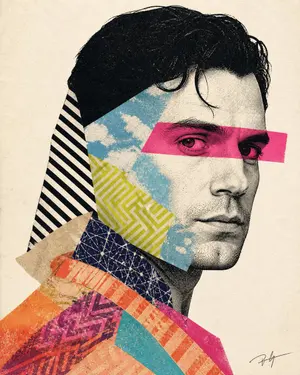
Mixed-media collage portrait illustration - Nano Banana Pro AI Prompt for Poster / Flyer
Create a high-detail contemporary mixed-media portrait illustration (art style) of a person attached in the uploaded reference image ( Do not change facial features of the person from the uploaded photo. Keep face of person 100% accurate from the reference image. Keep the original face of the attached person unchanged and realistic) in side-facing three-quarter profile, styled as a premium editorial art print / collage poster. Make it look like a real handcrafted screenprint–collage artwork scanned from paper — authentic print texture, halftone dots, paper grain, cut-paper layering, imperfect registration, and analog feel only. No AI-digital look. The face is high-contrast black-and-off-white halftone/stipple (like old newspaper/photo-transfer), slender and elegant, calm serious expression, direct gaze, short dark hair with one soft curl over the forehead. A bold hot-pink/magenta (eye band color) horizontal eye band crosses both eyes (semi-opaque, eyes still visible beneath). Hair is a solid black cutout shape. Layered collage fragments cut diagonally across the portrait: sky-blue cloud texture over forehead/cheek/jaw, lime-yellow geometric maze pattern on cheek/jaw, bold black-and-white diagonal stripes on the back silhouette, dark navy network scribble near the neck, beige torn-paper fragment, and lower neck/shoulder areas with overlapping warm orange, coral, peach, turquoise, and magenta textile patterns (zigzags, chevrons, diagonal stripes, mottled textures). Vertical portrait composition, head dominant and slightly right of center, clean negative space, plain warm off-white paper background with subtle grain. Tiny artist-signature scribble in lower-right corner only. Highly tactile, matte, scanned print aesthetic with visible paper tooth, ink absorption, and minor imperfections. Color palette: black, off-white/cream, hot pink/magenta, sky blue/cyan, lime yellow-green, dark navy, beige, orange/coral/peach, purple-magenta accents. Editorial screenprint/risograph collage style — bold, graphic, refined, and physically real. Avoid photorealism, glossy gradients, 3D shading, smooth vectors, watercolor, text, or extra elements. Aspect ratio 4:5 (aspect ratio)3e:T8e

Detailed Embroidery Portrait Effect
Create a portrait image of Detailed Embroidery Portrait Effect. Style: photorealistic. Composition: balanced and well-framed. Lighting: natural with cinematic mood. Category: portrait. Reference: detailed-embroidery-portrait-effect-21452.
Explore more prompts
Browse more AI image and video prompts by category.
FAQ
- How does the prompt keep the same character recognizable in every panel?
- It explicitly requires preserving strict facial identity consistency across all 16 expressions rather than allowing variation in features or proportions.
- Why list the emotions in that exact top-left to bottom-right order?
- The fixed sequence creates a clear visual narrative from innocent cuteness to full insanity, making the grid useful as a performance reference instead of a random assortment of faces.