
Text to Image
Censored Night Bus Window Scene — AI Image Prompt
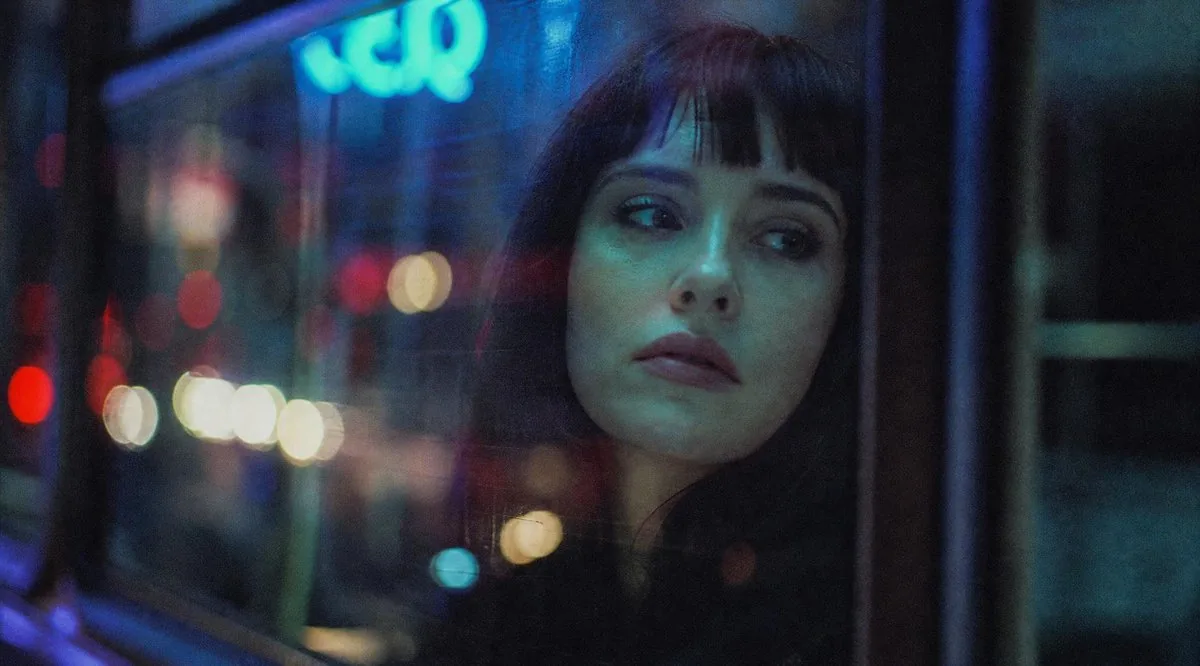
A cinematic rainy-night urban bus window scene with blurred neon lights and a silhouetted person whose face is hidden by a square censor block. - AIPinMaker
Prompt
Create a moody cinematic night photograph in a wide 16:9 frame, shot from inside or beside a bus or tram window in a rainy urban setting. The scene should be dark and atmospheric, with heavy glass reflections, soft film grain, shallow depth of field, and out-of-focus city bokeh lights in red, white, yellow, cyan, and blue. On the right half of the image, show the partial silhouette of {argument name="subject" default="a person seated by the window"}, mostly obscured by darkness and reflections, with only hair and shoulder shape faintly visible. Cover the subject's face with one large opaque square censor block, centered over the head and upper torso area, colored deep charcoal blue-gray, with sharp clean edges and no text. In the background, include a glowing blurry cyan-blue neon sign near the upper left that vaguely resembles letters but remains unreadable, plus vertical window frames and dark bus interior structure. Use a gritty analog film look, low contrast shadows, cool blue-green color grading, dim exposure, and soft motion-blurred street lights; no readable text, no watermark, no extra subjects.Prompt breakdown
- Subject
- partial silhouette of a person seated by the window on the right half, obscured by darkness and reflections with only hair and shoulder faintly visible, covered by one large opaque deep charcoal blue-gray censor block centered over head and upper torso
- Style
- moody cinematic night photograph with gritty analog film look, soft film grain, and shallow depth of field
- Lighting
- dim exposure with cool blue-green color grading, low contrast shadows, out-of-focus city bokeh lights in red white yellow cyan and blue, glowing blurry cyan-blue neon sign, and soft motion-blurred street lights
- Composition
- wide 16:9 frame shot from inside or beside a bus or tram window in rainy urban setting, vertical window frames and dark bus interior structure, censor block with sharp clean edges and no text
- Mood
- dark and atmospheric with heavy glass reflections
Remix ideas
- Swap the censor block to a deep red hue while keeping its sharp clean edges and placement
- Shift the unreadable cyan-blue neon sign slightly lower while retaining its blurry upper-left glow
- Intensify the rain streaks across the glass to amplify the heavy reflections over the silhouette
Reference images
How to use this AI Image prompt template
 1
1Copy the prompt — grab this template’s prompt and negative prompt.  2
2Pick a model — choose a recommended AI model for the best match.  3
3Generate — open the studio with one click and create your result.
Related templates

Cinematic Night Bus Window Portrait
Create a cinematic, grainy night photograph shot from inside a city bus or tram, looking through a rain-speckled window covered in reflections. The scene should feel like 35mm film with shallow depth of field, heavy bokeh, and moody neon lighting in deep blues, cyan, red, and warm white. On the left side and background, show blurred urban street lights and traffic dots outside the glass, including a soft glowing cyan sign near the upper left with indistinct lettering. On the right-center, place the partial silhouette of a seated passenger (subject) close to the window, mostly hidden in darkness and reflections. Cover the subject's face with one large opaque square censor block, exactly 1 visible censor block, positioned slightly right of center, dark charcoal with a subtle vertical gradient from bluish navy at the top to near-black at the bottom. The composition is wide horizontal, about 16:9, with the left half dominated by window reflections and colorful bokeh, and the right half darker with window frames and the passenger silhouette. Use realistic low-light photography, soft focus, visible film grain, muted contrast, no sharp text, no watermark, and an introspective late-night urban atmosphere.

Neon Sign Text on Concrete Surface
Create a creative image of Neon Sign Text On Concrete Surface. Style: photorealistic. Composition: balanced and well-framed. Lighting: natural with cinematic mood. Category: photography. Reference: neon-sign-text-on-concrete-surface-10424.

Immersive Nightclub Scene with Fashion Focus
Create a cinematic image of Immersive Nightclub Scene With Fashion Focus. Style: photorealistic. Composition: balanced and well-framed. Lighting: natural with cinematic mood. Category: cinematic-video. Reference: immersive-nightclub-scene-with-fashion-focus-3241.

Photorealistic Neon Tokyo Street Scene
Create a cinematic image of Photorealistic Neon Tokyo Street Scene. Style: photorealistic. Composition: balanced and well-framed. Lighting: natural with cinematic mood. Category: cinematic-video. Reference: photorealistic-neon-tokyo-street-scene-14086.

Tokyo Back Alley Neon Snapshot
Create a creative image of Tokyo Back Alley Neon Snapshot. Style: photorealistic. Composition: balanced and well-framed. Lighting: natural with cinematic mood. Category: photography. Reference: tokyo-back-alley-neon-snapshot-22102.
Cinematic rainy street, underwater cathedral, and design-to-photo
Create a cinematic image of Cinematic Rainy Street Underwater Cathedral And Design To Photo. Style: photorealistic. Composition: balanced and well-framed. Lighting: natural with cinematic mood. Category: cinematic-video. Reference: cinematic-rainy-street-underwater-cathedral-and-design-to-photo-210.
Explore more prompts
Browse more AI image and video prompts by category.
FAQ
- Why place the censor block over the head and upper torso area?
- The large opaque deep charcoal blue-gray square with sharp edges fully obscures the face and shoulders of the right-half silhouette, reinforcing anonymity amid the reflections and bokeh.
- What role does the cyan-blue neon sign play in the scene?
- Positioned blurry and unreadable in the upper left, the glowing sign adds vague urban texture without text, complementing the cool blue-green grading and out-of-focus city lights.