
Text to Image
Cat Jumping and Talking Video Prompt — AI Image Prompt
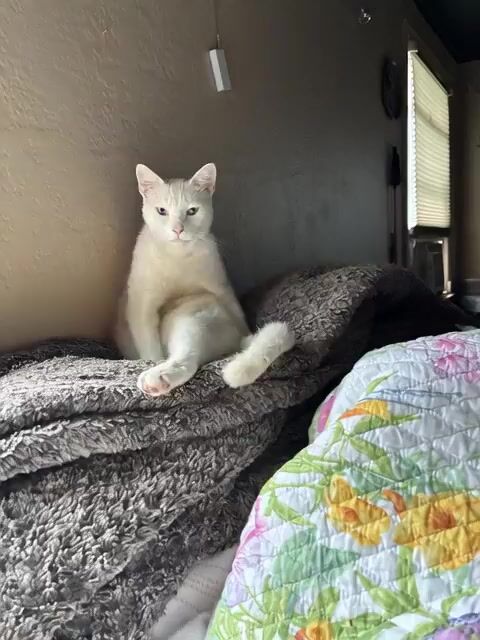
A detailed prompt for Grok Imagine to create a video of a cat jumping towards the camera, talking, smiling, and wiggling its tail. - AIPinMaker
Prompt
Make cat jump towards camera talking saying “I love you” with a big smile tail wiggles....❤️💋🌹Willis one of my fur babies 😻
Prompt breakdown
- Subject
- Willis the cat jumping toward the camera while saying “I love you,” showing a big smile and tail wiggles
- Composition
- Cat positioned in mid-air leap directly at the viewer for an intimate, approaching perspective
- Mood
- Playful and loving, driven by the spoken phrase, smile, and heart-kiss-rose emojis
Remix ideas
- Insert 'in a sunlit kitchen' to give Willis a simple indoor setting
- Change the dialogue to 'You missed me' while keeping the jump and smile
- Add subtle motion blur on the tail to emphasize the wiggle in a video render
How to use this AI Image prompt template
 1
1Copy the prompt — grab this template’s prompt and negative prompt.  2
2Pick a model — choose a recommended AI model for the best match.  3
3Generate — open the studio with one click and create your result.
Related templates

Maltese Dog Winter Olympics Highlight Reel
Create a creative video of Maltese Dog Winter Olympics Highlight Reel. Style: photorealistic. Composition: balanced and well-framed. Lighting: natural with cinematic mood. Category: cinematic-video. Reference: maltese-dog-winter-olympics-highlight-reel-151.

CatFu Dojo Fight Scene
Create a cinematic video of Catfu Dojo Fight Scene. Style: photorealistic. Composition: balanced and well-framed. Lighting: natural with cinematic mood. Category: cinematic-video. Reference: catfu-dojo-fight-scene-1766.
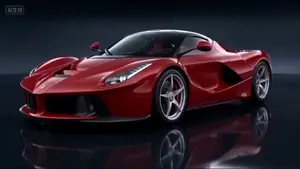
Commercial Sports Car Photography Video Prompt
Create a creative video of Commercial Sports Car Photography Video Prompt. Style: photorealistic. Composition: balanced and well-framed. Lighting: natural with cinematic mood. Category: cinematic-video. Reference: commercial-sports-car-photography-video-prompt-2596.
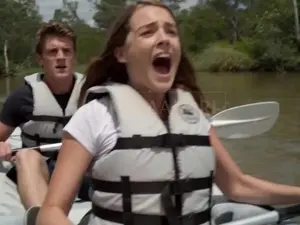
Giant Crocodile Kayak Attack
Cinematic action horror scene on a sunny Australian river surrounded by lush green jungle. A young couple kayaking in a white inflatable kayak: a terrified woman with long brown hair in a white t-shirt and life vest screams in panic at the front, while a muscular man in a dark t-shirt and life vest paddles desperately behind her with a shocked expression. A massive, hyper-realistic giant saltwater crocodile, over 40 feet long with dark armored scales, suddenly erupts from the murky water directly in front of the kayak. The enormous croc lunges aggressively with its jaws wide open, revealing massive sharp teeth and pink interior, creating huge water splashes. The crocodile slams into the kayak, flipping it violently and throwing the man overboard. Dynamic sequence shows the man being tossed into the air and plunging underwater, struggling and flailing in murky greenish water with bubbles rising. Fast-paced camera angles include close-up screaming faces, dramatic low-angle shots of the giant crocodile rising, POV from the kayak bow, and chaotic underwater shots of the man fighting to surface. Bright daylight, realistic water dynamics, intense splashing, photorealistic details, high tension Hollywood survival horror style, 10-second thrilling action clip.

Vlog Style Video Generation from Nano Banana Pro Image using Google Veo 3.1
Create a creative image of Vlog Style Video Generation From Nano Banana Pro Image Using Google Veo 31. Style: photorealistic. Composition: balanced and well-framed. Lighting: natural with cinematic mood. Category: photography. Reference: vlog-style-video-generation-from-nano-banana-pro-image-using-google-veo-31-9954.
Seedance 2.0 Prompt Generated via VSCode and Claude Code Analysis
Create a creative video of Seedance 20 Prompt Generated Via Vscode And Claude Code Analysis. Style: photorealistic. Composition: balanced and well-framed. Lighting: natural with cinematic mood. Category: cinematic-video. Reference: seedance-20-prompt-generated-via-vscode-and-claude-code-analysis-939.
Explore more prompts
Browse more AI image and video prompts by category.
FAQ
- Can I keep the emojis visible in the final image?
- Yes, place them as floating overlays near the cat's head or paw rather than embedding them as text.
- How do I turn this into a short video instead of a still?
- Append 'smooth 4-second loop, subtle head bob while speaking' to the end of the prompt.