
Text to Image
Bioluminescent Plush Creature Sheet — AI Image Prompt
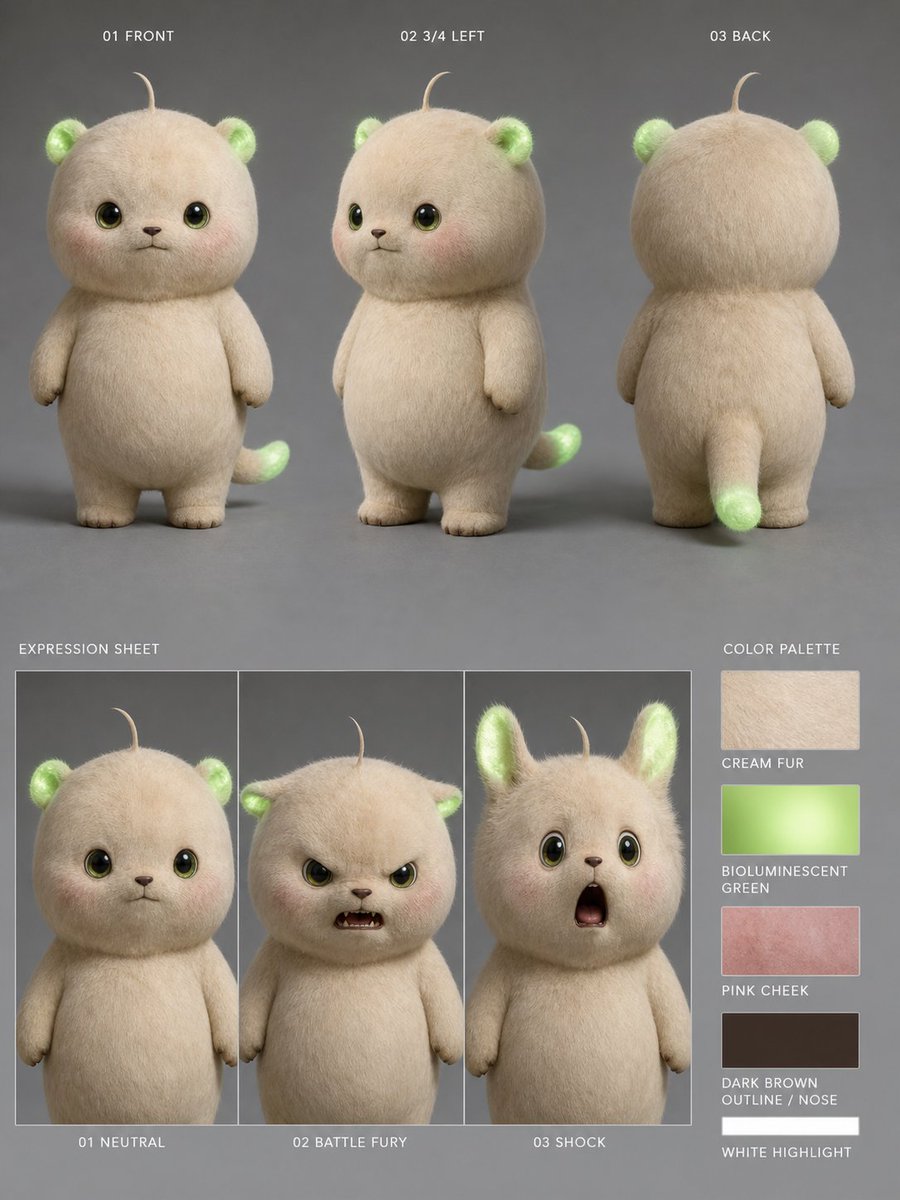
Generates a realistic character turnaround and expression sheet for a cute glowing plush creature used in consistent animation or video workflows. - AIPinMaker
Prompt
Goal: Create a realistic 3D character reference sheet for a cute plush-like creature named {argument name="character name" default="bioluminescent cream forest cub"}, designed for consistent video generation.

Canvas: Vertical 4:5 character sheet on a matte medium-gray studio background, soft diffused lighting, subtle floor shadows, high-resolution photorealistic fur rendering.

Subject details: The character is a small chubby teddy-bear/cat hybrid with a round oversized head, short rounded body, tiny arms, stubby legs, cream-colored dense fuzzy fur, glossy dark olive-brown eyes with bright catchlights, a tiny dark brown nose and mouth, faint pink cheeks, one thin curled hair sprout on top of the head, small rounded ears that glow bioluminescent green inside, and a short tail with a glowing green tip. The overall mood is adorable, soft, and toy-like, with realistic fiber texture and gentle translucency in the glowing green areas. Use {argument name="fur color" default="warm cream"}, {argument name="glow color" default="bioluminescent green"}, and {argument name="cheek color" default="soft pink blush"}.

Layout: Arrange the sheet in two main rows. Top row contains exactly 3 full-body turnaround views, evenly spaced and labeled in small white uppercase text: 1) “01 FRONT” showing the creature facing forward, 2) “02 3/4 LEFT” showing a three-quarter left view with the tail visible behind, 3) “03 BACK” showing the back view with rounded head, back fur, small arms, legs, and glowing tail tip. Bottom left contains an expression sheet with exactly 3 vertical framed panels labeled “EXPRESSION SHEET” above and captions below: 1) “01 NEUTRAL” with calm forward-facing eyes and closed small mouth, 2) “02 BATTLE FURY” with the face area covered by a centered opaque beige square block, 3) “03 SHOCK” with raised ears, wide eyes, and open surprised mouth. Bottom right contains a color palette column labeled “COLOR PALETTE” with exactly 5 rectangular swatches and labels: 1) “CREAM FUR” beige fur texture, 2) “BIOLUMINESCENT GREEN” glowing green gradient, 3) “PINK CHEEK” rosy pink texture, 4) “DARK BROWN OUTLINE / NOSE” dark brown swatch, 5) “WHITE HIGHLIGHT” white swatch.

Text style: Small clean sans-serif uppercase white labels, minimal technical character-sheet typography, aligned precisely and unobtrusively.

Constraints: Keep exactly 3 turnaround views, exactly 3 expression panels, and exactly 5 color swatches. Do not add extra characters, props, logos, watermarks, or decorative background elements. Maintain consistent proportions, fur texture, glowing ears and tail, and facial design across all views.39:Ta80,Goal: Create a realistic 3D character referePrompt breakdown
- Subject
- small chubby teddy-bear/cat hybrid with round oversized head, cream-colored dense fuzzy fur, glossy dark olive-brown eyes, tiny dark brown nose, one thin curled hair sprout, small rounded ears glowing bioluminescent green inside, short tail with glowing green tip
- Style
- realistic 3D photorealistic fur rendering with gentle translucency in the glowing green areas
- Lighting
- soft diffused lighting with subtle floor shadows
- Composition
- vertical 4:5 canvas split into top row of three evenly spaced full-body turnaround views and bottom row with expression sheet on left plus color palette column on right
- Mood
- adorable, soft, and toy-like
Remix ideas
- Swap the default bioluminescent green glow argument for a cool cyan to shift the forest-cub theme toward an arctic plush variant
- Replace the battle fury beige square with a single narrowed eye peeking out while keeping the rest of the neutral face structure
- Adjust the color palette swatches to include a sixth muted sage accent that matches the cream fur without altering the required five-rectangle layout
Reference images
How to use this AI Image prompt template
 1
1Copy the prompt — grab this template’s prompt and negative prompt.  2
2Pick a model — choose a recommended AI model for the best match.  3
3Generate — open the studio with one click and create your result.
Related templates
Pearlescent Glass Sculpture
Create a creative image of Pearlescent Glass Sculpture. Style: photorealistic. Composition: balanced and well-framed. Lighting: natural with cinematic mood. Category: photography. Reference: pearlescent-glass-sculpture-24271.
3D Anthropomorphic Snow Leopard Streetwear
Create a creative image of 3d Anthropomorphic Snow Leopard Streetwear. Style: photorealistic. Composition: balanced and well-framed. Lighting: natural with cinematic mood. Category: photography. Reference: 3d-anthropomorphic-snow-leopard-streetwear-10135.
Cinematic 3D Action Advertisement Prompt
Create a cinematic image of Cinematic 3d Action Advertisement Prompt. Style: photorealistic. Composition: balanced and well-framed. Lighting: natural with cinematic mood. Category: cinematic-video. Reference: cinematic-3d-action-advertisement-prompt-11174.

Toy Figure Character Transformation
Create a anime image of Toy Figure Character Transformation. Style: photorealistic. Composition: balanced and well-framed. Lighting: natural with cinematic mood. Category: anime. Reference: toy-figure-character-transformation-22152.

Pixar Style Animated Character Sheet
Create a anime image of Pixar Style Animated Character Sheet. Style: photorealistic. Composition: balanced and well-framed. Lighting: natural with cinematic mood. Category: anime. Reference: pixar-style-animated-character-sheet-21096.

3D Miniature Clay Figurine Illusion in an Artist's Studio
Create a creative image of 3d Miniature Clay Figurine Illusion In An Artists Studio. Style: photorealistic. Composition: balanced and well-framed. Lighting: natural with cinematic mood. Category: photography. Reference: 3d-miniature-clay-figurine-illusion-in-an-artists-studio-13183.
Explore more prompts
Browse more AI image and video prompts by category.
FAQ
- Why is the battle fury expression hidden behind an opaque beige square?
- The block creates a deliberate stylized mask that contrasts the creature's cute design while preserving clean reference utility for animation pipelines.
- How does the prompt maintain consistency across all views?
- It explicitly requires identical head shape, fur density, ear glow placement, tail tip, and facial features in every turnaround, expression panel, and palette reference.