
Text to Image
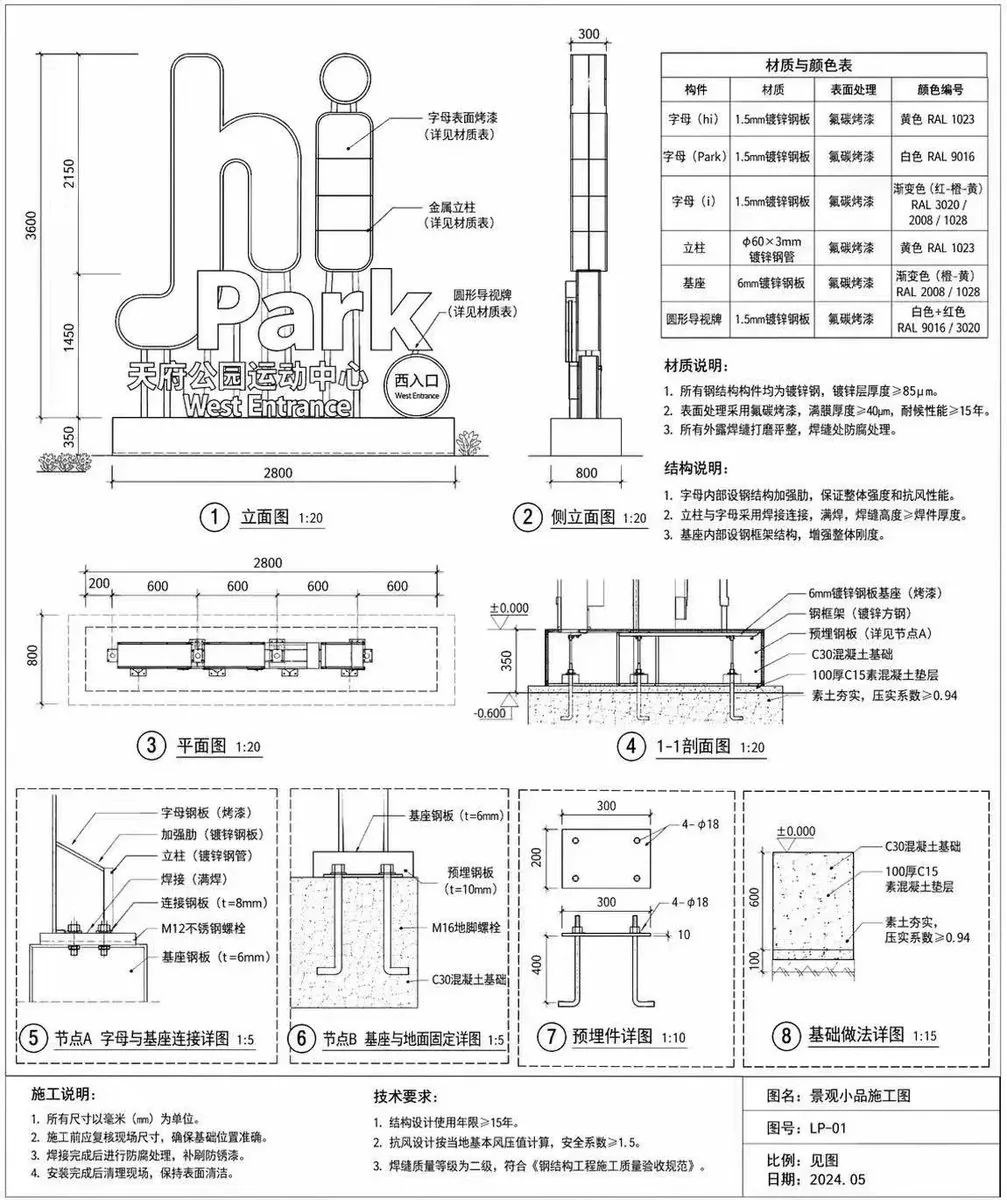
Architectural Signage Construction Drawing — AI Image Prompt
Generates a detailed technical blueprint for an outdoor sign, complete with elevations, sections, detail nodes, and material tables. - AIPinMaker
Prompt
{
  "type": "architectural construction drawing",
  "subject": "outdoor landscape sign",
  "style": "black and white technical line drawing, precise dimensions, engineering callouts, Chinese annotations",
  "sign_details": {
    "main_text": "{argument name=\"main sign text\" default=\"hi Park\"}",
    "sub_text": "{argument name=\"sub sign text\" default=\"天府公园运动中心\"}",
    "english_sub_text": "West Entrance"
  },
  "layout": {
    "diagrams_count": 8,
    "sections": [
      {
        "position": "top left",
        "title": "① 立面图 1:20",
        "description": "Front elevation showing overall dimensions and callouts pointing to the letters and base."
      },
      {
        "position": "top middle",
        "title": "② 侧立面图 1:20",
        "description": "Side elevation showing depth dimensions."
      },
      {
        "position": "top right",
        "elements": [
          {
            "type": "table",
            "title": "材质与颜色表",
            "rows": 6,
            "columns": 4
          },
          {
            "type": "text_block",
            "title": "材质说明:",
            "points_count": 3
          },
          {
            "type": "text_block",
            "title": "结构说明:",
            "points_count": 3
          }
        ]
      },
      {
        "position": "middle left",
        "title": "③ 平面图 1:20",
        "description": "Top-down plan view with horizontal dimensions."
      },
      {
        "position": "middle right",
        "title": "④ 1-1剖面图 1:20",
        "description": "Cross-section view showing foundation and ground levels."
      },
      {
        "position": "bottom row",
        "description": "Four detailed node diagrams enclosed in dashed boxes.",
        "details": [
          "⑤ 节点A 字母与基座连接详图 1:5",
          "⑥ 节点B 基座与地面固定详图 1:5",
          "⑦ 预埋件详图 1:10",
          "⑧ 基础做法详图 1:15"
        ]
      }
    ],
    "footer": {
      "position": "bottom edge",
      "blocks": [
        {
          "title": "施工说明:",
          "points_count": 4
        },
        {
          "title": "技术要求:",
          "points_count": 3
        },
        {
          "title": "title block",
          "fields": [
            "图名: {argument name=\"project title\" default=\"景观小品施工图\"}",
            "图号: {argument name=\"drawing number\" default=\"LP-01\"}",
            "比例: 见图",
            "日期: {argument name=\"drawing date\" default=\"2024.05\"}"
          ]
        }
      ]
    }
  }
}3d:Ta5a,{
  "type": "architectural construction drawing",
  "subject": "outdoor landscape sign",
"style": "black and white technical line drawing, precise dimensions, engineering callouts, Chinese annPrompt breakdown
- Subject
- outdoor landscape sign with main text 'hi Park', sub text '天府公园运动中心' and 'West Entrance'
- Style
- black and white technical line drawing with precise dimensions, engineering callouts, and Chinese annotations
- Composition
- eight diagrams arranged in specific positions: top left front elevation ①立面图 1:20, top middle side elevation ②侧立面图 1:20, top right material table and notes, middle left plan view ③平面图 1:20, middle right cross-section ④1-1剖面图 1:20, bottom row four detailed node diagrams ⑤-⑧, plus footer with 施工说明, 技术要求 and title block
Remix ideas
- Swap the main sign text argument to a custom park name while retaining all Chinese annotations and the West Entrance label
- Modify the bottom row node scales from 1:5 to 1:2 for the letter-to-base connection detail A
- Insert an extra material row in the top-right table to specify LED backlighting options for the sign letters
Reference images
How to use this AI Image prompt template
 1
1Copy the prompt — grab this template’s prompt and negative prompt.  2
2Pick a model — choose a recommended AI model for the best match.  3
3Generate — open the studio with one click and create your result.
Related templates

Under Glass Floor Perspective Shot
Create a creative image of Under Glass Floor Perspective Shot. Style: photorealistic. Composition: balanced and well-framed. Lighting: natural with cinematic mood. Category: photography. Reference: under-glass-floor-perspective-shot-23912.

Everyday Object Reimagined as a City
Create a creative image of Everyday Object Reimagined As A City. Style: photorealistic. Composition: balanced and well-framed. Lighting: natural with cinematic mood. Category: photography. Reference: everyday-object-reimagined-as-a-city-3442.

Mount Fuji Street With Cloud Kanji
Create a creative image of Mount Fuji Street With Cloud Kanji. Style: photorealistic. Composition: balanced and well-framed. Lighting: natural with cinematic mood. Category: photography. Reference: mount-fuji-street-with-cloud-kanji-19534.

Dual-Concept Street Art Mural
Create a creative image of Dual Concept Street Art Mural. Style: photorealistic. Composition: balanced and well-framed. Lighting: natural with cinematic mood. Category: photography. Reference: dual-concept-street-art-mural-16790.

Desert Ruins of Pure Math Grid
Create a creative image of Desert Ruins Of Pure Math Grid. Style: photorealistic. Composition: balanced and well-framed. Lighting: natural with cinematic mood. Category: photography. Reference: desert-ruins-of-pure-math-grid-2513.

Master Model Maker Concept Template - Nano Banana Pro AI Prompt for Social Media Post
Do this for Eiffel Tower (structure name): Input Variable: [INSERT STRUCTURE] System Instruction: Act as a Cinematic Director. Create a hyper-realistic portrait of a Master Model Maker putting the final touches on a scale replica of the Input Structure. 1. Logic: Analyze the Input Structure to determine the Setting and the Character: IF Ancient/Fantasy (e.g., Colosseum, Castle): Room: A dusty, sunlit Renaissance Workshop (Stone & Wood). also showcasing "Previous Projects" (other models in the same genre). Character: An elderly Artisan in a leather apron. Materials: Plaster, Clay, Balsam Wood. IF Sci-Fi/Industrial (e.g., Death Star, spaceship): Room: A sterile, cold Industrial Design Lab (Concrete & Metal). also showcasing "Previous Projects" (other models in the same genre). Character: A younger Prop Master in a workshop jumpsuit or lab coat. Materials: Grey Resin (Kitbash), Styrene, Fiber Optics. IF Modern Architecture (e.g., Skyscraper): Room: A clean, white Architectural Firm (Glass & White Walls). also showcasing "Previous Projects" (other models in the same genre). Character: A minimalist Architect in a black turtleneck. Materials: White Foamcore, Acrylic, 3D Printed Plastic. 2. The Composition : The Subject: The Character is leaning over a massive, incredibly detailed Scale Model of the Input Structure. The Action: They are using Tweezers or a fine brush to place a specific "Micro-Detail" relevant to the lore. Death Star: Placing a tiny Turbo-Laser Turret. Colosseum: Dusting sand onto the arena floor. City: Gluing a tiny streetlamp. The Scale: Extreme scale contrast. The human hands look giant next to the tiny windows/bricks of the model. 3. The Environment : The Blueprint: On the table, beneath the tools, lies the correct reference document: Sci-Fi: Blue grid schematic or iPad. Fantasy: Yellowed parchment map. Modern: White vector floorplan. The Clutter: The tools scattered around must match the medium (e.g., Clay tools vs. Soldering Iron vs. X-Acto knives). 4. Lighting & Atmosphere: Lighting Match: The lighting must match the inferred room. Workshop: Warm God Rays (Dusty). Lab: Cool Fluorescent Tubes (Clean/Hazy). Focus: Shallow depth of field. Sharp focus on the tweezers and the contact point. Output: ONE image, 16:9 Aspect Ratio, Cinematic Photography, 8k Resolution.
Explore more prompts
Browse more AI image and video prompts by category.
FAQ
- What scales are used for the main elevation views?
- The front, side, plan, and section views are all drawn at 1:20 scale with larger scales like 1:5 and 1:10 reserved for connection nodes.
- How many detailed diagrams does this construction drawing include?
- There are eight diagrams total covering elevations, plans, sections, and four specific node details for the sign's letters, base, embedded parts, and foundation.