
Text to Image
AI Image Generator UI Mockup — AI Image Prompt
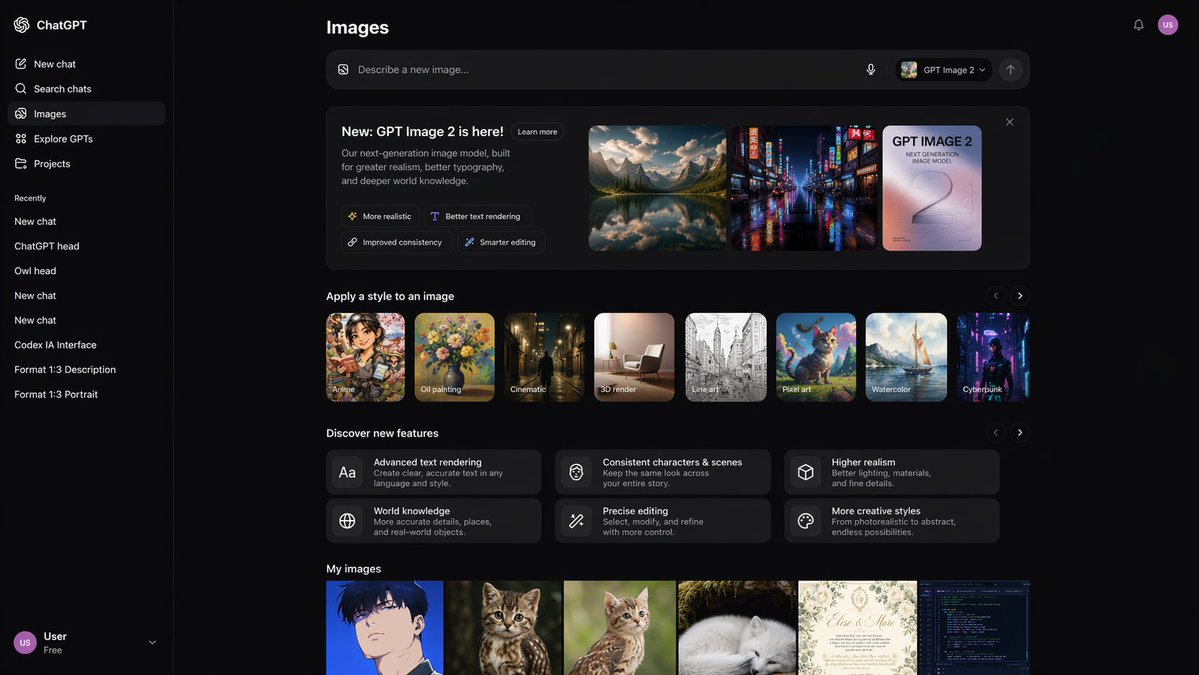
A detailed dark-mode web interface mockup for an AI image generation tool, featuring style galleries, feature highlights, and recent image grids. - AIPinMaker
Prompt
{
  "type": "UI/UX web application mockup",
  "theme": "dark mode",
  "sidebar": {
    "logo": "{argument name=\"app name\" default=\"ChatGPT\"}",
    "navigation_items": 5,
    "recent_chats_count": 8,
    "user_profile": "User, Free tier"
  },
  "main_content": {
    "header": "Images",
    "input_bar": {
      "placeholder": "{argument name=\"input placeholder\" default=\"Describe a new image...\"}",
      "model_selector": "{argument name=\"model name\" default=\"GPT Image 2\"}"
    },
    "sections": [
      {
        "title": "{argument name=\"hero title\" default=\"New: GPT Image 2 is here!\"}",
        "description": "Our next-generation image model, built for greater realism, better typography, and deeper world knowledge.",
        "feature_tags_count": 4,
        "hero_images_count": 3,
        "hero_images_descriptions": ["mountain lake landscape", "neon cyberpunk street", "typography poster"]
      },
      {
        "title": "Apply a style to an image",
        "style_thumbnails_count": 8,
        "style_labels": ["Anime", "Oil painting", "Cinematic", "3D render", "Line art", "Pixel art", "Watercolor", "Cyberpunk"]
      },
      {
        "title": "Discover new features",
        "feature_cards_count": 6,
        "feature_labels": ["Advanced text rendering", "Consistent characters & scenes", "Higher realism", "World knowledge", "Precise editing", "More creative styles"]
      },
      {
        "title": "My images",
        "recent_images_count": 6,
        "recent_images_descriptions": ["anime boy portrait", "tabby kitten", "tabby kitten", "sleeping white arctic fox", "wedding invitation", "code editor terminal"]
      }
    ]
  }
}Prompt breakdown
- Subject
- Dark mode UI/UX web application mockup of ChatGPT image generator with sidebar logo, 5 nav items, 8 recent chats, Free tier profile, Images header, input bar placeholder, GPT Image 2 selector, hero section with 3 images of mountain lake landscape/neon cyberpunk street/typography poster, 8 style thumbnails labeled Anime/Oil painting/Cinematic/3D render/Line art/Pixel art/Watercolor/Cyberpunk, 6 feature cards, and 6 recent images of anime boy portrait/tabby kitten/sleeping white arctic fox/wedding invitation/code editor terminal
- Style
- Clean web application interface design in dark mode
- Composition
- Left sidebar navigation plus main content with header, input bar, hero section, horizontal style thumbnails, feature cards grid, and My images gallery
- Mood
- Modern professional tech interface
Remix ideas
- Swap the hero title argument to emphasize typography improvements instead
- Change recent images descriptions to focus on a single theme like wildlife only
- Increase style thumbnails count to 10 and add labels like Surreal or Vintage
Reference images
How to use this AI Image prompt template
 1
1Copy the prompt — grab this template’s prompt and negative prompt.  2
2Pick a model — choose a recommended AI model for the best match.  3
3Generate — open the studio with one click and create your result.
Related templates
Crumple Paper Furniture Concept Design
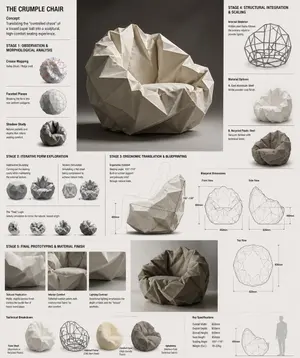
Design Concept: The Crumple Chair (furniture type) Core Philosophy: Translating the "controlled chaos" of a tossed paper ball (inspiration) into a sculptural, high-comfort seating experience.\n\nStage 1: Observation & Morphological Analysis The goal is to deconstruct the image of the crumpled paper into usable geometric data. Crease Mapping: Identify the primary "valley" and "ridge" lines. These represent potential structural ribs or seams in the chair. Faceted Planes: Break down the sphere into a series of non-uniform polygons. Each flat surface of the paper becomes a potential panel for the chair’s upholstery or shell. Shadow Study: Analyze how the "tossed" form creates deep recesses. These natural pockets guide where the user’s weight will be cradled. \n\nStage 2: Iterative Form Exploration Moving from a sphere to a seat through "Digital Crumpling." Subtractive Sculpting: Imagine the paper ball as a solid mass. Use Boolean operations to "carve out" a seating cavity that fits the human form while maintaining the external jagged texture. Tension Simulation: Use 3D software (like Rhino or Blender) to simulate a flat sheet of material being compressed. This ensures the folds look authentic and not "modeled." The "Toss" Logic: Experiment with gravity-based simulation dropping a digital mesh to see how it settles naturally, mimicking the "tossed" origin. \n\nStage 3: Ergonomic Translation & Blueprinting Refining the raw aesthetic into a functional object. The Comfort Core: Overlay a standard ergonomic template (Seating Angle: 105°–110°) over the crumpled form. Adjust the internal "folds" to provide lumbar support and pressure relief. Blueprint Generation: Create technical orthographic views (Front, Side, Top). Map out the dimensions: Seat Height: 450mm Total Width: 850mm Surface Smoothing: Maintain the sharp "paper edges" on the exterior shell while softening the interior contact points for skin comfort. \n\nStage 4: Structural Integration & Scaling Making the concept physically viable. The Skeleton: Design a hidden internal frame (likely CNC-bent steel rods or a 3D-printed lattice) that follows the most prominent ridges of the paper folds to provide rigidity. Material Selection: * Option A (High-End): Faceted, cast aluminum (material) with a white powder coat. Option B (Soft): Vacuum-formed recycled plastic shell covered in "memory-fold" technical fabric that retains a wrinkled appearance. \n\nStage 5: Final Prototyping & Material Finish Textural Replication: Apply a matte, slightly porous finish to the material to mimic the tactile feel of heavy-bond paper. Lighting Contrast: Use directional studio lighting in the final renders to emphasize the "tossed" shadows, making the chair look like a giant piece of discarded inspiration. Design Tip: To keep the "tossed" look authentic, avoid symmetry.3c:Tb6f,

Exploded View Visualization of a Drip Coffee Maker - Nano Banana Pro AI Prompt for Product Marketing
A photorealistic premium exploded view visualization of a Scarlett (appliance brand) drip coffee maker. The coffee machine, featuring a black plastic body with metal accents, is completely disassembled with all components floating in mid-air, arranged in a strict vertical composition along a central axis Floating Components (Top to Bottom) Render Style & Camera: Photorealistic 3D render, high-end appliance advertising photography level (Octane / Cinema 4D style), PBR materials, extremely high detail on plastic, glass, and metal textures. Frontal view with a slight downward tilt. Vertical aspect ratio (9:16). The object occupies approximately 70% of the frame. The mood conveys premium quality, cleanliness, engineering precision, and the concept of "seeing how coffee works Render Style & Camera: Photorealistic 3D render, high-end appliance advertising photography level (Octane / Cinema 4D style), PBR materials, extremely high detail on plastic, glass, and metal textures. Frontal view with a slight downward tilt. Vertical aspect ratio (9:16). The object occupies approximately 70% of the frame. The mood conveys premium quality, cleanliness, engineering precision, and the concept of "seeing how coffee works.

Two-Phase Prompt for Absurd Product Fusion Concepts
Create a ecommerce image of Two Phase Prompt For Absurd Product Fusion Concepts. Style: photorealistic. Composition: balanced and well-framed. Lighting: natural with cinematic mood. Category: product. Reference: two-phase-prompt-for-absurd-product-fusion-concepts-2069.

Stylized Football Figurine Popping Out of Energy Drink Can
Create a creative image of Stylized Football Figurine Popping Out Of Energy Drink Can. Style: photorealistic. Composition: balanced and well-framed. Lighting: natural with cinematic mood. Category: photography. Reference: stylized-football-figurine-popping-out-of-energy-drink-can-12348.

High-Concept Levitation Fashion Editorial
Complete STYLE (fashion style) outfit floating in its exact worn position around an invisible body with every piece suspended mid-breath, mid-billow. LOOK (bottom to top): [FOOTWEAR] → [BOTTOMS] → [TOP] → [LAYER] → [ACCESSORIES] → [JEWELLERY] → [HEADWEAR] FABRIC PHYSICS: each material true to its weight, wool hangs, silk drapes, denim holds its crease, leather keeps its shape. Every edge lifting slightly as if caught in one silent gust. LABELS: hairline leader to floating label box. "[GARMENT]" uppercase / "[FABRIC]" italic / "[ONE DEFINING DETAIL]" LIGHTING: soft directional from upper left + warm fill from below catching linings and sole edges + cool rim outlining the silhouette. BACKGROUND: COLOR (background color) seamless, fashion-forward. TITLE: "LOOK NAME (look name)" elegant serif type, top right. SUBTITLE: "[MOOD / OCCASION]" italic. Mood: high-concept levitation editorial, the outfit exists, the person is imagination. 4K, extraordinary fabric fidelity, tack sharp.3c:T441,Comp

Plush Chibi Soccer Mascot
Create a hyper-realistic collectible plush chibi soccer mascot inspired by a blond football striker (subject), standing front-facing in a premium studio setup with a smooth gradient blue background (background). The character has oversized glossy blue eyes, soft embroidered facial features, a tiny cute smile, rosy cheeks, and highly detailed fluffy fabric texture with visible stitching and luxury plush materials. Stylized proportions with an oversized head and small body, Pixar-style realism, ultra-cute aesthetic. The mascot wears a modern football jersey with premium embroidered details, alternate jersey designs, unique sponsor patches, jersey number 9 (number), fitted shorts, long socks, and detailed football boots. Generate multiple outfit variations including sky-blue, black-and-gold, red-and-white, neon yellow, and striped kits. Include different hairstyles such as slicked-back blond hair, messy textured cut, braided top knot, headband style, mullet-inspired cut, and short fluffy hair. Render as a luxury designer plush toy with cinematic studio lighting, soft shadows, realistic fabric fuzz, ultra-detailed seams, vibrant colors, centered composition, shallow depth of field, photorealistic toy photography, highly detailed embroidery, premium stitching, 8k resolution, Unreal Engine quality, sharp focus, collectible mascot aesthetic, high-end merchandise style.
Explore more prompts
Browse more AI image and video prompts by category.
FAQ
- What text describes the new GPT Image 2 model in the hero section?
- It highlights greater realism, better typography, and deeper world knowledge.
- How many feature cards appear under Discover new features?
- Exactly six cards cover Advanced text rendering, Consistent characters & scenes, Higher realism, World knowledge, Precise editing, and More creative styles.