
Text to Image
3D Technical Reference Sheet — AI Image Prompt
A complex technical diagram prompt for creating a monochrome 4x4 character sheet with motion indicators and numbered panels. - AIPinMaker
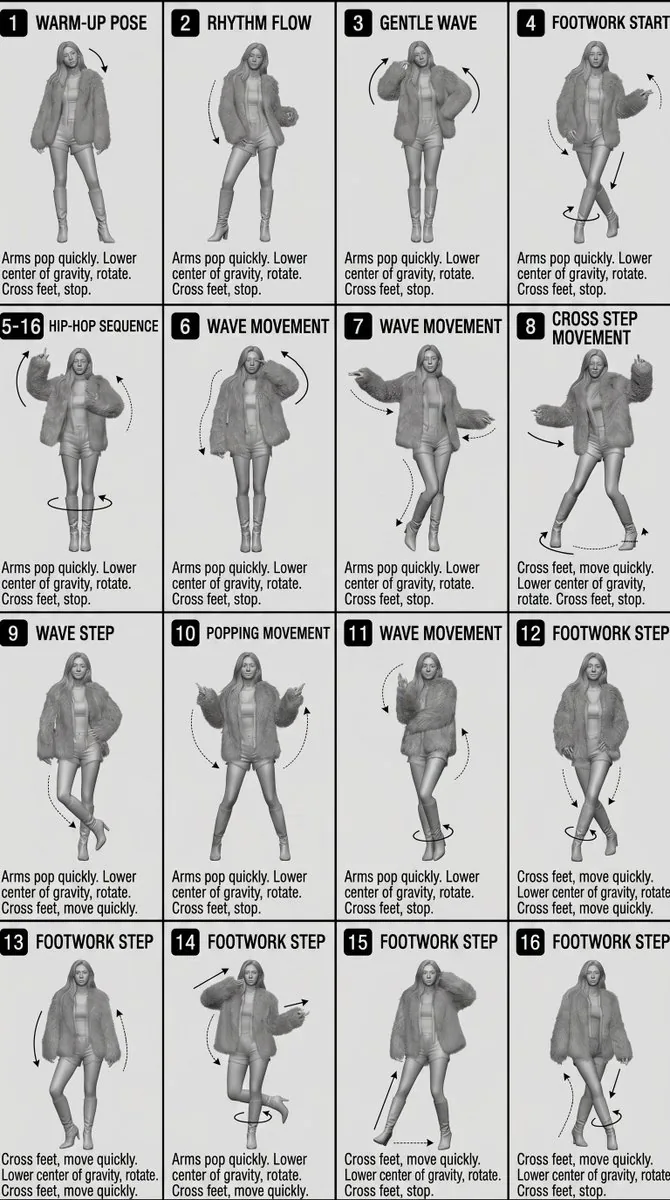
Prompt
[STYLE]
Monochrome grayscale illustration, 3D-rendered character, clean {argument name="sheet type" default="instructional reference sheet"}, white background, comic-style cell grid layout, technical diagram aesthetic.

[LAYOUT]
{argument name="grid layout" default="4×4 grid layout"} with a total of 16 panels. Each panel is separated by thin black border lines. Cells are numbered from 1 to 16, with consistent panel sizes.

[CHARACTER]
 image1 (the same character appears consistently in all panels)

[PANEL STRUCTURE – per cell]

Top-left: bold number badge + {argument name="text content" default="English title text"}

Center: full-body character pose illustration

Bottom-left: English description text (3–4 lines)

Overlay: directional arrows indicating movement

[ARROWS / MOTION INDICATORS]
Curved arrows, straight arrows, and circular rotation indicators placed around the character to show motion flow and direction.

[RENDERING STYLE]
Highly detailed 3D sculpted style, soft studio lighting, subtle shadows, no color, grayscale shading, clean linework, game concept art quality.

[NEGATIVE]
No background scenery, no color tones, no additional characters, no complex background.38:T4Prompt breakdown
- Subject
- consistent 3D-rendered character shown in varied full-body poses across all 16 panels with motion arrows
- Style
- monochrome grayscale illustration, comic-style cell grid, technical diagram aesthetic, highly detailed 3D sculpted style with clean linework
- Lighting
- soft studio lighting with subtle shadows in grayscale shading
- Composition
- 4x4 grid of 16 equal panels separated by thin black borders, each with top-left number badge, center pose, bottom-left description, and overlay arrows
- Mood
- clean, instructional, and technically precise
Remix ideas
- Change the grid layout argument to 3x5 to create 15 panels while keeping the same character and arrow overlays
- Replace default English title text with specific pose labels such as 'Forward Stride' or 'Twist Rotation' in the top-left badges
- Increase emphasis on circular rotation indicators around the limbs while keeping the overall monochrome grayscale rendering
Reference images
How to use this AI Image prompt template
 1
1Copy the prompt — grab this template’s prompt and negative prompt.  2
2Pick a model — choose a recommended AI model for the best match.  3
3Generate — open the studio with one click and create your result.
Related templates
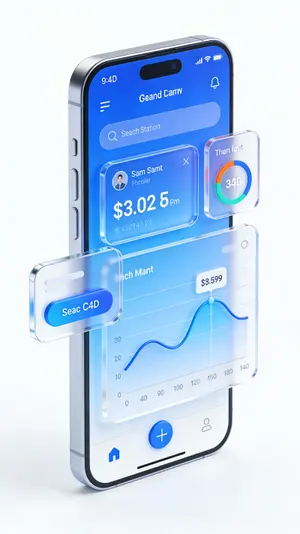
C4D-Style Finance App UI (Variant)
金融理财APP手机UI设计,C4D风格高级UI,3D立体数据图表,蓝色渐变界面,悬浮卡片设计,玻璃拟态按钮,动态余额数字显示,市场趋势曲线图,纯白色背景,杰作,高细节
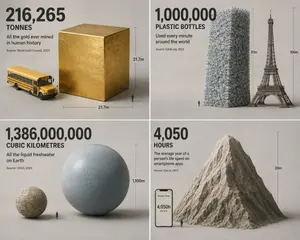
Isometric Statistic Visualization Render
Create a infographic image of Isometric Statistic Visualization Render. Style: photorealistic. Composition: balanced and well-framed. Lighting: natural with cinematic mood. Category: illustration. Reference: isometric-statistic-visualization-render-25899.

Pixar Style Character Design Sheet
Create a anime image of Pixar Style Character Design Sheet. Style: photorealistic. Composition: balanced and well-framed. Lighting: natural with cinematic mood. Category: anime. Reference: pixar-style-character-design-sheet-23054.

3D Grayscale Dance Reference Sheet
Monochromatic grayscale illustration, 3D-rendered character, clean instructional reference sheet. White background, comic-style cell grid layout, technical diagram aesthetic. [LAYOUT] 4×4 grid layout (16 panels total). Each panel separated by thin black border lines. Panels are evenly sized and consistently aligned. Each cell is clearly numbered from 1 to 16. [CHARACTER] Young female dancer with an athletic build, ponytail hairstyle, wearing a crop top, baggy pants, and sneakers (subject). The same character must appear consistently in all panels. [PANEL STRUCTURE – per cell] Top-left: bold number badge + Korean (language) title text Center: full-body character pose illustration Bottom-left: Korean (language) description text (3–4 lines) Overlay: directional arrows indicating movement flow [ARROWS / MOTION INDICATORS] Curved arrows, straight arrows, and circular rotation indicators. Arrows should be placed around the character to clearly show movement direction and flow. [RENDERING STYLE] Highly detailed 3D sculpted style. Soft studio lighting with subtle shadows. No color — grayscale only. Clean linework, polished finish, game concept art quality. [NEGATIVE PROMPT] No background scenery. No color tones. No additional characters. No cluttered or complex backgrounds.37:T55b
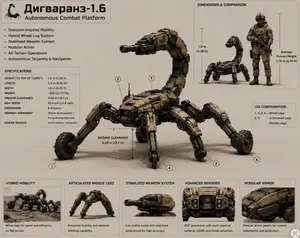
Scorpion Combat Robot Spec Sheet
Goal: Create a detailed military-industrial specification sheet for a fictional autonomous scorpion-shaped combat robot named Дигваранз-1.6 (platform name), with the subtitle “Autonomous Combat Platform.” Canvas: Landscape 4:3 technical presentation board on a warm light beige background, thin gray panel borders, clean infographic layout, realistic hard-surface concept art mixed with labeled engineering diagram. Use tan, dark bronze, black, gunmetal, and muted military colors. The overall look should feel like a defense robotics brochure or field manual page. Main subject: Center a large scorpion-inspired autonomous combat platform in three-quarter view, facing left. It has a low armored body, segmented tan modular armor panels with rivets and dark mechanical joints, six numbered legs, hybrid wheel-and-leg mobility, and a high curved scorpion tail ending in a stabilized turret weapon. The weapon is a compact 30 mm autocannon with a red sensor or muzzle detail. The robot should look rugged, heavy, realistic, and operational, with subtle floor shadows. Add circular callout markers for exactly 6 leg positions: 1, 2, 3, 4, 5, and 6. Include a ground-clearance measurement arrow beneath the center body reading “GROUND CLEARANCE 0.50 m (19.7 in).” Top-left title block: Add a small black scorpion icon, then the large Cyrillic title “Дигваранз-1.6 (platform name)” and the English subtitle “Autonomous Combat Platform.” Under it, show exactly 6 feature bullets: “Scorpion-Inspired Mobility,” “Hybrid Wheel-Leg System,” “Stabilized Weapon System,” “Modular Armor,” “All-Terrain Operations,” and “Autonomous Targeting & Navigation.” Left specifications panel: A bordered box titled “SPECIFICATIONS” with exactly 9 rows: “HEIGHT (TO TOP OF TURRET) 1.0 m (3.28 ft),” “LENGTH 2.0 m (6.56 ft),” “WIDTH 1.6 m (5.25 ft),” “WEIGHT ~350 kg (771 lb),” “GROUND CLEARANCE 0.50 m (19.7 in),” “MAX SPEED 20 km/h (12.4 mph),” “ENDURANCE 6–8 hours,” “PRIMARY ARMAMENT 30mm Autocannon / Energy Weapon (Optional),” and “POWER SOURCE Hybrid (Battery + Generator).” Top-right comparison panel: A bordered inset titled “DIMENSIONS & COMPARISON.” Show exactly 2 figures inside: the scorpion combat robot beside a standing armored soldier holding a rifle. Add height guides labeled “1.0 m (3.28 ft)” for the robot and “Average Human Height 1.75 m (5.74 ft)” for the soldier. Right-middle leg configuration panel: A small bordered box titled “LEG CONFIGURATION” with exactly 2 numbered lines: “1, 3, 4, 6 – Wheel Legs” and “2, 5 – Articulated Legs (Middle Legs).” Bottom row: Add exactly 5 bordered feature cards spanning the width. Each card contains a small realistic render and a caption. Card 1 title “HYBRID MOBILITY,” image of the robot driving across rough ground, caption “Wheel legs for speed and efficiency on flat terrain.” Card 2 title “ARTICULATED MIDDLE LEGS,” image focused on the middle walking legs, caption “Enhanced stability and obstacle climbing capability.” Card 3 title “STABILIZED WEAPON SYSTEM,” image close-up of the tail turret, caption “Low-profile turret with stabilized autocannon for high accuracy.” Card 4 title “ADVANCED SENSORS,” image close-up of the front sensor array with cameras, caption “360° awareness with multi-spectral cameras, LIDAR, and threat detection.” Card 5 title “MODULAR ARMOR,” image close-up of armor plates, caption “Modular armor panels for mission adaptability and protection.” Style constraints: Use crisp sans-serif typography, black and dark gray text, precise labels, thin leader lines, and realistic lighting. Keep all text legible and aligned. Do not add extra logos, watermarks, explosions, battlefield smoke, or human gore. Maintain a clean concept-sheet presentation for autonomous combat platform (robot role).39:Tfb5,Goal: Create a detailed military-industrial specification sheet for a fictional autonomous scorpion-shaped combat robot named {argument name="platform name" defa
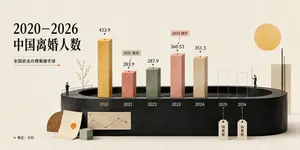
China Divorce Data 3D Infographic
Goal: Create an elegant editorial-style 3D infographic about 2020–2026 China divorce population (headline topic), using Chinese typography and a minimalist museum-display aesthetic. Canvas: Wide horizontal 16:9 composition on warm off-white textured paper, soft studio lighting, subtle shadows, muted cream background. Layout: Place a large black Chinese headline on the upper left reading “2020–2026\n中国离婚人数”. Beneath it, add a smaller subtitle “全国依法办理离婚手续” with a thin horizontal line ending in a small orange dot. The main visual is a dark charcoal oval/cylindrical podium spanning the lower middle, with a recessed oval opening at the top like a stage. Along the podium front, label the years from left to right: 2020, 2021, 2022, 2023, 2024, 2025, 2026. Chart elements: Use exactly 7 vertical year positions. Show 5 solid rectangular 3D bars and 2 dashed-outline placeholder bars. The 5 solid bars are: 2020 tall ochre-gold bar labeled “433.9”; 2021 shorter dusty coral bar labeled “283.9” with a small callout tag “2021 低点”; 2022 muted sage-green bar labeled “287.9”; 2023 taller salmon-pink bar labeled “360.53” with a small callout tag “2023 回升”; 2024 beige stone bar labeled “351.3”. The 2 future placeholders are dashed transparent bars for 2025 and 2026, each with a hanging tag below reading “待更新”. Put small black dots and leader lines above each numeric value. Decorative details: Add two tiny human figures for scale: one standing on the left edge of the podium near a simple railing and sparse delicate branch/tree, another standing on the right side near the future bars. Add a large flat golden sun circle in the upper right. Add a tall cream rectangular slab on the far right behind the podium with a thin black vertical line in front. At the lower left, place a wooden semicircle, a leaning paper sheet with a small orange circle, a small pale green cube, and a miniature beige line-chart card attached to the podium front. Text and legend: In the bottom-left corner add an orange dot followed by “单位:万对”. Keep all visible text in Chinese as specified, with crisp black type and no extra labels. Visual style: Refined data-visualization poster, tactile paper texture, 3D clay/paper-cut look, muted ochre coral sage beige palette, high-end magazine infographic, clean negative space, realistic soft shadows, precise alignment. Constraints: Use exactly the 7 year positions and exactly the 5 solid bars plus 2 dashed future bars described above. Do not add watermarks, logos, extra charts, or additional people.39:Ta6a,Goal: Create an elegant editorial-style 3D infographic about {argument name="headline topic" def
Explore more prompts
Browse more AI image and video prompts by category.
FAQ
- How many panels appear in the final reference sheet?
- The prompt specifies a 4x4 grid layout that produces exactly 16 numbered cells with consistent sizes.
- Does the same character appear in every panel?
- Yes, image1 is referenced once and must remain identical across all 16 panels for consistency.