
텍스트 투 이미지
Spaghettification Glitch Effect (Loki Inspired) - Nano Banana Pro AI Prompt for Portrait / Selfie — AI 이미지 프롬프트
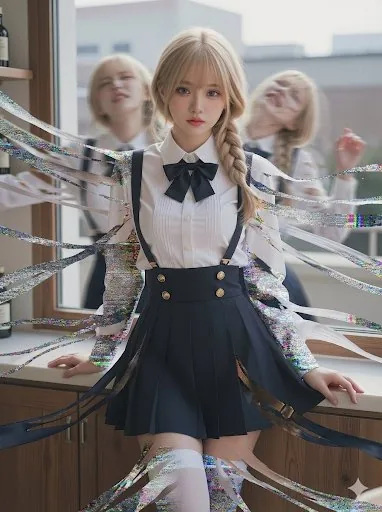
A multi-layered prompt designed to recreate the 'spaghettification' or disintegration effect seen in the Loki TV series. It uses four distinct layers of instructions to ensure background stability, violent unraveling of the subject's edges into non-glowing ribbons, analog glitch overlay concentrated only on the edges, and ghostly motion-blur afterimages behind the subject. - AIPinMaker
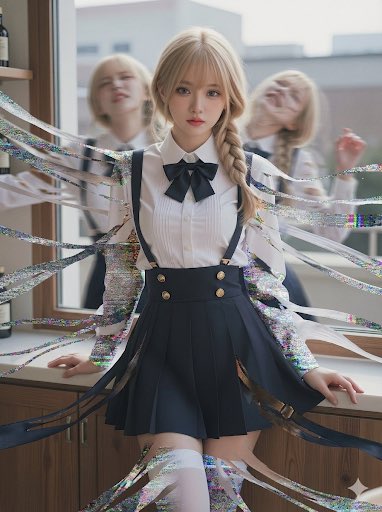
프롬프트
(Photorealistic:1.3), raw photograph, cinematic lighting, sharp focus on the subject’s face and eyes, crisp skin texture.
LAYER 1: BACKGROUND STABILITY (CRITICAL):

The entire background environment from the input image remains completely STATIC, FROZEN, CLEAN, and UNCHANGED — no noise, no scanlines, no distortions, no glitches in the background.
LAYER 2: FOREGROUND SUBJECT EDGE-CHAOS:

The main subject’s core (face/torso) stays clear and undistorted, BUT the outer silhouette boundaries are unraveling violently into long ribbons of (non-glowing physical matter:1.3), showing stretched fabric/leather/latex-like material with realistic strand separation and tearing flow (“Spaghettification”), no gore.
LAYER 3: ANALOG GLITCH OVERLAY (EDGE-ONLY):

Heavy VHS static, scan lines, color bleed, and screen tearing noise are CONCENTRATED EXCLUSIVELY ON THE UNRAVELING EDGES of the main subject, like an edge mask. No full-frame VHS overlay; the core and background remain clean.
LAYER 4: GHOSTLY AFTERIMAGES (BEHIND SUBJECT):

Directly BEHIND the unraveling main subject, visible through the gaps, there are TWO translucent, ghostly motion-blur AFTERIMAGES. They are violently twisted into agonizing, struggling postures, dragged by temporal distortion. They remain behind the subject, partially occluded, not separate characters.

Negative prompt (optional but recommended):

full-frame glitch, background distortion, extra people, duplicate main subject, neon glow, energy beams, particles, blood, gore, exposed organs, messy face, blurry eyes, deformed hands3f:T623,(P
참고 이미지
이 AI 이미지 프롬프트 템플릿 사용 방법
 1
1프롬프트 복사 — 템플릿의 프롬프트와 네거티브 프롬프트를 가져오세요.  2
2모델 선택 — 가장 잘 맞는 추천 AI 모델을 고르세요.  3
3생성 — 클릭 한 번으로 스튜디오를 열어 결과를 만드세요.
관련 템플릿

Old photo restoration prompt
Create a creative image of Old Photo Restoration Prompt. Style: photorealistic. Composition: balanced and well-framed. Lighting: natural with cinematic mood. Category: photography. Reference: old-photo-restoration-prompt-32.

Image-to-Image Action Generation Template
Create a cinematic image of Image To Image Action Generation Template. Style: photorealistic. Composition: balanced and well-framed. Lighting: natural with cinematic mood. Category: cinematic-video. Reference: image-to-image-action-generation-template-9155.
Image-to-Image Clothing Swap Prompt
Create a creative image of Image To Image Clothing Swap Prompt. Style: photorealistic. Composition: balanced and well-framed. Lighting: natural with cinematic mood. Category: photography. Reference: image-to-image-clothing-swap-prompt-2563.

Realistic LEGO Food Miniature
Transform only the food items (target object) in the image into tiny LEGO-style miniature sculptures (style) while keeping everything else completely unchanged and realistic. Preserve the original composition, lighting, camera angle, perspective, background, hands, table, people, utensils, and environment exactly as they are. The food should appear rebuilt from authentic LEGO bricks and pieces: visible studs, blocky geometry, plastic texture, tiny LEGO tiles, rounded brick edges, and miniature construction details. Keep the food instantly recognizable while translating it into a highly detailed LEGO miniature aesthetic. The LEGO food should match the original food’s colors, proportions, toppings, and arrangement. Maintain realistic shadows, reflections, depth of field, and interaction with the environment so the LEGO food feels naturally placed inside the real photograph. The contrast between the realistic world and the giant LEGO food sculptures should feel playful, surreal, and highly believable. Add 3-4 big emojis (extras) to the picture.39

Mixed-Reality Comic Transformation
Convert the subject in this image into a 4:5 mixed-reality transformation with a fully realistic background and a realistically rendered face, combined with bold cartoon apparel (style), hand-drawn comic fire effects, and playful cartoon companions. Use a live-action hybrid composition with the subject preserved as the clear identity anchor while the stylized elements read as designed overlays inside one coherent scene. CHARACTER: Preserve the subject’s recognizable facial identity, hair state, and facial hair pattern if presented exactly, then re-render the face with realistic live-action AAA structure, natural skin response, and clean hybrid integration. Ensure high brightness, low contrast, medium saturation, low sharpness details. Dress the figure in exaggerated cartoon clothing with simplified seams, and graphic trims that feel intentionally designed rather than photographed. Add funny cartoon characters as supporting visual accents with expressive silhouettes, rounded forms, and lively attitude, while keeping the subject as the primary focal figure. The body should remain human and believable, but the clothing and accessories should carry comic exaggeration and strong graphic personality. FACE & ANATOMY: Keep the subject’s core facial proportions, expression logic, and likeness intact, rendered with realistic but controlled hybrid facial detail. Use natural eye depth, believable skin, while avoiding any plastic toy look or full caricature distortion. The body should read as live-action proportioned, with the stylization concentrated in the outfit, props, and surrounding comic elements. ENVIRONMENT: Restyle the exact same environment as a realistic setting with clear depth and natural perspective. Build the scene as a mixed-reality stage where comic fire drawings, playful animated accents, and graphic energy bursts sit visibly inside the real space without breaking spatial coherence. Keep the background believable, structured, and physically present, with the stylized elements integrated as deliberate designed interventions. RENDER PIPELINE: Use a mixed-reality rendering pipeline that combines realistic plate-like environment treatment with stylized 2D graphic overlays and hybrid character compositing. Preserve live-action shading on the face and background, then layer cartoon clothing, comic effect shapes, and illustrated fire forms with crisp contour control and clean edge separation. The final finish must feel like a polished real-world composite with intentional animated design language, not a pure cartoon render and not a standard photograph. COLOR & LIGHT: Use clean low contrast, and bright comic-highlight behavior against a realistic ambient base. Shadows remain natural in the background and face, while the stylized garments and effects carry punchy neon-like energy and high chroma separation.3a:T

Ultra-Detailed 3D Graphite Sketch
Create a creative image of Ultra Detailed 3d Graphite Sketch. Style: photorealistic. Composition: balanced and well-framed. Lighting: natural with cinematic mood. Category: photography. Reference: ultra-detailed-3d-graphite-sketch-2557.
더 많은 프롬프트 탐색
카테고리별 AI 이미지·영상 프롬프트를 더 찾아보세요.