
텍스트 투 이미지
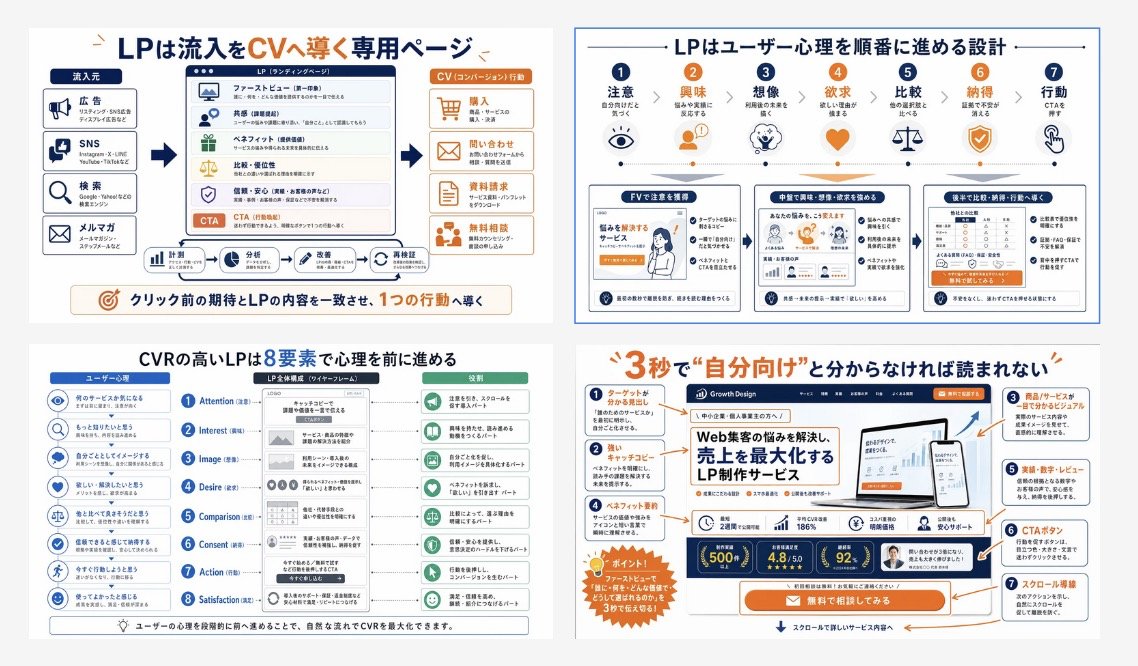
Japanese LP Conversion Infographic Grid — AI 이미지 프롬프트
A four-panel Japanese educational infographic that explains landing page structure, user psychology, and conversion design for training materials or marketing presentations. - AIPinMaker
프롬프트
{"type":"Japanese landing page education infographic collage","style":"clean corporate training slide, flat vector infographic mixed with UI mockup thumbnails, white background, navy blue and orange accent palette, thin gray dividers, rounded boxes, clear iconography, presentation-ready","language":"Japanese","canvas":{"aspect_ratio":"16:9","background":"light gray outer margin with four white infographic panels in a 2x2 grid"},"layout":{"grid":{"rows":2,"columns":2,"count":4},"sections":[{"title":"LPは流入をCVへ導く専用ページ","position":"top-left","count":4,"labels":["流入元","LP(ランディングページ)","CV(コンバージョン)行動","クリック前の期待とLPの内容を一致させ、1つの行動へ導く"]},{"title":"LPはユーザー心理を順番に進める設計","position":"top-right","count":7,"labels":["注意","興味","想像","欲求","比較","納得","行動"]},{"title":"CVRの高いLPは8要素で心理を前に進める","position":"bottom-left","count":8,"labels":["Attention","Interest","Image","Desire","Comparison","Consent","Action","Satisfaction"]},{"title":"3秒で“自分向け”と分からなければ読まれない","position":"bottom-right","count":7,"labels":["ターゲットがわかる見出し","キャッチコピー","商品/サービスが誰でも分かるビジュアル","ベネフィット・実績","実績・数字・レビュー","CTAボタン","スクロール導線"]}]},"panel_details":{"top_left":{"diagram_type":"conversion funnel explainer","source_count":4,"sources":["広告","SNS","検索","メルマガ"],"lp_module_count":6,"lp_modules":["ファーストビュー","共感","ベネフィット","比較・優位性","信頼・安心","CTA"],"conversion_count":4,"conversions":["購入","問い合わせ","資料請求","無料相談"],"footer_flow_count":5,"footer_flows":["計測","分析","改善案","実装依頼","再検証"]},"top_right":{"diagram_type":"user psychology progression with icons and three sample LP thumbnails","step_count":7,"steps":[{"label":"注意","icon":"eye"},{"label":"興味","icon":"person"},{"label":"想像","icon":"head with spark"},{"label":"欲求","icon":"heart"},{"label":"比較","icon":"scales"},{"label":"納得","icon":"shield check"},{"label":"行動","icon":"hand clicking"}],"sample_card_count":3,"sample_cards":["FVで注意を獲得","中盤で興味・想像・欲求を深める","後半で比較・納得・行動へ導線" ]},"bottom_left":{"diagram_type":"8-step CVR framework","left_column_count":8,"left_column":"user psychology prompts with blue circular icons","center_column_count":8,"center_column":"LP structure blocks aligned to each stage inside a smartphone-like wireframe","right_column_count":8,"right_column":"green action or reading-state outcomes for each stage","header_labels_count":3,"header_labels":["ユーザー心理","LP全体構成(ワイヤーフレーム)","役割"]},"bottom_right":{"diagram_type":"annotated LP hero critique","headline":"{argument name=\"headline text\" default=\"3秒で\"自分向け\"と分からなければ読まれない\"}","annotation_count":7,"annotations":["ターゲットがわかる見出し","キャッチコピー","商品/サービスが誰でも分かるビジュアル","ベネフィット・実績","実績・数字・レビュー","CTAボタン","スクロール導線"],"mockup_brand":"{argument name=\"brand name\" default=\"Growth Design\"}","mockup_headline":"{argument name=\"mockup headline\" default=\"Web集客の悩みを解決し、売上を最大化するLP制作サービス\"}","device_count":2,"devices":["desktop monitor","smartphone"],"metric_badge_count":3,"metric_badges":["500+","4.8/5.0","92%"],"cta_text":"{argument name=\"CTA text\" default=\"無料で相談してみる\"}"}},"visual_notes":{"icon_style":"simple line and flat icons in navy, orange, and muted green","typography":"bold Japanese sans-serif headlines, smaller readable body text, emphasis in orange for key words and numbers","composition":"dense but orderly educational poster, each panel framed separately with consistent spacing","quality":"sharp, high-resolution slide suitable for social media post or training manual cover","avoid":"photorealism, messy hand-drawn look, dark background, 3D rendering"}}3d:T10ea,{"type":"Japanese landing page education infographic collage","style":"clean corporate training slide, flat vector infographic mixed with UI mockup thumbnails, white background, navy blue and orange accent palette, thin gray dividers, rounded boxes, clear iconography, presentation-ready","language":"Japanese","canvas":{"aspect_ratio":"16:9","background":"light gray outer margin with four white infographic panels in a 2x2 grid"},"layout":{"grid":{"rows":2,"columns":2,"count":4},"sections":[{"title":"LPは流入をCVへ導く専用ページ","position":"top-left","count":4,"labels":["流入元","LP(ランディングページ)","CV(コンバージョン)行動","クリック前の期待とLPの内容を一致させ、1つの行動へ導く"]},{"title":"LPはユーザー心理を順番に進める設計","position":"top-right","count":7,"labels":["注意","興味","想像","欲求","比較","納得","行動"]},{"title":"CVRの高いLPは8要素で心理を前に進める","position":"bottom-left","count":8,"labels":["Attention","Interest","Image","Desire","Comparison","Consent"참고 이미지
이 AI 이미지 프롬프트 템플릿 사용 방법
 1
1프롬프트 복사 — 템플릿의 프롬프트와 네거티브 프롬프트를 가져오세요.  2
2모델 선택 — 가장 잘 맞는 추천 AI 모델을 고르세요.  3
3생성 — 클릭 한 번으로 스튜디오를 열어 결과를 만드세요.
관련 템플릿
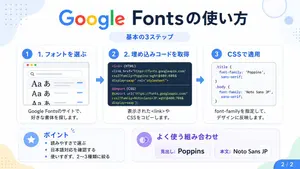
Google Fonts Japanese Tutorial Infographic
{"type":"Japanese infographic","topic":"How to use Google Fonts","style":"clean modern flat design, white background, soft pastel blue and mint corner blobs, rounded cards with subtle shadows, tech tutorial aesthetic, crisp vector typography and UI illustrations","canvas":{"aspect_ratio":"16:9"},"headline":{"main":"Google Fontsの使い方","sub":"基本の3ステップ"},"layout":{"sections":[{"title":"1. フォントを選ぶ","position":"left","count":1,"labels":["1. フォントを選ぶ"],"card_style":"rounded white panel with light blue border/shadow","icon":"blue numbered circle with 1","illustration":"browser window showing a font search interface, 3 visible font preview rows with large Aa あ samples, a search bar at top, small colored window buttons, light gray interface lines and blue accent dashes","body_text":"Google Fontsのサイトで、好きな書体を探します。"},{"title":"2. 埋め込みコードを取得","position":"center","count":1,"labels":["2. 埋め込みコードを取得"],"card_style":"rounded white panel with light blue border/shadow","icon":"blue numbered circle with 2","illustration":"dark code panel with two labeled code examples separated by a thin divider","code_blocks":{"count":2,"labels":["<link> (HTML)","@import (CSS)"],"content":["<link href=\"https://fonts.googleapis.com/css2?family=Poppins:wght@400;600&display=swap\" rel=\"stylesheet\">","@import url('https://fonts.googleapis.com/css2?family=Noto+Sans+JP:wght@400;700&display=swap');"]},"body_text":"表示された<link>やCSSをコピーします。"},{"title":"3. CSSで適用","position":"right","count":1,"labels":["3. CSSで適用"],"card_style":"rounded white panel with light blue border/shadow","icon":"blue numbered circle with 3","illustration":"white code card containing CSS with two selectors and font-family rules","code_blocks":{"count":2,"labels":[".title","body"],"content":[".title { font-family: 'Poppins', sans-serif; }","body { font-family: 'Noto Sans JP', sans-serif; }"]},"body_text":"font-familyを指定して、デザインに反映します。"},{"title":"ポイント","position":"bottom-left","count":3,"labels":["読みやすさで選ぶ","日本語対応を確認する","使いすぎず、2〜3種類に絞る"],"card_style":"rounded white panel with pale blue tint","icon":"blue star in a circle","body_format":"bullet list"},{"title":"よく使う組み合わせ","position":"bottom-center-right","count":2,"labels":["見出し: Poppins","本文: Noto Sans JP"],"card_style":"rounded white panel with pale lavender tint","icon":"purple linked-rings symbol","body_format":"two pill-shaped example boxes"}],"connectors":{"count":2,"style":"large blue right-pointing arrows between the 3 top cards"},"pagination":{"text":"2 / 2","position":"bottom-right","style":"blue rounded corner tab"}},"text_language":"Japanese","color_palette":{"primary_blue":"#2f80ff","navy":"#0f2b5b","google_colors":["#4285F4","#DB4437","#F4B400","#0F9D58"],"lavender":"#8b6cff","background":"#ffffff"}}3a:Tbd9,{"type":"Japanese infographic","topic":"How to use Google Fonts","style":"clean modern flat design, white background, soft pastel blue and mint corner blobs, rounded cards with subtle shadows, tech tutorial aesthetic, crisp vector typography and UI illustrations","canvas":{"aspect_ratio"

Japanese AI Stack Infographic Map
{"type":"Japanese infographic map","headline":"{argument name=\"headline text\" default=\"2026年版 月50万勢のAIスタック完全マップ\"}","style":"clean high-contrast social media infographic, white background, thick rounded blue border accents, bold black Japanese typography, colorful category bars, icon-led tool cards, square 4:5 layout, crisp vector design","top_summary":{"count":4,"cards":[{"icon":"group of people","main":"17ツール","sub":"厳選の最強セット"},{"icon":"money bag","main":"月50万","sub":"再現できる仕組み"},{"icon":"clock","main":"15分で全体像","sub":"サクッと把握できる"},{"icon":"target","main":"3〜5個選ぶだけ","sub":"最短ルートで成果へ"}]},"layout":{"sections":[{"title":"① 集客・ライティング系(4ツール)","position":"top section","bar_color":"blue","count":4,"tool_cards":[{"number":1,"icon":"writing hand","name":"Claude (Sonnet/Opus 4.7)","description":"長文ライティング・教育配信の本命。LP・メルマガはここで全部作る"},{"number":2,"icon":"memo and pencil","name":"ChatGPT (GPT-5.5)","description":"リサーチ+構造化。アイデア出しと仮説検証で使い分け"},{"number":3,"icon":"magnifying glass","name":"Perplexity","description":"ソース付きリサーチ専用。ファクトチェックの相棒"},{"number":4,"icon":"robot arm","name":"ClaudeCode","description":"自動化・スクリプト・自分専用ツール開発の最強枠"}]},{"title":"② ビジュアル・LP制作系(4ツール)","position":"second section","bar_color":"green","count":4,"tool_cards":[{"number":5,"icon":"artist palette","name":"GPT Image 2.0","description":"図解・画像・サムネ生成。プロ級プロンプトで再現性◎"},{"number":6,"icon":"paintbrush","name":"Canva Magic Layer","description":"GPT Image 2.0出力の編集仕上げ"},{"number":7,"icon":"globe","name":"Codex","description":"LPの構造とコードを一気に出す。GPT Image 2.0と組ませて完成"},{"number":8,"icon":"magic wand","name":"Figma AI","description":"本格LP用の最後の見栄え調整"}]},{"title":"③ 動画・音声系(5ツール)","position":"third section","bar_color":"orange","count":5,"tool_cards":[{"number":9,"icon":"clapperboard","name":"HeyGen Hyperframes","description":"4月リリース。テロップ+AIアバターで動画コストゼロ"},{"number":10,"icon":"film strip","name":"Claude Renoise","description":"動画台本→Hyperframesへの橋渡し"},{"number":11,"icon":"video camera","name":"Grok Images","description":"動画素材生成のダークホース"},{"number":12,"icon":"music note","name":"Suno","description":"BGM・ジングル全自動。商用OK"},{"number":13,"icon":"talking head","name":"FishAudio","description":"日本語ナレーション最強。AI声で語らせる"}]},{"title":"④ 集客動線・販売系(4ツール)","position":"bottom section","bar_color":"purple","count":4,"tool_cards":[{"number":14,"icon":"speech bubble","name":"UTAGE","description":"LP・LINE配信・決済の三位一体。仕組み化の本丸"},{"number":15,"icon":"smartphone","name":"LINE公式アカウント","description":"見込み客の温め場。ステップ配信で7日教育"},{"number":16,"icon":"bar chart","name":"Stripe","description":"決済・サブスク。29,800円商品もここで管理"},{"number":17,"icon":"rising chart","name":"Notion×Claude","description":"数字管理+週次振り返りの自動化"}]}]},"footer":"{argument name=\"footer text\" default=\"⭐ 月50万勢は全部使わない。まずは3〜5個の主力ツールを選んで組む。\"}","design_details":"Use 17 total numbered cards, each in a rounded white rectangle with a colored number badge matching the section. Preserve the Japanese text exactly, emphasize the numbers 2026, 月50万, 17ツール, and 3〜5個 in large bold type. Make the composition dense but readable, optimized for X/Twitter sharing."}
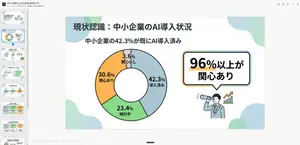
High-Quality Flat Design Slide Generation Prompt
Create a creative image of High Quality Flat Design Slide Generation Prompt. Style: photorealistic. Composition: balanced and well-framed. Lighting: natural with cinematic mood. Category: photography. Reference: high-quality-flat-design-slide-generation-prompt-872.
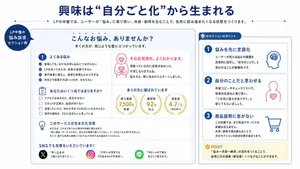
Japanese LP Empathy Infographic
{"type":"Japanese educational infographic slide","purpose":"explain how empathy-driven landing page copy creates self-identification and reader engagement","style":{"palette":["deep blue","white","light gray","pink","gold","black","green","multicolor social app accents"],"look":"clean corporate presentation design, rounded cards, thin blue outlines, soft shadows, flat vector icons, bold Japanese typography","aspect_ratio":"16:9"},"canvas":{"background":"white with subtle light gray framing","top_decor":"thin dotted blue horizontal lines on both sides of the subtitle area"},"header":{"headline":"{argument name=\"headline text\" default=\"興味は “自分ごと化”から生まれる\"}","headline_color":"deep blue","headline_alignment":"center","subtitle":"LPの中盤では、ユーザーの『悩み』に寄り添い、共感・納得を生むことで、自然に読み進めたくなる状態をつくります。","subtitle_color":"dark gray"},"layout":{"sections":[{"title":"LP中盤の悩み訴求セクション例","position":"left edge, circular callout badge","count":1,"labels":["LP中盤の悩み訴求セクション例"]},{"title":"main example panel","position":"center-left large rounded rectangle","count":7,"labels":["こんなお悩み、ありませんか?","よくある悩み","そのお気持ち、よくわかります。","あなたはいくつ当てはまりますか?","多くの方に選ばれています","このサービスが生まれた背景","SNSでも反響をいただいています!"]},{"title":"このセクションのポイント","position":"right tall rounded rectangle","count":4,"labels":["1 悩みを先に言語化","2 自分のことだと思わせる","3 商品説明に急がない","POINT"]}]},"main_panel":{"container":"large light gray rounded card with blue border","header":{"title":"こんなお悩み、ありませんか?","subtitle":"多くの方が、同じような壁にぶつかっています。"},"cards":[{"title":"よくある悩み","position":"upper left","icon":"blue exclamation mark in a circle","count":4,"items":["集客しても、なかなか申し込みにつながらない","LPを作ってみたが、効果が実感できない","専門業者に頼むと、費用も時間もかかりすぎる","何をどう改善すればいいのか、分からない"]},{"title":"そのお気持ち、よくわかります。","position":"upper right","icon":"pink line-art person with heart on chest and heart above head","count":3,"items":["そのお気持ち、よくわかります。","頑張っているのに成果が出ないと、不安になりますよね。","私たちも、同じ悩みからスタートしました。"]},{"title":"あなたはいくつ当てはまりますか?","position":"middle left","icon":"blue checklist clipboard","count":4,"items":["アクセスはあるのに、反応が少ない","どのLPが正解か、自信が持てない","改善したいけど、何から手をつければいいか分からない","制作や運用を、プロに任せたいと思っている"]},{"title":"多くの方に選ばれています","position":"middle right","icon":"3 gold laurel stat badges","count":3,"items":["導入実績 2,500社 突破","継続率 92% 以上","満足率 4.7 / 5(自社調べ)"]},{"title":"このサービスが生まれた背景","position":"lower middle","icon":"blue light bulb","count":3,"items":["私たちは、これまで多くのLP制作や改善に携わる中で、","『良い商品・サービスなのに、伝え方が原因で届いていない』ケースをたくさん見てきました。","そこで、誰でも簡単に成果につながるLPを作れる仕組みをつくりました。"]},{"title":"SNSでも反響をいただいています!","position":"bottom full width","icon":"social proof row","count":3,"items":["X: 『申し込みが2倍になりました!』","Instagram: 『デザインが苦手でもプロ並みのLPが完成!』","LINE: 『サポートが丁寧で安心して使えます』"]}]},"right_panel":{"title":"このセクションのポイント","cards":[{"step":1,"title":"悩みを先に言語化","icon":"blue head profile with scribble brain","description":"ユーザーが抱える悩みや課題を具体的に提示し、『自分のことだ』と思わせることが最優先です。"},{"step":2,"title":"自分のことだと思わせる","icon":"pink person outline with heart on chest","description":"共感コピーやチェックリストで、読者の気持ちに寄り添い、『この先に答えがありそう』と感じてもらいましょう。"},{"step":3,"title":"商品説明に急がない","icon":"blue shopping cart","description":"この段階では、まだ商品やサービスの詳細は伝えきれません。共感・納得を積み重ねることで、次のセクションの訴求効果が高まります。"},{"step":"POINT","title":"POINT","icon":"gold check badge","description":"『悩み→共感→納得』の流れをつくることで、自然に次の提案(解決策)へつなげることができます。"}]},"text_language":"Japanese","rendering_notes":"Keep all visible text in Japanese, with crisp legible layout. Emphasize educational LP manual aesthetics, high information clarity, even spacing, and presentation-slide balance. Use vector icons and clean sans-serif Japanese fonts."}3a:T1550,{"type":"Japanese educational infographic slide","purpose":"explain how empathy-driven landing page copy creates self-identification and reader engagement","style":{"palette":["deep blue","white","light gray","pink","gold","black","green","multicolor social app accents"],"look":"clean corporate presentation design, rounded cards, thin blue outlines, soft shadows, flat vector icons, bold Japanese typography","aspect_ratio":"16:9"},"canvas":{"background":"white with subtle light gray framing","top_decor":"thin dotted blue horizontal lines on both sides of the subtitle area"},"header":{"headline":"{argument name=\"headline text\" default=\"興味は “自分ごと化”から生まれる\"}","headline_color":"deep blue","headline_alignment":"center","subtitle":"LPの中盤では、ユーザーの『悩み』に寄り添い、共感・納得を生むことで、自然に読み進めたくなる状態をつくります。","subtitle_color":"dark gray"},"layout":{"sections":[{"title":"LP中盤の悩み訴求セクション例","position":"left edge, circular callout badge","count":1,"labels":["LP中盤の悩み訴求セクション例"]},{"title":"main example panel","position":"center-left large rounded rectangle","count":7,"labels":["こんなお悩み、ありませんか?","よくある悩み","そのお気持ち、よくわかります。","あなたはいくつ当てはまりますか?","多くの方に選ばれています","このサービスが生まれた背景","SNSでも反響をいただいています!"]},{"title":"このセクションのポイント","position":"right tall rounded rectangle","count":4,"labels":["1 悩みを先に言語化","2 自分のことだと思わせる","3 商品説明に急がない","POINT"]}]},"main_panel":{"container":"large light gray rounded card with blue border","header":{"title":"こんなお悩み、ありませんか?","subtitle":"多くの方が、同じような壁にぶつかっています。"},"cards":[{"title":"よくある悩み","position":"upper left","icon":"blue exclamation mark in a circle","count":4,"items":["集客しても、なかなか申し込みにつながらない","LPを作ってみたが、効果が実感できない","専門業者に頼むと、費用も時間もかかりすぎる","何をどう改善すればいいのか、分からない"]},{"title":"そのお気持ち、よくわかります。","position":"upper right","icon":"pink line-art person with heart on chest and heart above head","count":3,"items":["そのお気持ち、よくわかります。","頑張っているのに成果が出ないと、不安になりますよね。","私たちも、同じ悩みからスタートしました。"]},{"title":"あなたはいくつ当てはまりますか?","position":"midd
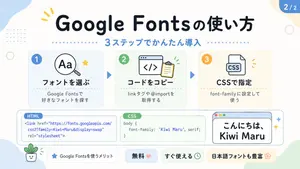
Cute Google Fonts Tutorial Infographic
Create a cute pastel Japanese infographic slide with a clean white background and soft rounded abstract corner blobs in pale blue, cream, and light green. The design is friendly, educational, and modern, with thick rounded sans-serif Japanese typography, subtle drop shadows, thin gray outlines, dotted divider accents, and small decorative doodles. At the top center, place a large bold headline in dark navy that reads "Google Fontsの使い方". Directly below it, add a blue subheadline reading "3ステップでかんたん導入" with a horizontal row of small blue dots on both sides. In the top right corner, add a rounded blue page badge that reads "2/2". Arrange 3 rounded rectangular step cards across the upper middle row, evenly spaced left to right, each with a pale tinted background, soft border, and a colored circular number badge in the upper left. Card 1 has a pale blue background and a blue badge with "1". Inside, show a simple magnifying glass icon over the letters "Aa" plus a small yellow star accent. The bold title reads "フォントを選ぶ" and the smaller text below reads "Google Fontsで 好きなフォントを探す". Card 2 has a pale green background and a green badge with "2". Inside, show a browser window icon with code brackets "</>" and a clipboard, plus tiny green motion marks. The bold title reads "コードをコピー" and the smaller text below reads "linkタグや@importを 取得する". Card 3 has a pale cream background and an orange badge with "3". Inside, show a document icon labeled "CSS" with small orange accent marks. The bold title reads "CSSで指定" and the smaller text below reads "font-family に設定して 使う". Place 2 medium blue triangular arrows between the 3 cards to show progression. Across the lower middle, create 3 horizontally aligned demo boxes. The left box is a rounded white code panel with a small blue tab label reading "HTML". Inside, display this code in blue text exactly across 3 lines: "<link href=\"https://fonts.googleapis.com/" "css2?family=Kiwi+Maru&display=swap" "rel=\"stylesheet\">". The center box is a rounded white code panel with a green tab label reading "CSS". Inside, display dark text exactly as: "body {" " font-family: 'Kiwi Maru', serif;" "}". The right box is a rounded white mock browser window with a pale blue title bar and 3 tiny circular window buttons at top left in red, yellow, and green. Inside, show large Japanese sample text in black reading "こんにちは、 Kiwi Maru" in a cute rounded handwritten-style font. Add 2 small sparkle accents to the right of this browser window. At the bottom, place 4 pill-shaped badges from left to right. Badge 1 is white with a small blue star icon and text "Google Fontsを使うメリット". Badge 2 is pale blue with bold text "無料" followed by a pink heart. Badge 3 is pale green with bold text "すぐ使える" followed by a small clock icon. Badge 4 is pale yellow with bold text "日本語フォントも豊富" followed by a flower icon. Add 4 extra decorative elements around the canvas: a yellow 3-stroke sparkle near the top left of the headline, a pale blue dotted square grid in the upper left background, a thin light green ring on the left side, and a tiny smiling potted plant illustration in the lower left corner. Keep the whole composition flat vector-like, crisp, cute, and highly legible, in a social-media educational carousel style.3d:Td6d,Create a cute pastel Japanese infographic slide with a clean white background and soft rounded abstract corner blobs in pale blue, cream, and light green. The design is
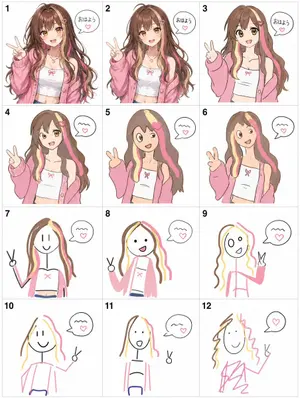
Visual Telephone Game Grid
Create a game image of Visual Telephone Game Grid. Style: photorealistic. Composition: balanced and well-framed. Lighting: natural with cinematic mood. Category: illustration. Reference: visual-telephone-game-grid-20512.
더 많은 프롬프트 탐색
카테고리별 AI 이미지·영상 프롬프트를 더 찾아보세요.