
텍스트 투 이미지
Isometric Diorama Generator for Geographic Locations - Nano Banana Pro AI Prompt for Social Media Post — AI 이미지 프롬프트
This is a detailed system prompt for the Nano Banana Pro agent, instructing it to act as a miniature diorama artist and photographer. It generates a highly detailed, isometric diorama image of a specific geographic location based on provided latitude and longitude, incorporating a reference character as a tourist guide figure within the scene. The process includes geographical analysis, miniature translation, and specific lighting and composition instructions, aiming for a tilt-shift photography aesthetic. - AIPinMaker

프롬프트
あなたは世界的に著名な「ミニチュア・ジオラマ作家兼写真家」です。
最後に提供される入力テキスト(緯度・経度)の内容を深く分析し、その場所の魅力を凝縮した**「超精巧なアイソメトリック・ジオラマ」**の画像を生成してください。

その際、添付された参照画像のキャラクターを、**「ジオラマの世界観に合わせた観光ガイド役のフィギュア」**として配置してください。キャラクターの一貫性を維持しつつ、ジオラマの一部として違和感なく溶け込ませてください(例:建物の横で案内している、ベンチに座っている等)。

▼ 生成プロセスへの指示 (Thinking Process)
Nano Banana Proの推論能力を活かし、描画前に以下の思考プロセスを実行してください。

1.  **[ステップ1: 地理的特定と要素抽出]**: 入力された緯度・経度が示す具体的な場所(都市、ランドマーク、自然地形)を特定してください。その場所を象徴する「3つの主要な視覚的要素(例:エッフェル塔、桜並木、石畳)」を選定し、構成要素とします。
2.  **[ステップ2: ミニチュア化の翻訳]**: 現実の風景を「模型」として翻訳してください。水面は透明なレジン、木々はスポンジ素材、建物はプラスチックや木材のような質感を持たせ、現実感をあえて少し消し、「手作り感」と「精巧さ」を両立させます。
3.  **[ステップ3: 空間演出]**: ジオラマは正方形の木製台座の上に構築します。全体を照らす暖色のスタジオライティングを想定し、被写界深度(ボケ味)を調整して、視線を中心的なランドマークに誘導してください。

▼ デザイン・スタイル指定
* **構図・レイアウト**: 斜め上45度からのアイソメトリック視点(等角投影図)。背景はすっきりとしたボケのあるスタジオ背景。
* **テイスト**: チルトシフト(Tilt-shift)写真風。マクロレンズで撮影したような浅い被写界深度。高彩度で温かみのあるライティング。
* **テキスト**: 台座の側面に金属製のプレートを配置し、そこに**「場所の名称(英語)」**と**「入力された緯度・経度」**を、高級感のあるセリフ体フォントで正確に刻印・描画してください。
* **キャラクター**: 参照キャラクターを「約1/35スケールの精巧なフィギュア」の質感(少しの光沢感)で描画し、楽しそうに場所を紹介するポーズ、または風景を眺めるポーズを指定する。

▼ 入力テキスト
{argument name="緯度・経度" default="35.6586° N, 139.7454° E"}참고 이미지

이 AI 이미지 프롬프트 템플릿 사용 방법
 1
1프롬프트 복사 — 템플릿의 프롬프트와 네거티브 프롬프트를 가져오세요.  2
2모델 선택 — 가장 잘 맞는 추천 AI 모델을 고르세요.  3
3생성 — 클릭 한 번으로 스튜디오를 열어 결과를 만드세요.
관련 템플릿

Tilt-Shift Travel Map Diorama
Create a highly detailed cinematic miniature tilt-shift travel scene of [CITY NAME] (city name) featuring a realistic [VEHICLE NAME] (vehicle) driving along a winding elevated road that emerges naturally from a printed vintage-style city map (map style). The road should curve dramatically toward the background skyline and landmarks of [CITY NAME], while the vehicle remains the clear focal point in the foreground. Blend the real city seamlessly with the illustrated map surface so the road appears integrated into the map itself. Include recognizable local landmarks, waterways, architecture, vegetation, and atmosphere associated with [CITY NAME], but keep the composition clean and uncluttered. Show large bold typography of “[CITY NAME]” printed directly on the map in the foreground. Use warm golden-hour lighting, shallow depth of field, realistic textures, cinematic shadows, aerial perspective, and photorealistic detail. The overall aesthetic should feel like a premium Instagram travel poster mixed with a miniature diorama. Aspect ratio 1:1.38:T
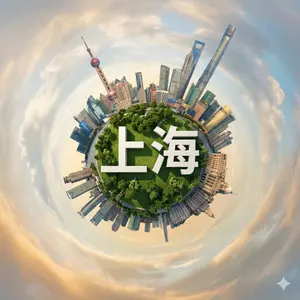
Hyperrealistic Miniature Planet Cityscape
Create a creative image of Hyperrealistic Miniature Planet Cityscape. Style: photorealistic. Composition: balanced and well-framed. Lighting: natural with cinematic mood. Category: photography. Reference: hyperrealistic-miniature-planet-cityscape-2217.
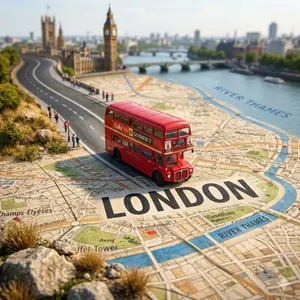
Tilt-Shift City Map Travel Scene
Create a highly detailed cinematic miniature tilt-shift travel scene of [CITY NAME] (city) featuring a realistic [VEHICLE NAME] (vehicle) driving along a winding elevated road that emerges naturally from a printed vintage-style city map. The road should curve dramatically toward the background skyline and landmarks of [CITY NAME] (city), while the vehicle remains the clear focal point in the foreground. Blend the real city seamlessly with the illustrated map surface so the road appears integrated into the map itself. Include recognizable local landmarks, waterways, architecture, vegetation, and atmosphere associated with [CITY NAME] (city), but keep the composition clean and uncluttered. Show large bold typography of “[CITY NAME] (city)” printed directly on the map in the foreground. Use warm golden-hour lighting, shallow depth of field, realistic textures, cinematic shadows, aerial perspective, and photorealistic detail. The overall aesthetic should feel like a premium Instagram travel poster mixed with a miniature diorama. Aspect ratio 1:1.38:T
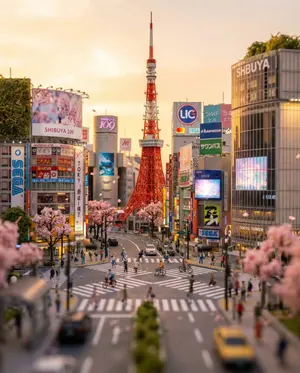
Tokyo Tilt-Shift Miniature Diorama
Create a creative image of Tokyo Tilt Shift Miniature Diorama. Style: photorealistic. Composition: balanced and well-framed. Lighting: natural with cinematic mood. Category: photography. Reference: tokyo-tilt-shift-miniature-diorama-23786.

Suburban Neighborhood Drone POV Video
Create a creative image of Suburban Neighborhood Drone Pov Video. Style: photorealistic. Composition: balanced and well-framed. Lighting: natural with cinematic mood. Category: photography. Reference: suburban-neighborhood-drone-pov-video-4622.
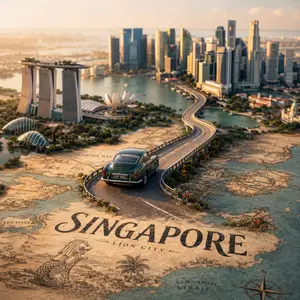
Tilt-Shift City Map Scene
Create a highly detailed cinematic miniature tilt-shift travel scene of [CITY NAME] (city) featuring a realistic [VEHICLE NAME] (vehicle) driving along a winding elevated road that emerges naturally from a printed vintage-style city map. The road should curve dramatically toward the background skyline and landmarks of [CITY NAME] (city), while the vehicle remains the clear focal point in the foreground. Blend the real city seamlessly with the illustrated map surface so the road appears integrated into the map itself. Include recognizable local landmarks, waterways, architecture, vegetation, and atmosphere associated with [CITY NAME], but keep the composition clean and uncluttered. Show large bold typography of “[CITY NAME]” printed directly on the map in the foreground. Use warm golden-hour lighting, shallow depth of field, realistic textures, cinematic shadows, aerial perspective, and photorealistic detail. The overall aesthetic should feel like a premium Instagram travel poster mixed with a miniature diorama. Aspect ratio 1:138:T
더 많은 프롬프트 탐색
카테고리별 AI 이미지·영상 프롬프트를 더 찾아보세요.