
텍스트 투 이미지
Expression Transformation: Crying While Smiling — AI 이미지 프롬프트
A prompt designed to test the consistency and expression transformation capabilities of image models. It requests transforming a character's expression to 'crying while smiling'—specifically, tears streaming down cheeks while maintaining a gentle, bittersweet smile—while strictly preserving the character design, hairstyle, clothing, and art style. - AIPinMaker
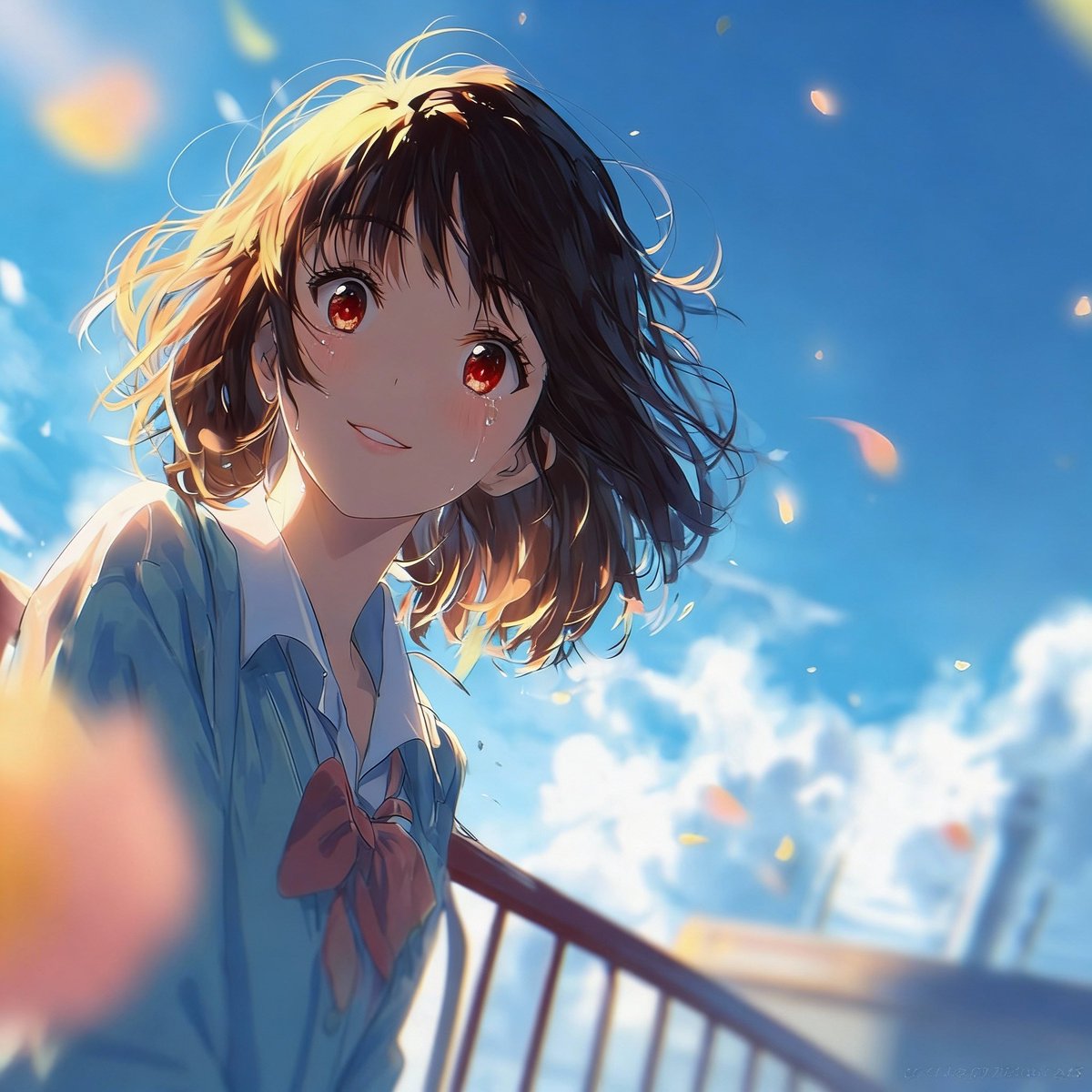
프롬프트
Create a cinematic image of Expression Transformation Crying While Smiling. Style: photorealistic. Composition: balanced and well-framed. Lighting: natural with cinematic mood. Category: cinematic-video. Reference: expression-transformation-crying-while-smiling-1882.
이 AI 이미지 프롬프트 템플릿 사용 방법
 1
1프롬프트 복사 — 템플릿의 프롬프트와 네거티브 프롬프트를 가져오세요.  2
2모델 선택 — 가장 잘 맞는 추천 AI 모델을 고르세요.  3
3생성 — 클릭 한 번으로 스튜디오를 열어 결과를 만드세요.
관련 템플릿

Detailed prompt for old photo restoration using GPT Image 1.5
{ "task": "portrait_restoration", "language": "zh-CN", "prompt": { "subject": { "type": "human_portrait", "identity_fidelity": "match_uploaded_face_100_percent", "no_facial_modification": true, "expression": "natural", "eye_detail": "sharp_clear", "skin_texture": "ultra_realistic", "hair_detail": "natural_individual_strands", "fabric_detail": "rich_high_frequency_detail" }, "lighting": { "exposure": "bright_clear", "style": "soft_studio_light", "brightness_balance": "even", "specular_highlights": "natural_on_face_and_eyes", "shadow_transition": "smooth_gradual" }, "image_quality": { "resolution": "8k", "clarity": "high", "noise": "clean_low", "artifacts": "none", "over_smoothing": "none" }, "optics": { "camera_style": "full_frame_dslr", "lens": "85mm", "aperture": "f/1.8", "depth_of_field": "soft_shallow", "bokeh": "smooth_natural" }, "background": { "style": "clean_elegant", "distraction_free": true, "tone": "neutral" }, "color_grading": { "style": "cinematic", "saturation": "rich_but_natural", "white_balance": "accurate", "skin_tone": "natural_true_to_subject" }, "style_constraints": { "no_cartoon": true, "no_beauty_filter": true, "no_plastic_skin": true, "no_face_reshaping": true, "no_ai_face_swap": true } }, "negative_prompt": [ "cartoon", "anime", "cgi", "painterly", "plastic skin", "over-smoothing", "over-sharpening halos", "heavy skin retouching", "face reshaping", "identity drift", "face swap", "beauty filter", "uncanny", "washed out", "color cast", "blown highlights", "crushed shadows", "banding", "jpeg artifacts", "extra fingers", "deformed eyes", "asymmetrical face", "warped features" ], "parameters": { "fidelity_priority": "identity", "detail_priority": "eyes_skin_hair_fabric", "realism_strength": 0.95, "sharpening": "micro_contrast_only", "skin_retention": "keep_pores_and_microtexture", "recommended_denoise": "low_to_medium" } }

Harley Quinn Cosplay Enhancer - Nano Banana Pro AI Prompt for Social Media Post
{ "modified_image_prompt": { "core_subject": "A hyper-detailed, high-fidelity portrait of the Harley Quinn cosplayer from image_0.png, focusing on the upper body, torso, and hips, with several key updates and enhanced textures.", "pose_and_framing": "The twisted over-the-shoulder pose is maintained, but with a tighter framing that is more of a detailed portrait focus, cutting off the lower-most part of the glutes and thighs seen in image_0.png.", "key_modifications": { "attire_updates": { "shirt_text": "The text on the white section of the baseball tee is rendered in crisp, detailed, elaborate cursive: 'Lil' Monster (shirt text)'. Below it, a smaller line of block text reads: 'Est. 1992'. This replaces the simple partial text from image_0.png.", "pants_texture": "The red and blue hot pants are rendered with hyper-realistic, individually defined sequins, creating a vibrant, tactile texture that replaces the more subtle texture of image_0.png." }, "tattoo_updates": { "added_thigh_tattoos": [ { "location": "Upper part of the visible left thigh", "text": "HOMICIDAL (thigh tattoo 1)", "style": "Crisp green text" }, { "location": "Side of the visible right thigh", "text": "SADDIST (thigh tattoo 2)", "style": "Crisp green text" } ] } }, "background_and_lighting": "A flawless, seamless white studio wall, perfectly clean. Lighting is professional, focused high-key studio lighting, precisely highlighting textures (sequins, skin, fabric weave) without being harsh." } }

Artistic Portrait Editing for Girls (Image-to-Image)
Create a portrait image of Artistic Portrait Editing For Girls Image To Image. Style: photorealistic. Composition: balanced and well-framed. Lighting: natural with cinematic mood. Category: portrait. Reference: artistic-portrait-editing-for-girls-image-to-image-1854.
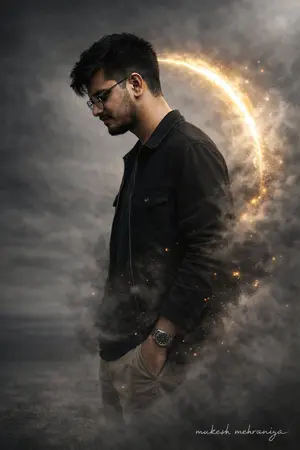
Complex JSON Prompt for Hyper-Realistic Identity Lock
{ "type": "image_edit_prompt", "engine": "Gemini Nano Banana Pro", "reference_images": [ "uploaded_face_photo", "uploaded_full_body_photo" ], "edit_priority": "photographic realism over stylization", "identity_lock": { "face": { "match_reference_priority": "absolute", "instruction": "use the uploaded face photo as the ONLY facial truth source", "preserve_features": [ "exact eye shape", "exact nose width and tip", "exact lip shape", "beard density and unevenness", "natural skin pores", "minor asymmetry", "glasses shape and position" ], "forbidden": [ "face beautification", "face reshaping", "skin smoothing", "jawline enhancement", "symmetry correction" ] }, "body": { "preserve": true, "instruction": "keep natural body proportions exactly as uploaded", "no_slimming": true, "no_broadening": true } }, "subject": { "gender": "male", "pose": { "orientation": "side profile", "facing": "right", "head": "slightly bowed", "posture": "natural relaxed human posture" }, "expression": "neutral and real, not model-like" }, "skin_and_texture": { "skin_type": "real human skin", "details": [ "visible pores", "natural oil shine", "minor blemishes", "uneven skin tone", "real beard texture" ], "explicit_instruction": "DO NOT smooth skin, DO NOT polish face, DO NOT beautify" }, "clothing": { "outfit": "modern casual realistic", "top_layer": "black denim jacket with real fabric grain", "inner_layer": "dark cotton t-shirt", "bottom": "neutral slim-fit trousers", "fabric_behavior": "wrinkles, folds, weight visible" }, "lighting": { "type": "real photographic lighting", "style": "soft diffused key light", "rim_light": "very subtle warm edge light", "instruction": "avoid hard glow, avoid halo, avoid fantasy lighting" }, "effects": { "smoke": { "density": "moderate", "realism": "photographed smoke, not CGI", "interaction": "partially occluding body naturally" }, "particles": { "intensity": "very low", "instruction": "secondary element only, must not affect face realism" }, "aura": { "intensity": "minimal", "instruction": "background separation only, not stylized energy" } }, "background": { "remove_original_room": true, "environment": "neutral cinematic backdrop", "look": "real photographed environment, not fantasy" }, "composition": { "aspect_ratio": "3:4", "focus": "face sharpness highest priority", "depth_of_field": "natural camera DOF", "lens_simulation": "50mm portrait lens" }, "signature": { "text": "mukesh mehraniya", "placement": "bottom right", "opacity": 0.3 } }
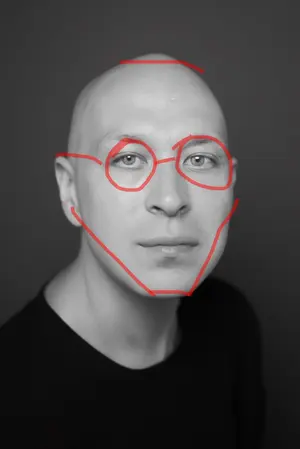
Image Editing Prompt for Jawline, Glasses, and Head Shape
Create a creative image of Image Editing Prompt For Jawline Glasses And Head Shape. Style: photorealistic. Composition: balanced and well-framed. Lighting: natural with cinematic mood. Category: photography. Reference: image-editing-prompt-for-jawline-glasses-and-head-shape-2333.

Introspective Portrait in a Bathroom with Identity Lock - Nano Banana Pro AI Prompt for Social Media Post
Edit this photo without altering the face. create a photorealistic potrait of A young woman with fair, smooth skin and naturally soft pink lips, with dark brown hair styled with bangs. She is sitting in a relaxed pose on a toilet. She wears a white button-up shirt, slightly open at the collar, with sleeves rolled up to the elbows, paired with black suspenders and wearing a black pant. She accessorizes with a luxurious silver wristwatch, a delicate chain bracelet, a minimalist ring on one of her ring fingers, and a small silver necklace. Her expression appears thoughtful and introspective, with her gaze directed downward. Her right arm is raised, with her hand resting against her head, while her left arm rests gently on her lap. Soft lighting creates subtle shadows that highlight her facial features, accessories, and the texture of her clothing. The overall atmosphere is calm and introspective, with a minimalist and sophisticated aesthetic. Use the original face 100% exactly as shown in the provided reference photo, with no alterations.
더 많은 프롬프트 탐색
카테고리별 AI 이미지·영상 프롬프트를 더 찾아보세요.