
텍스트 투 이미지
Annotated Manga App Screenshot — AI 이미지 프롬프트
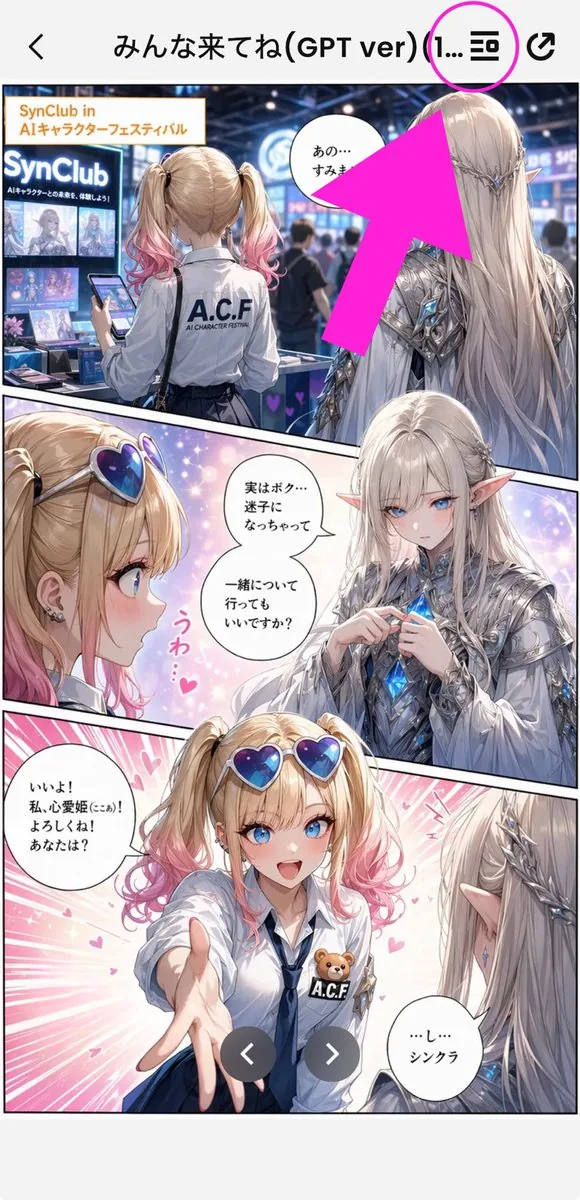
Generates a vertical smartphone screenshot of a Japanese manga preview in an app with a bright arrow highlighting the top menu icon. - AIPinMaker
프롬프트
Goal: Create a tall smartphone screenshot showing a manga/comic preview inside a mobile app, with an instructional annotation pointing to a menu icon at the top.

Canvas: Vertical 9:16 mobile screenshot, white app background, high-resolution anime manga art framed by a phone UI. The top navigation bar is about 80 px tall with a back chevron on the far left, a centered Japanese title, and two icons on the right.

Top app UI: Show exactly 4 top-bar elements: 1 black back arrow on the left, 1 centered title reading {argument name="screen title" default="みんな来てね(GPT ver) (1..."}, 1 black list/menu icon near the upper right, and 1 black share/export icon at the far right. Add exactly 1 bright magenta circle around the list/menu icon and exactly 1 oversized hot-pink arrow pointing diagonally upward toward that circled icon from the manga area.

Main comic layout: A full-color anime manga page divided into exactly 3 diagonal panels with thick black panel borders. The art style is glossy, detailed, romantic fantasy shoujo manga with soft lighting, sparkles, pink heart effects, and a convention/exhibition setting.

Panel 1: Wide top panel showing a busy futuristic convention booth for an AI character festival. In the foreground, show a blonde teenage girl from behind with twin ponytails fading into pink tips, wearing a white shirt with “A.C.F” printed on the back and holding a smartphone. To her right stands a tall elegant male elf with very long silver-white hair, pointed ears, ornate silver armor, and blue crystal details, seen from behind/side. Booth signage should include “SynClub” and “SynClub in AIキャラクターフェスティバル.” Include exactly 1 speech bubble in this panel near the elf, with Japanese text beginning “あの…”. The large hot-pink arrow partially covers the upper-right area of this panel.

Panel 2: Middle diagonal panel with a close-up of the girl on the left and the elf facing her on the right, against a dreamy pastel background. The girl has heart-shaped blue-purple sunglasses pushed on her head, blonde twin tails with pink ends, earrings, and an excited expression area obscured. The elf wears ornate silver clothing and holds or touches a glowing blue crystal at his chest. Add exactly 2 speech bubbles in this panel: one near the elf reading “実はボク…迷子になっちゃって 一緒について行ってもいいですか?” and one small decorative vertical pink reaction text reading “うわ…♥”. Place exactly 2 beige rectangular face-censor blocks in this panel, one over each character’s face.

Panel 3: Large bottom panel with energetic pink speed lines and hearts. The girl reaches one hand forward toward the viewer, wearing a white blouse, navy tie, blue skirt, heart sunglasses on her head, and an A.C.F badge with a small teddy bear. The elf is seen from behind/right with long silver hair and pointed ear, looking at her. Add exactly 2 speech bubbles: the girl’s bubble on the left reading “いいよ! 私、心愛姫(ここあ)! よろしくね! あなたは?” and the elf’s bubble on the lower right reading “…し…シンクラ”. Place exactly 1 beige rectangular face-censor block over the girl’s face. Overlay exactly 2 dark gray circular carousel navigation buttons near the bottom center, one with a white left chevron and one with a white right chevron.

Visible repeated elements count: exactly 3 manga panels, exactly 5 speech bubbles total, exactly 3 beige face-censor rectangles, exactly 2 carousel buttons, exactly 1 magenta circle, exactly 1 hot-pink arrow, exactly 4 top navigation elements.

Visual style: polished anime illustration, crisp smartphone screenshot, saturated pink annotation graphics, detailed lighting, convention crowd blur in the background, clean app UI. Keep the image vertically cropped like a social media screenshot, with no extra watermark beyond the visible booth and comic text.39:Tf7a,Goal: Create a tall smartphone screenshot showing a manga/comic preview inside a mobile app, with an instructional annotation pointing to a menu icon at the top.

Canvas: Vertical 9:16 mobile scre참고 이미지
이 AI 이미지 프롬프트 템플릿 사용 방법
 1
1프롬프트 복사 — 템플릿의 프롬프트와 네거티브 프롬프트를 가져오세요.  2
2모델 선택 — 가장 잘 맞는 추천 AI 모델을 고르세요.  3
3생성 — 클릭 한 번으로 스튜디오를 열어 결과를 만드세요.
관련 템플릿

Five-panel manga of a YouTube thumbnail creator workflow
Create a anime image of Five Panel Manga Of A Youtube Thumbnail Creator Workflow. Style: photorealistic. Composition: balanced and well-framed. Lighting: natural with cinematic mood. Category: anime. Reference: five-panel-manga-of-a-youtube-thumbnail-creator-workflow-289.

Anime Butler Date Manga Screenshot
Goal: Create a vertical smartphone screenshot of a romantic comedy anime manga page about a sudden outfit change during a date, with the characters' faces intentionally covered by soft rectangular privacy blurs. Canvas: Tall 9:16 mobile screenshot, approximately 625 x 1080, with a black app viewer header at the top. Header includes a back arrow on the left, centered white Japanese title text 服装チェンジ(今だけ)(1/1) (header title), and two small white interface icons on the right. Add two semi-transparent circular navigation buttons with left and right chevrons near the bottom center. Layout: Use exactly 6 tilted comic panels separated by thick black gutters. Panel 1, top left: close-up of a petite blonde young woman in a purple-and-white maid-like dress, one finger near her lips, embarrassed. Panel 2, top right: handsome dark-haired young man in a black butler tuxedo standing on a European street. Panel 3, middle left: the same butler man scratching the back of his head awkwardly. Panel 4, middle right: close-up of the blonde woman blushing heavily, overwhelmed. Panel 5, bottom large panel spanning most of the width: the blonde woman has fallen forward onto the cobblestone street, flustered, skirt and translucent sleeves spread dramatically. Panel 6, bottom right narrow panel: partial view of the butler man reaching out in surprise. Characters: The woman is a delicate blonde anime girl with long wavy hair, side braids, purple flower hair ornaments, violet tassel earrings, flushed cheeks, and a frilly white-and-purple maid dress with translucent lace sleeves (female character). The man is a tall handsome anime man with tousled black hair, a black butler suit, gold trim, white ruffled shirt, black bow tie, lapel chain, and a decorative brooch (male character). Cover the visible faces with exactly 5 soft rectangular censor blurs: one over the woman's face in panel 1, one over the man's face in panel 2, one over the man's face in panel 3, one over the woman's face in panel 4, and one over the partial man's face in panel 6; leave the fallen woman's closed-eyed face in panel 5 visible. Text content: Use exactly 10 speech bubbles and preserve the Japanese dialogue in this set: どうして… / いつもはメイド服なのに…! / おーいミワどうしたんだ? / てか貸してくれるか? / ? / そんなに驚くことか? / あーたまにはいいだろ? / かっこよすぎる…っ / ずるいよこんなの反則でしょー!!! / おい、ミワ!? (Japanese dialogue text). Add exactly 4 sound-effect or reaction texts: はなそそや… / きゅううん…♡ / はぁっ / ガクッ!! (sound effects). Visual style: Polished high-detail AI anime illustration, soft romantic lighting, pastel highlights, sparkles, shallow depth of field, ornate European city street background, glossy manga rendering, dramatic diagonal panel composition, expressive rom-com pacing. Keep the image vertical, dense, and screenshot-like; do not add extra panels, extra characters, watermarks, or additional text.37:Tc86,Goal: Create a vertical smartphone screenshot of a romantic comedy anime manga page about a sudden outfit change during a date, with the characters' faces intentionally covered by soft rectangular privacy blurs. Canvas: Tall 9:
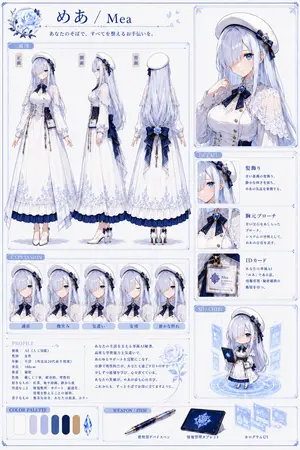
Elegant AI Secretary Character Sheet
Goal: Create a polished anime VTuber / Live2D character reference sheet for めあ / Mea (character name), an elegant personal AI secretary girl in a white, navy, and pale-blue rose motif. Canvas: Vertical A4-style character design board, 2:3 aspect ratio, white background with delicate pale-blue ornamental borders, thin blue divider lines, small floral corner decorations, and a clean premium visual-novel artbook layout. Use soft watercolor-like shading, crisp anime line art, luminous blue eyes, very detailed lace, ribbons, embroidery, and accessories. Top header: Place a large blue rose illustration in the upper left, then the title めあ / Mea (character name) in elegant deep-blue serif/Japanese calligraphy. Under it add the tagline あなたのそばで、すべてを整えるお手伝いを。 (tagline). Keep the palette cool, refined, and luxurious. Main left section: Add a large boxed “three-view” area titled 「三面図」. Show exactly 3 full-body standing character views side by side, labeled 「正面」, 「側面」, and 「背面」. The character has very long silver-lavender hair reaching below the waist, straight with soft waves, pale skin, blue eyes, a white beret, navy-blue rose hair ornament, navy ribbon accents, and a white long maid-like secretary dress. The outfit includes a fitted white bodice with gold buttons, translucent lace capelet sleeves, puff sleeves, long skirt with pale-blue floral embroidery near the hem, navy underskirt ruffle, navy waist sash and oversized back bow, dangling gold chains, a visible ID card at the hip, white stockings, and white heeled Mary Jane shoes with navy bows. The front view faces forward with arms relaxed; side view faces left; back view shows the long hair, beret, large bow, and layered skirt. Right top portrait: Add a large framed bust portrait of the same character on the upper right. She poses gently with one hand near her collar, showing the white beret, long hair, lace shoulder cape, navy bow tie, blue gemstone brooch, and white blouse. Her face is intentionally covered by a plain light-gray square censor block, centered over the face. Detail section: Below the portrait, create a vertical 「DETAIL」 panel with exactly 3 detail cards. Card 1: close-up of the hair ornament, labeled 「髪飾り」, describing blue roses and quiet intelligence. Card 2: close-up of the chest ribbon and gemstone, labeled 「胸元ブローチ」, describing a blue gemstone brooch as a motif of AI and her presence. Card 3: close-up of the ID card, labeled 「IDカード」, showing a badge that reads “Mea AI Secretary” and describing her dedicated AI secretary identity. Expression section: Along the lower left, create a horizontal 「EXPRESSION」 strip with exactly 5 framed bust portraits, each labeled in Japanese: 「通常」, 「微笑み」, 「気遣い」, 「安堵」, 「静かな照れ」. The first expression has the face covered with a plain light-gray square censor block like the main portrait. The other four show soft blue-eyed expressions: faint smile, concerned caring look, eyes-closed relief, and quiet bashful blush. Keep hairstyle and outfit consistent in all five. Profile section: Create a 「PROFILE」 box beneath the expressions with Japanese profile text. Include the following visible attributes: species 「AI(人工知能)」, role 女性 (role), age/gender 不明(外見は20代前半程度) (age and gender), height 166cm (height), physique 「標準」, personality 「優しく丁寧、献身的、理性的」, strengths 「記録、集中支援、静かな夜」, weak points 「情報整理・サポート、最適化、深夜を整えることの補助」, likes 「無茶な命令、あなたの言葉、キラー」. To the right of the profile text, add a short poetic Japanese introduction paragraph and a pale-blue line-art rose. Chibi section: On the lower right, create a framed 「SD / CHIBI」 panel with exactly 1 super-deformed chibi version of the character standing on a glowing circular hologram platform. She holds a dark-blue tablet or notebook and is surrounded by floating translucent blue UI windows. Bottom row: Add a 「COLOR PALETTE」 panel with exactly 7 visible palette items: 6 rounded vertical color swatches plus 1 faceted crystal icon. The swatches are off-white, pale lavender-gray, light periwinkle, medium blue, deep navy, and warm beige/gold; the crystal is icy blue. Add a 「WEAPON / ITEM」 panel with exactly 3 labeled items: a blue-and-gold administrative device pen labeled 「管理用デバイスペン」, a dark-blue information-management tablet labeled 「情報管理タブレット」, and floating hologram UI screens labeled 「ホログラムUI」. Visual constraints: Make the sheet look like a professional character design specification page, highly detailed but tidy. Use thin blue borders, small ornamental flourishes, pale-blue shadows, and consistent typography. Preserve the Japanese labels exactly where specified. Do not add extra characters, extra expression portraits, extra item cards, logos, watermarks, or unrelated text.39:T14b9,Goal: Create a polished anime VTuber / Live2D character reference sheet for めあ / Mea (character name), an elegant personal AI secretary girl in a white, navy, and pale-blue rose motif. Canvas: Vertical A4-style character design board, 2:3 aspect ratio, white background with delicate pale-blue ornamental borders, thin blue divider lines, small floral corner decorations, and a clean premium visual-novel artbook layout. Use
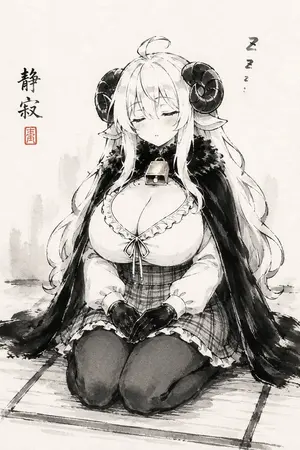
Sleepy Sheep Girl Sumi-e
Create a vertical monochrome Japanese ink-wash anime illustration on textured off-white rice paper, showing a sleepy sheep-horned anime girl (character name) kneeling in formal seiza on a simple tatami mat. She is centered, front-facing, eyes closed, with a peaceful drowsy expression, faint blush, long flowing white (hair color) hair, pointed elf-like ears, and two large dark curled ram horns. She wears a frilled low-neck blouse, plaid corset-style waist skirt, dark thigh-high stockings, short black gloves, and a heavy black fur-trimmed cape draped over both shoulders; add a small square bell or pendant at her throat. Her hands rest neatly together in her lap, fingers forming a quiet relaxed pose, emphasizing calm sleepiness. Use expressive sumi-e brushwork: black and gray ink washes, loose sketch lines, soft bleeding edges, minimal shading with occasional warm beige accents on the pendant, no full color. Background is sparse with pale gray misty brush marks suggesting distant vertical shapes, lots of empty paper space, and a grounded ink shadow under the mat. Add exactly two text elements: vertical calligraphy on the left reading 静寂 (calligraphy text) with one small red square seal beneath it, and a tiny vertical sleep mark on the upper right reading Z z z… (sleep text). Keep the composition serene, cute, and sleepy, like a modern manga character rendered as traditional ink painting; no watermark, no extra characters, no border.37:T61
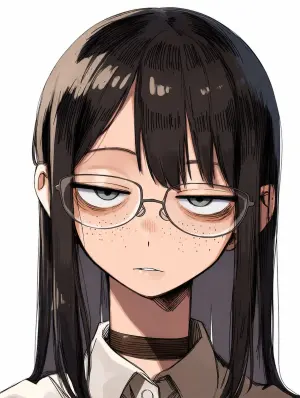
Censored Anime Girl Portrait
Create a close-up anime-style portrait of a bespectacled young woman with a deadpan, half-lidded stare (character description) facing forward against a plain white background. She has long straight black-brown (hair color) hair with blunt bangs, glossy sketchy highlights, and hair falling past both shoulders; both ears are slightly visible through the hair. Only the upper torso is shown, wearing a crisp white (shirt color) collared shirt with a dark tie or inner placket and a dark brown choker around the neck. Thin eyeglass frames are partially visible at the left and right edges of the face. Render in polished Japanese manga/anime illustration style with clean ink outlines, dense hatching in the hair, soft cel shading, subtle skin tones, and a vertical portrait crop. Place one large opaque square censor block centered over the entire face, from the forehead down to just above the chin, colored with a muted brown-to-taupe vertical gradient, hiding the eyes, nose, mouth, and most of the glasses while leaving the hair, ears, neck, collar, and shoulders visible. No text, no watermark, no extra objects.

Junji Ito Style K-Horror
Create a creative image of Junji Ito Style K Horror. Style: photorealistic. Composition: balanced and well-framed. Lighting: natural with cinematic mood. Category: photography. Reference: junji-ito-style-k-horror-5283.
더 많은 프롬프트 탐색
카테고리별 AI 이미지·영상 프롬프트를 더 찾아보세요.