
텍스트 투 이미지
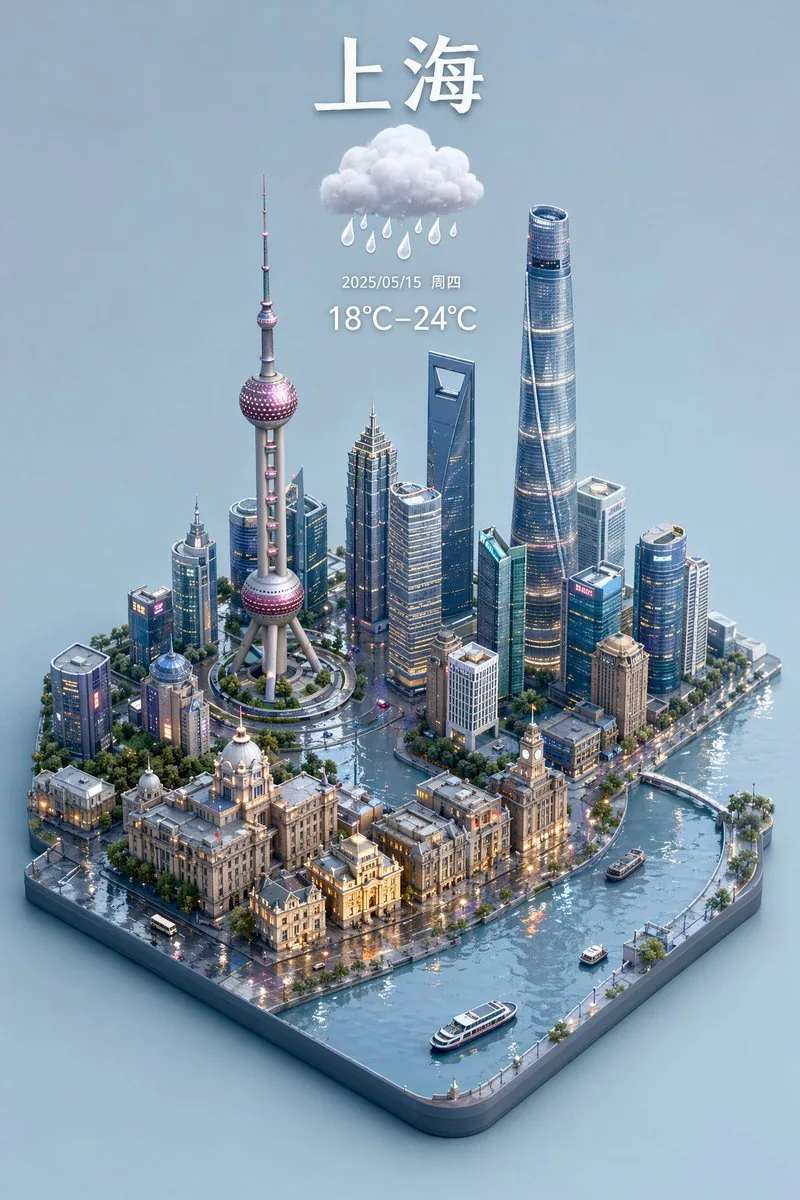
3D Isometric Miniature City Weather Map — AI 이미지 프롬프트
Generates a 3D isometric city map with accurate text rendering of weather information and landmarks.
프롬프트
Create a creative image of 3d Isometric Miniature City Weather Map. Style: photorealistic. Composition: balanced and well-framed. Lighting: natural with cinematic mood. Category: photography. Reference: 3d-isometric-miniature-city-weather-map-17565.
참고 이미지
이 AI 이미지 프롬프트 템플릿 사용 방법
 1
1프롬프트 복사 — 템플릿의 프롬프트와 네거티브 프롬프트를 가져오세요.  2
2모델 선택 — 가장 잘 맞는 추천 AI 모델을 고르세요.  3
3생성 — 클릭 한 번으로 스튜디오를 열어 결과를 만드세요.
관련 템플릿

Find Ruhia in Shibuya
{"type":"highly detailed isometric 3D hidden-object city scene","title_text":"{argument name=\"headline text\" default=\"ルヒアを探せ!\"}","setting":"a bright sunny Golden Week special scene in Shibuya, Tokyo, viewed from a high elevated wide angle like a miniature diorama, with Tokyo Tower and skyscrapers in the blue-sky background","main_goal":"create a 'find the character' puzzle image where the viewer searches for Ruhia among a huge chibi crowd","style":"GPT-image-2 style, ultra-detailed toy-like 3D render, anime chibi figures, crisp daylight, shallow miniature depth of field, vibrant commercial colors, dense urban signage, playful travel poster mood","layout":{"camera":"high-angle wide shot looking down into a famous Shibuya-style crossing packed with chibi pedestrians","foreground":"zebra crosswalks, small cars and buses, trees, street lamps, shop entrances, crowds of chibi anime people","midground":"large QFRONT building in the center with TSUTAYA and STARBUCKS COFFEE signs, surrounded by many vertical Japanese signs and billboards","background":"Shibuya 109 building on the left, red Tokyo Tower behind it, modern office towers and commercial buildings filling the skyline","top_right_overlay":"a white rectangular signboard with a thin red decorative border, bold black Japanese headline text, and a yellow rubber duck icon"},"counted_elements":{"rubber_ducks":{"count":2,"items":["one small yellow rubber duck sitting on the roof of the SHIBUYA 109 building at the upper left","one yellow rubber duck icon inside the top-right headline placard"]},"major_brand_or_landmark_signs":{"count":17,"items":["SHIBUYA 109","UNIQLO","H&M","IKEA","QFRONT","STARBUCKS COFFEE","TSUTAYA","Hisamitsu","サロンパス","DHC","109MEN'S","DMM TV","Glico running man billboard","竹下通り gate","Tokyo Tower","もも原宿 billboard","アイ♡ライブ billboard"]},"headline_placards":{"count":1,"items":["top-right white bordered placard reading {argument name=\"headline text\" default=\"ルヒアを探せ!\"} with a duck"]}},"characters":{"crowd":"hundreds of small anime chibi pedestrians packed shoulder-to-shoulder across the streets and sidewalks, with varied hair colors, outfits, animal-ear accessories, tiny bags, and idol-like costumes","hidden_target":"{argument name=\"hidden character\" default=\"Ruhia\"} should be camouflaged somewhere in the crowd as the object of the search game","character_style":"cute rounded chibi proportions, oversized heads, glossy eyes, tiny bodies, toy figurine texture"},"signage_and_details":"fill the buildings with colorful Japanese street signs, idol posters, cafe signs, karaoke signs, capsule-toy-like decorations, rooftop air conditioners, balconies, windows, and miniature urban clutter; include a Takeshita Street-style decorative arch in the lower center-left with cute mascot ornaments","color_palette":"clear blue sky, warm sunlight, saturated reds, blues, yellows, pink idol billboards, gray concrete buildings, and multicolored crowd accents","render_quality":"extremely dense details, sharp readable central signs, realistic miniature shadows, whimsical but believable Shibuya travel scene, no empty areas"}

Isometric Harbor District Cross-Section
Create a creative image of Isometric Harbor District Cross Section. Style: photorealistic. Composition: balanced and well-framed. Lighting: natural with cinematic mood. Category: photography. Reference: isometric-harbor-district-cross-section-20530.

Miniature Diorama Prompt for Visualizing the Historical Journey of Calculus - Nano Banana Pro AI Prompt for Infographic / Edu Visual
Input A: calculus (concept) Input A is a technology that traveled historical trade routes (papermaking, gunpowder, astronomy, silk production, algebra, etc.). Analyze: origin civilization, the journey route, cultural adaptations at each stop, timeline of spread. Goal: Miniature Silk Road/trade route caravan scene showing technology being transported and transformed. Rules: - Base: 3D topographic map showing actual historical route (mountains, deserts, seas) - Caravan: 8-12 miniature merchant/scholar figurines progressing along route with pack animals - Each stop: micro-diorama of how that civilization adapted the technology * Origin point: technology in pure form with inventor culture's aesthetic * Midpoint stops: hybrid versions showing cultural fusion * Destination: fully transformed/adapted version - Include: the technology itself transforming—paper becoming different textures, numbers changing symbol systems, etc. - Obstacles: miniature barriers that were overcome (mountain passes, hostile territories, language barriers shown as scroll fragments in different scripts) - Time markers: seasons/years labeled along route - Materials: actual sand/terrain materials, tiny textiles from different cultures, brass caravans - Lighting: journey from dawn (origin) to dusk (destination) across the scene Output: ONE image, 21:9 ultra-wide to capture full journey, epic historical adventure photography43
Three.js survival-mode replica of Minecraft
design a full survival mode replica of minecraft (game_name) with threejs (tech_stack)
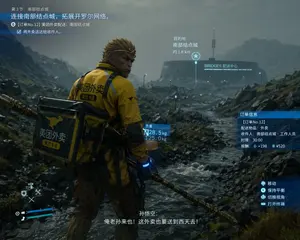
Cinematic Game UI Mockup
{ "type": "video game screenshot mockup", "style": "cinematic, realistic 3D graphics, overcast, rainy, desolate rocky landscape reminiscent of Death Stranding", "character": { "identity": "{argument name=\"character identity\" default=\"Sun Wukong\"}", "features": "monkey face, golden headband, holding a golden staff", "outfit": "yellow delivery jacket with black accents, large square black and yellow delivery backpack", "branding": "kangaroo logo and text {argument name=\"delivery company\" default=\"美团外卖\"} on jacket and backpack" }, "environment": { "foreground": "rocky terrain with a flowing stream", "background": "futuristic circular building with a tall antenna, glowing text {argument name=\"building name\" default=\"BRIDGES 配送中心\"}" }, "layout": { "ui_elements": 7, "sections": [ { "position": "top-left", "type": "mission objective", "text": "第3节:南部结点城 / {argument name=\"mission objective\" default=\"连接南部结点城,拓展开罗尔网络。\"} / [订单No.12] 美团外卖配送:南部结点城 / 将外卖送达给收件人。" }, { "position": "center-right", "type": "destination marker", "text": "目的地 / 南部结点城 / 约 1.8 km", "icon": "star" }, { "position": "center", "type": "weight info", "text": "负重 / 28.5 kg / 125.0 kg", "attached_to": "backpack" }, { "position": "middle-right", "type": "order info", "text": "订单信息 / [订单No.12] / 配送物品:外卖 / 收件人:南部结点城·工作人员 / 时限:30:00 / 报酬:+198 ¥520" }, { "position": "bottom-right", "type": "controls", "text": "移动 / 保持平衡 / 切换视角 / 打开终端", "icons": "controller buttons" }, { "position": "bottom-center", "type": "subtitles", "text": "孙悟空: / {argument name=\"subtitle text\" default=\"俺老孙来也!这外卖也要送到西天去!\"}" }, { "position": "bottom-left", "type": "HUD", "elements": "blue health/stamina bars, D-pad tool icons" } ] } }

Screen Time Digital Town Visualization Prompt - Nano Banana Pro AI Prompt for Infographic / Edu Visual
请读取用户上传的【屏幕时间数据截图】,识别排名前四的 APP 名称及图标。检索这些 APP 的信息和图标样式。基于 APP 组合的调性(社交/娱乐/办公/综合),自主决定核心美术风格。 【2. 主体模型构建:微缩城镇基础 (The Town Infrastructure)】 在画面中央构建一个生生不息的微缩数字城镇,而不仅仅是建筑展示: 智能底座(地基): 风格化的手机基座。但表面不再是平的,而是地形化的(根据风格可能是起伏的电路板山丘、玻璃水面或乐高底板)。 建筑群(APP 实体化): 代表 APP 的摩天大楼。 底座: 一个卡通风格的智能手机底座,边缘是圆润的磨砂金属,屏幕表面散发着微微的呼吸光。底座周围环绕着漂浮的实体化 3D Emoji(云朵、星星、爱心),材质像半透明的果冻。 建筑群(APP 实体化): 岛上矗立着 Q 版摩天大楼,代表识别出的 APP。 高度法则: 建筑高度严格对应使用时长。使用时间最长的 APP 是最高的摩天大楼,占据视觉中心。 造型法则: 提取 APP 图标的几何特征(如圆形图标变成球体堆叠塔,方形图标变成圆角立方体大厦)。 材质: 混合高级磨砂软陶 (Polymer Clay) 与 半透明果冻树脂。表面要有细腻的指纹纹理和漫反射光泽,像昂贵的盲盒玩具。 顶部 Logo: 楼顶矗立着该 App 的 3D 立体 Logo,材质像刚出炉的亮面糖果。 悬浮时间卡片: 在 Logo 正上方,悬浮着磨砂玻璃质感的 3D 气泡。气泡内包裹着立体的、发着柔光的数字(对应使用时长,如 "4h 12m (使用时长)")。 建筑之间不要孤立排列,而是要形成街区。高楼在中心(CBD区域),周围可能有低矮的系统应用建筑(设置、日历等)。 【3. 城市生态与交互系统 (Urban Ecosystem & Interactions)】 (核心升级:增加“交互”与“生活气息”) 请在建筑之间添加丰富的动态细节,展现这个“数字城镇”是如何运作的: 交通与连接 (The Data Flow): 连接方式: 建筑之间必须有物理连接。 风格自适应: 如果是赛博风,就是发光的光纤高架桥和磁悬浮列车;如果是极简风,就是透明的玻璃管道;如果是可爱风,就是彩虹滑梯。 载具与运输: 管道里或道路上要有流动的光点/胶囊,代表数据传输。 活跃的“数据精灵” (The Digital Citizens): NPC设定: 除了主角小人外,增加微小的功能性 NPC。 消息搬运工: 在社交 APP 大楼(如微信)附近,有飞行的纸飞机无人机或背着信封的小邮差进进出出。 点赞精灵: 在视频/社区 APP 大楼(如抖音/小红书)周围,漂浮着发光的红心或拇指气球,像萤火虫一样飞舞。 外卖/购物骑手: 如果有美团/淘宝,要有微缩的骑手或包裹传送带连接到主角所在的主楼。 公共基础设施 (Public Utilities): Wi-Fi 信号塔: 在城镇高处矗立着一座发光的信号塔(Wi-Fi 图标造型),向全城广播能量波纹。 电池能源站: 城镇边缘有一个圆柱形的能源罐(电池图标造型),连接着粗壮的线缆给主楼供电,里面甚至可以看到绿色的液体电量在晃动。 通知飞艇: 空中悬浮着小型的飞艇或云朵,上面挂着“新消息”或“红点”的横幅。 【4. 底部视觉中心:风格化 3D 铭牌】 (保持不变,强调高级设计感) 主标题设计: “SCREEN TIME” 或 “今日成分 (主标题)” 几个大字被设计成充气气球字体 (Inflatable Typography) 或 霓虹灯管字体,材质跟当前主题相关。它们不是印在纸上,而是实实在在地“站立”在画面最前景。 装饰细节: 标题周围散落着一些微小的 3D 碎片元素(如播放键、点赞拇指、电量图标),增加了画面的丰富度和潮流感。 副标题文案: 在立体标题下方,生成一条悬浮的发光灯带,上面写着一句基于用户数据的简短犀利点评。 【5. 渲染与摄影 (Tech Specs)】 构图: 轴侧俯视,强调繁华感和秩序感。 细节: 极其丰富的微观细节(Micro-details),让观众忍不住放大看每一个角落的小人在做什么。 关键词: Octane Render, C4D, Isometric City, Micro World, Living Ecosystem, 8k Resolution.3f:T1375,Please read the user-uploaded [Screen Time Data Screenshot] and identify the top four APP names and icons. Retrieve information and icon styles for these APPs. Based on the tone of the APP combination (Social/Entertainment/Office/Comprehensive), independently decide on the core art style. [2. Main Model Construction: Miniature Town Infrastructure] Construct a vibrant miniature digital town in the center of the screen, not just a display of buildings: Smart Base (Foundation): A stylized mobile phone base. The surface is no longer flat but topographical (depending on the style, it could be rolling circuit board hills, glass water surfaces, or Lego baseplates). Building Cluster (APP Embodiment): Skyscrapers representing the APPs. Base: A cartoon-style smartphone base with rounded, frosted metal edges, and the screen surface emits a faint breathing light. The base is surrounded by floating, materialized 3D Emojis (clouds, stars, hearts) with a translucent jelly texture. Building Cluster (APP Embodiment): Q-version skyscrapers stand on the island, representing the identified APPs. Height Rule: Building height strictly corresponds to usage duration. The APP with the longest usage time is the tallest skyscraper, occupying the visual center. Shape Rule: Extract the geometric features of the APP icons (e.g., circular icons become stacked spherical towers, square icons become rounded cube buildings). Material: A mix of high-grade Frosted Polymer Clay and Translucent Jelly Resin. The surface should have delicate fingerprint textures and diffuse reflection gloss, like an expensive blind box toy. Top Logo: The 3D logo of the App stands on the rooftop, with a texture like freshly baked, glossy candy. Floating Time Card: A frosted glass-textured 3D bubble floats directly above the Logo. The bubble encapsulates three-dimensional, softly glowing numbers (corresponding to usage duration, such as "4h 12m (usage duration)"). Buildings should not be arranged in isolation but should form neighborhoods. Tall buildings are in the center (CBD area), surrounded by potentially low-rise system application buildings (Settings, Calendar, etc.). [3. Urban Ecosystem and Interaction System (Urban Ecosystem & Interactions)] (Core Upgrade: Add “Interaction” and “Liveliness”) Please add rich dynamic details between the buildings to show how this “Digital Town” operates: Traffic and Connection (The Data Flow): Connection Method: Buildings must have physical connections. Style Adaptation: If it's cyberpunk, use glowing fiber optic elevated bridges and maglev trains; if mi
더 많은 프롬프트 탐색
카테고리별 AI 이미지·영상 프롬프트를 더 찾아보세요.