
텍스트 투 이미지
3D Clay Style Year-End Summary Poster Generator - Nano Banana Pro AI Prompt for Poster / Flyer — AI 이미지 프롬프트
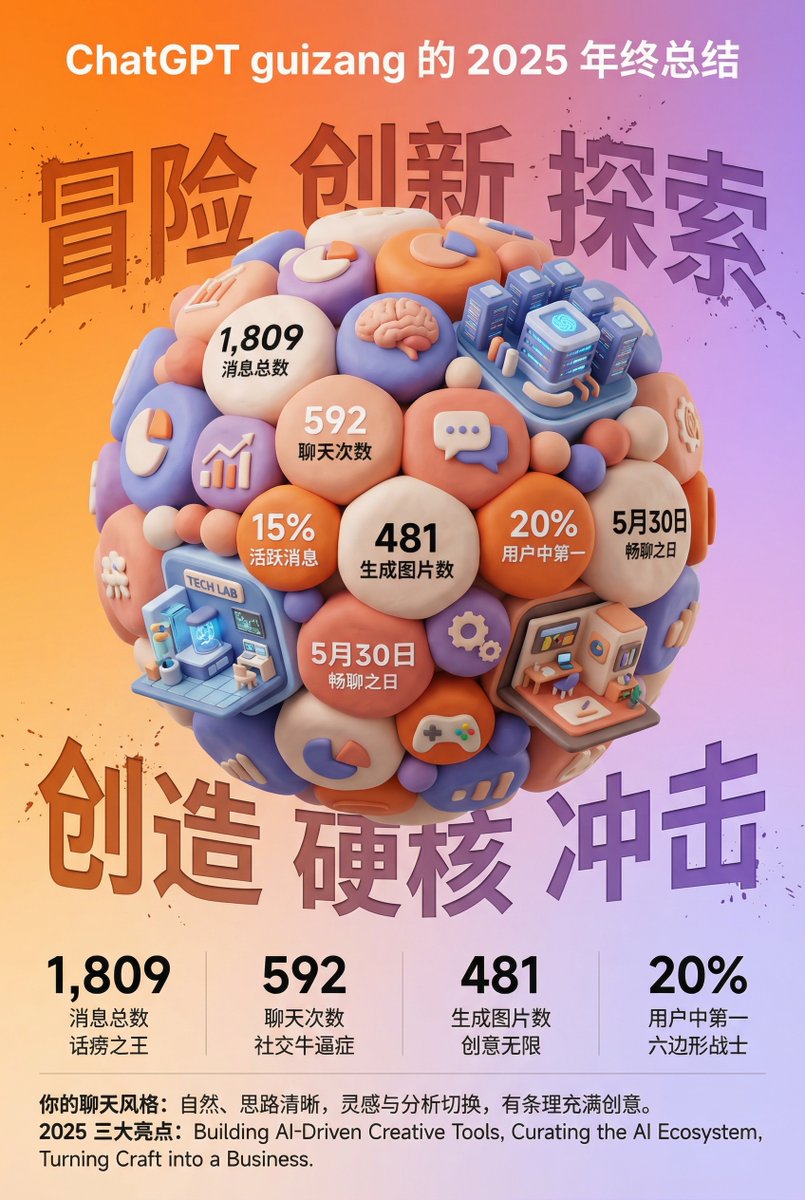
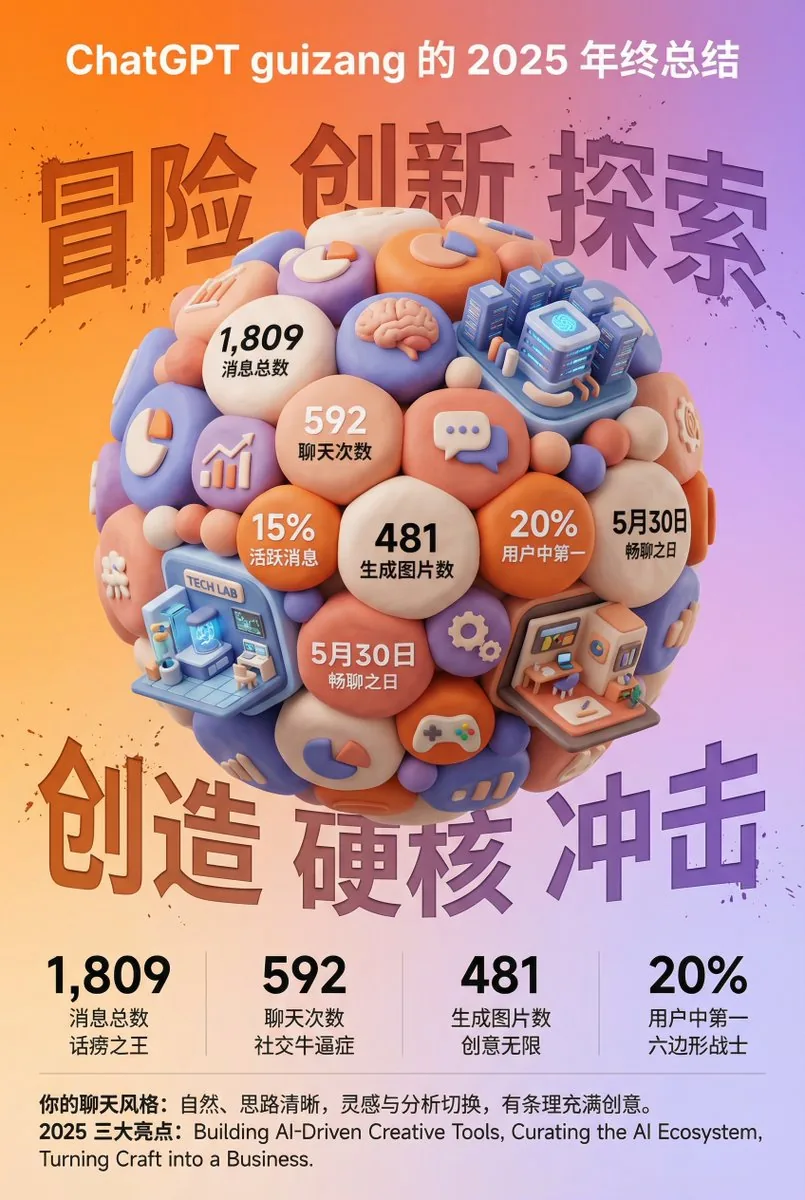
A highly detailed, structured prompt for generating a visually impactful 3D year-end summary poster (like a ChatGPT summary) based on an uploaded screenshot of user data. The style is fixed: 3D clay/soft plastic texture (like a 'blind box toy'), high saturation colors, and a clear, magazine-like layout. The core visual is a tightly packed clay sphere composed of data bubbles, themed icons, and miniature architectural elements representing chat categories. - AIPinMaker
프롬프트
任务目标:
基于用户同时上传的年终总结截图中的数据和信息,设计一张风格鲜明、极具视觉冲击力的 3D 年终总结海报,用户名 {argument name="用户名" default="[guizang]"}

整体风格与情绪(固定风格):
核心风格: 融合 3D 趋势、游戏化元素和高饱和度色彩。
材质感: 画面主体呈现精致的黏土(Clay)或软塑胶材质渲染,边缘圆润,光影柔和,给人一种“盲盒玩具”的亲切感。

排版感: 整体布局要像一份精致的高级杂志,疏密有致,信息架构清晰。文字排版简洁明了,不要添加任何卡片、胶囊或底框类的装饰背景。

画面主体(核心视觉):
视觉中心是一颗巨大的、紧密堆叠的 Q 版 3D 黏土球体。球体的组成元素需要根据用户上传截图中的具体内容来动态生成:

数据气泡: 将截图中提取的关键数字和对应的标签(例如:消息总数、聊天次数、生成图片数、活跃度排名等)制作成圆润的黏土数据气泡嵌入球体。

主题图标: 根据截图体现的用户兴趣点,添加相应的通用黏土图标(例如:游戏手柄、大脑、图表、对话气泡等)。

类别建筑(核心要求): 分析截图中的内容侧重点,在球体中融入几座代表不同聊天品类的精致微缩黏土建筑。例如:
如果包含 AI/技术内容,加入一座带有科技感的未来数据中心建筑。
如果包含游戏内容,加入一座像素风格的游戏城堡。
如果包含创意/艺术内容,加入一个微型艺术工作室。
组合方式: 所有这些元素(气泡、图标、建筑)必须非常紧密、融洽地挤在一起,无缝组成一个完美的球形,不露出内部结构。

背景设计(固定框架):
底色: 采用高饱和度的暖橙色到柔和紫色的渐变背景(参考之前的风格)。

背景文字: 在星球背后,放置六个巨大的、带有喷溅纹理和反向蚀刻效果的汉字,主题可以是“冒险 创新 探索”(上排)和“创造 硬核 冲击”(下排),部分被球体遮挡,增加街头硬核感。

信息架构与排版(内容从截图中提取):
顶部 (Header): 放置白色的 ChatGPT Logo,并根据截图信息生成标题,格式为:“[{argument name="用户名" default="从截图中提取的用户名"}] 的 [年份] 年终总结”。

底部数据区 (Data Grid): 在球体下方,创建一个极简的 2x2 纯文字数据网格。从截图中选取 4 个最核心的数据,使用超粗无衬线字体展示大数字,并配上相应的文字标签和有趣的社交属性短语(例如:“社交牛逼症”、“话痨”、“六边形战士”等,依据数据特性生成)。
页脚总结 (Footer): 在最底部用小字排版两段文字,内容直接从用户截图中的总结段落(如“你的聊天风格”和“年度亮点”)提取。3f:Tda4,Task Goal:
Based on the data and information in the year-end summary screenshot uploaded by the user, design a 3D year-end summary poster with a distinct style and strong visual impact, username {argument name="Username" default="[guizang]"}

Overall Style and Mood (Fixed Style):
Core Style: Blending 3D trends, gamification elements, and high-saturation colors.
Material Feel: The main body of the image presents exquisite clay or soft plastic material rendering, with rounded edges and soft light and shadow, giving a friendly 'blind box toy' feel.

Layout Sense: The overall layout should resemble a refined, high-end magazine, well-spaced, with clear information architecture. Text layout should be concise and clear, without adding any decorative backgrounds like cards, capsules, or bottom frames.

Main Visual (Core Visual):
The visual center is a massive, tightly stacked Q-version 3D clay sphere. The elements composing the sphere need to be dynamically generated based on the specific content in the user's uploaded screenshot:

Data Bubbles: Key numbers and corresponding labels extracted from the screenshot (e.g., total messages, chat times, images generated, activity ranking, etc.) are made into rounded clay data bubbles embedded in the sphere.

Theme Icons: Based on the user's interests reflected in the screenshot, add corresponding general clay icons (e.g., game controller, brain, chart, chat bubble, etc.).

Category Buildings (Core Requirement): Analyze the focus of the content in the screenshot and integrate several exquisite miniature clay buildings representing different chat categories into the sphere. For example:
If it includes AI/technology content, incorporate a futuristic data center building with a sense of technology.
If it includes gaming content, incorporate a pixel-style game castle.
If it includes creati참고 이미지
이 AI 이미지 프롬프트 템플릿 사용 방법
 1
1프롬프트 복사 — 템플릿의 프롬프트와 네거티브 프롬프트를 가져오세요.  2
2모델 선택 — 가장 잘 맞는 추천 AI 모델을 고르세요.  3
3생성 — 클릭 한 번으로 스튜디오를 열어 결과를 만드세요.
관련 템플릿
Pixar Style Storyboard Poster
Create a social-media image of Pixar Style Storyboard Poster. Style: photorealistic. Composition: balanced and well-framed. Lighting: natural with cinematic mood. Category: poster. Reference: pixar-style-storyboard-poster-25798.
3D Animated Storyboard Poster Grid
Create a clean, colorful storyboard poster in a 3x4 grid layout with 12 panels on a single page. Title at the top: "[MAIN TITLE] (title)" Each panel must include: a scene number in a small circle, a short scene title, a colorful illustrated image, a 1–2 line description under the image. Main characters must remain visually consistent across all 12 panels: Character 1: [describe main character in detail] (character one) Character 2: [describe second character in detail] (character two) Theme/story: [overall story theme] (theme) Scene breakdown: [Scene title] – [what happens] [Scene title] – [what happens] [Scene title] – [what happens] [Scene title] – [what happens] [Scene title] – [what happens] [Scene title] – [what happens] [Scene title] – [what happens] [Scene title] – [what happens] [Scene title] – [what happens] [Scene title] – [what happens] [Scene title] – [what happens] [Scene title] – [what happens] Design style: cute 3D animated storybook style, warm emotional lighting, bright colors, soft shadows, child-friendly, clean panel borders, readable typography, neat poster composition, high detail. Important: Keep all 12 panels inside one single image. Make the layout clean and balanced. Keep the characters consistent in face, outfit, and colors. Make the text readable and properly placed. No cropped panels. No extra characters unless mentioned.3a:T5e5,Create a clean, co
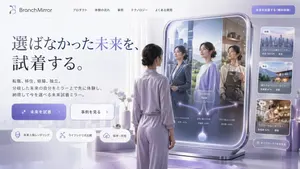
Futuristic Smart Mirror Website Mockup
{ "type": "website landing page mockup", "style": "futuristic, clean, 3D render, corporate tech", "color_palette": "{argument name=\"color palette\" default=\"soft purple, lavender, and silver\"}", "header": { "logo": "{argument name=\"brand name\" default=\"BranchMirror\"}", "navigation_links": 5, "cta_button": "solid purple button at top right" }, "hero_section": { "headline": "{argument name=\"main headline\" default=\"選ばなかった未来を、試着する。\"}", "subtext": "paragraph of Japanese text explaining the product", "buttons": [ { "style": "solid purple", "text": "{argument name=\"primary button text\" default=\"未来を試着\"}", "icon": "sparkles" }, { "style": "white outline", "text": "事例を見る", "icon": "arrow right" } ], "feature_tags": { "count": 3, "style": "pill-shaped with icons", "labels": ["未来人格レンダリング", "ライフシナリオ比較", "保存・共有"] } }, "main_visual": { "subject": "{argument name=\"subject description\" default=\"woman in lavender loungewear with hair in a low bun\"}", "pose": "standing, seen from behind, looking into a large freestanding smart mirror", "smart_mirror_ui": { "reflections": { "count": 3, "descriptions": [ "woman in business suit with city background", "woman in casual sweater with nature background", "woman in apron with cafe background" ] }, "overlay_graphics": "glowing branching diagram starting from a bottom orb, splitting into 3 paths to each reflection, with a central 'Now' label" } }, "sidebar_ui": { "cards": { "count": 3, "descriptions": [ "cityscape image with job change stats", "coastal house image with relocation stats", "flower shop image with independence stats" ] }, "bottom_button": "glassmorphism button to see all scenarios" } }
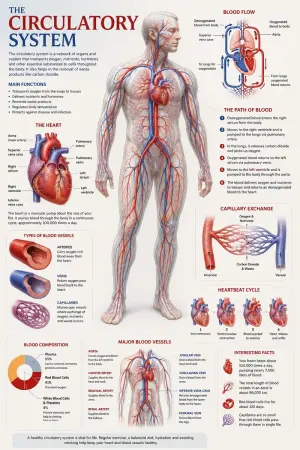
Medical Anatomy Visualization Poster
Create a premium educational “scientific anatomical visualization poster” focused on the human circulatory system (subject), designed more like a modern medical museum display and biological atlas page rather than a typical infographic. The composition should feel elegant, immersive, and medically artistic, blending anatomical realism, scientific illustration, and cinematic educational design. Visual Direction: • Vertical poster composition or clean square format • Soft medical-grade background with subtle paper textures, anatomical sketch overlays, and faint scientific grid lines • Refined medical color palette using ivory white, deep crimson red, arterial blue, soft pink tissue tones, muted gray, and subtle gold accents • Clean editorial typography with elegant anatomical labeling • Minimal UI-style information panels — focus more on visual storytelling and anatomical beauty • Thin precision annotation lines with museum-style labels • Soft realistic lighting and premium biological rendering • Highly detailed semi-transparent human body illustration revealing the circulatory network beneath the skin • Realistic vascular textures with glowing arteries and veins flowing throughout the body • Sophisticated educational aesthetic inspired by high-end medical textbooks and anatomy exhibitions Main Subject Presentation: A breathtaking ultra-detailed anatomical render of the human circulatory system placed centrally, featuring: • semi-transparent human anatomy • hyper-detailed arteries and veins • visible heart chambers and aorta • capillary branching networks • realistic blood-flow coloration • glowing oxygenated vs deoxygenated circulation pathways • anatomically accurate vessel placement • subtle organ visibility beneath the vascular system • premium medical illustration realism Surround the anatomy with elegant educational visualization modules such as: • enlarged realistic heart anatomy • pulmonary circulation diagram • systemic circulation flow visualization • artery vs vein comparison • capillary exchange illustration • heartbeat cycle sequence • microscopic blood-cell closeups • blood composition visualization • major vessel identification map • oxygen transport explanation Add sophisticated scientific visual elements like: • blood-flow directional arrows • vascular cross-section diagrams • anatomical side callouts • circulation pathway diagrams • microscopic tissue exchange visuals • transparent organ overlays • ECG/heartbeat waveform accents • subtle medical chart graphics • biological texture overlays • anatomical scale comparisons Style Keywords: “museum-quality anatomical poster” “scientific medical atlas page” “premium biology visualization” “high-end anatomy illustration” “medical education artwork” “editorial anatomical design” “cinematic biological rendering” “ultra-detailed circulatory anatomy” “luxury medical textbook aesthetic3e:Tbe7,Create a premium educational “scientific anatomical visualization poster” focused on the {argument name="subje
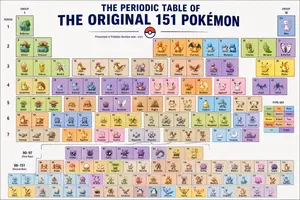
Themed Periodic Table Design
Create a creative image of Themed Periodic Table Design. Style: photorealistic. Composition: balanced and well-framed. Lighting: natural with cinematic mood. Category: photography. Reference: themed-periodic-table-design-14388.

Image to Infographic Guide
{ "image_description": { "overall_theme": "High-technology augmented reality analysis of a scenic outdoor portrait", "resolution": "4K UHD, hyper-realistic with sharp data overlay", "subject": { "name": "Woman_Model_A", "pose": "Seated_profile, looking_left, side", "attire": { "garment": "Draped_One_Shoulder Pleated_Silk_Green_Dress", "color_hex": "#1E6641", "footwear": "Boots_Maroon", "accessory": { "type": "Bag_Two-Tone Leather/Metal", "details": "Gold_Buckle_feature" } } }, "environment": { "location": "Nusa_Penida_Cliffside", "terrain": "Rocky_Path", "details": { "main_trees": { "type": "Fern_Tree", "count": 3 }, "vegetation": "Lush mossy trees, vibrant red flowers, exotic plants", "boundary": "Wooden fence posts with thick rope rail", "background": "Distant tree-covered cliffs partially obscured by mist, with birds in flight", "specific_sign": "Small sign on a fence post with the text 'Kelingking'" } }, "data_overlay": { "style": "Translucent cyan digital interface with glowing gridlines and panel outlines", "panels": [ { "position": "Top-Left (Stacked Vertical)", "content": [ "ANALYSIS: SUBJECT_DETECT", "POSE: SEATED_PROFILE", "OUTFIT: DRAPED_ONE_SHOULDER", "COLOR: #1E6641_SILK_GREEN", "ACCESSORY_1: BAG_TWO-TONE", "MATERIAL: LEATHER/METAL", "HEEL: BOOTS_MAROON" ] }, { "position": "Top-Center (Floating Block)", "content": "COORDINATES: -8.7495° S, 115.0934° E" }, { "position": "Center-Left (Embedded Annotation)", "linked_to": "Leftmost Fern Tree", "content": "FERN_TREE (count: 3)" }, { "position": "Center-Right (Embedded Annotation)", "linked_to": "Rightmost Fern Tree", "content": "FERN_TREE (count: 3)" }, { "position": "Top-Right (Annotation)", "linked_to": "Cliffs", "content": "CLIFF_DISTANCE (approx: 450m)" }, { "position": "Bottom-Right (Formatted JSON Block)", "content": "{\n \"model\": {\n \"name\": \"Woman_Model_A\",\n \"pose\": \"Seated_left_looking_side\"\n },\n \"apparel\": {\n \"garment\": \"Pleated_Silk_Green_Dress\",\n \"style\": \"One-Shoulder_Draped\"\n },\n \"bag\": {\n \"type\": \"Two-Tone_Leather_Gold-Buckle\",\n \"brand\": \"Luxury_Accessory\"\n },\n \"location\": \"Nusa_Penida_Cliffside\",\n \"terrain\": \"Rocky_Path\"\n}" } ] } } }51
더 많은 프롬프트 탐색
카테고리별 AI 이미지·영상 프롬프트를 더 찾아보세요.