
텍스트 투 이미지
12-Style Anime Photo Transformation Grid — AI 이미지 프롬프트
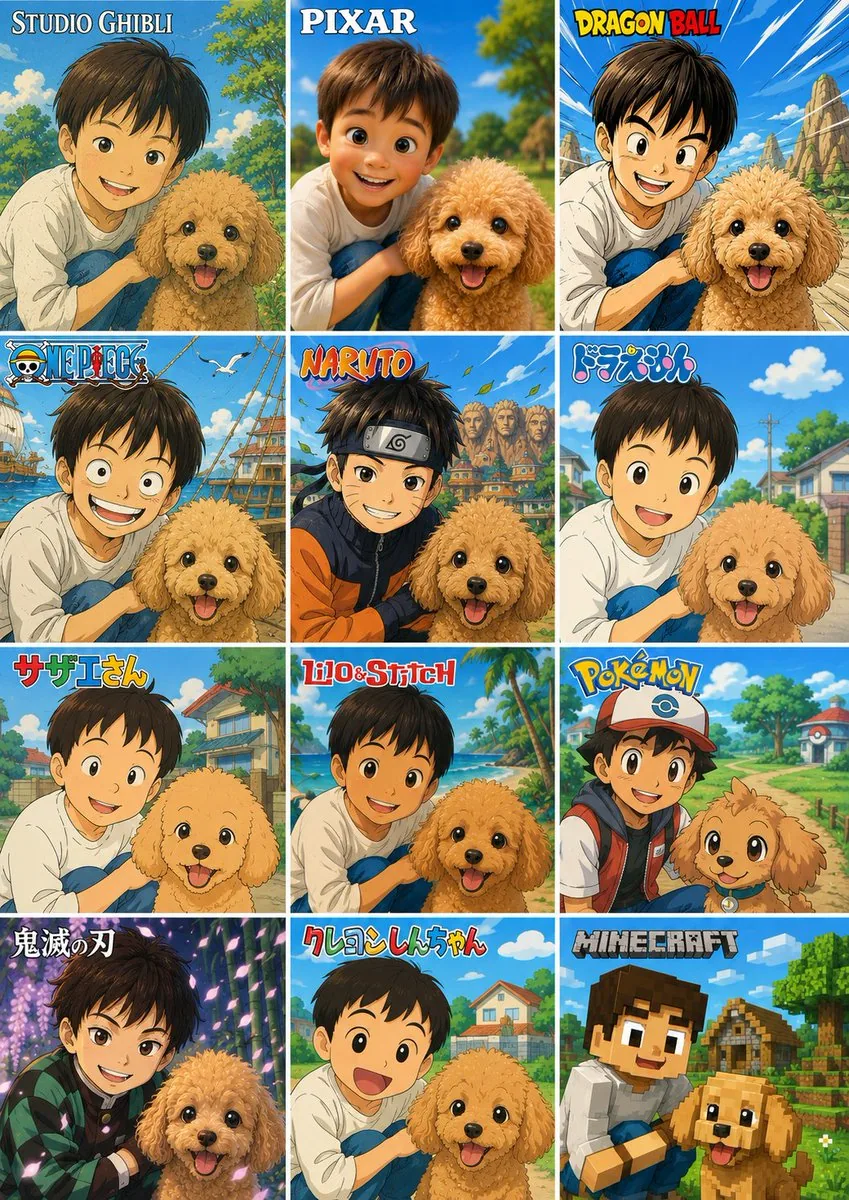
Creates a 12-panel comparison collage that turns one reference photo into multiple famous anime and game-inspired visual styles. - AIPinMaker
프롬프트
Using the provided reference photo, create a single vertical comparison sheet that transforms the boy-and-dog photo into a 3-column by 4-row grid of exactly 12 square panels, each panel showing the same composition reimagined in a different popular animation/game style. Keep the boy and dog as the recognizable subjects from the reference, preserving their relative pose and closeness, but render each panel in the requested style with matching backgrounds, linework, colors, and character proportions. Add a bold style title/logo at the top of each panel.

Canvas and layout: Make a vertical collage with 12 equal panels, thin white gutters, arranged left-to-right and top-to-bottom.

Panel styles and visible labels, exactly 12:
1. Studio Ghibli — label: “STUDIO GHIBLI”, soft hand-painted pastoral anime look.
2. Pixar — label: “PIXAR”, polished 3D family-animation look.
3. Dragon Ball — label: “DRAGON BALL”, dynamic shonen action look with speed lines and rocky landscape.
4. One Piece — label: “ONE PIECE”, nautical adventure anime look with ship elements.
5. Naruto — label: “NARUTO”, ninja anime look with village rooftops and headband styling.
6. Doraemon — label: “ドラえもん”, bright suburban children’s anime look.
7. Sazae-san — label: “サザエさん”, classic Japanese family anime look.
8. Lilo & Stitch — label: “Lilo & Stitch”, tropical island animation look.
9. Pokémon — label: “POKÉMON”, colorful trainer-and-companion adventure look.
10. Demon Slayer — label: “鬼滅の刃”, dramatic dark fantasy anime look with glowing particles.
11. Crayon Shin-chan — label: “クレヨンしんちゃん”, simple rounded children’s anime look.
12. Minecraft — label: “MINECRAFT”, blocky voxel game style.

Customizable text: Use {argument name="first style label" default="STUDIO GHIBLI"}, {argument name="second style label" default="PIXAR"}, {argument name="third style label" default="DRAGON BALL"}, {argument name="ninth style label" default="POKÉMON"}, and {argument name="twelfth style label" default="MINECRAFT"} where those panel titles appear.

Constraints: Do not add extra panels or extra labels. Preserve the reference subjects in every panel, including the boy with the dog, while changing only the art style, environment details, and franchise-inspired visual language. Keep the collage clean, colorful, and poster-like.37:T97f,Using the provided reference photo, create a single vertical comparison sheet that transforms the boy-and-dog photo i참고 이미지
이 AI 이미지 프롬프트 템플릿 사용 방법
 1
1프롬프트 복사 — 템플릿의 프롬프트와 네거티브 프롬프트를 가져오세요.  2
2모델 선택 — 가장 잘 맞는 추천 AI 모델을 고르세요.  3
3생성 — 클릭 한 번으로 스튜디오를 열어 결과를 만드세요.
관련 템플릿

12-Style Anime Pet Collage
Using the provided reference image as the subject and composition base, create a vertical 3-column by 4-row comparison collage showing the same child and dog transformed into exactly 12 different animation/game styles. Keep the child-and-dog pairing, close pose, cheerful outdoor feeling, and the privacy face-obscuring blocks where present, but redraw each tile in a distinct branded-inspired cartoon/anime aesthetic with matching backgrounds and a title logo at the top of each tile. Canvas and layout: Make one poster-style image with 12 equal rectangular panels separated by thin white grid lines, arranged 3 columns × 4 rows. Each panel should crop the subjects similarly to the reference but adapt the scenery to the chosen style. Panels, in order from top-left to bottom-right, with exactly these 12 visible title labels: 1. STUDIO GHIBLI (style label 1) — soft hand-painted fantasy countryside look. 2. PIXAR (style label 2) — glossy 3D animated family-film look. 3. DRAGON BALL (style label 3) — bold action manga look with dramatic sky and rocky landscape. 4. ONE PIECE (style label 4) — pirate-adventure anime look with ships, sea, and birds. 5. NARUTO (style label 5) — ninja anime look with village rooftops and energetic colors. 6. ドラえもん — bright simple children’s anime suburb look. 7. サザエさん — classic Japanese family anime neighborhood look. 8. Lilo & Stitch — tropical island cartoon look with palms and beach colors. 9. Pokémon — colorful adventure anime look with cap/backpack styling and a path through a game-like town. 10. 鬼滅の刃 — dramatic dark fantasy anime look with glowing purple forest lighting. 11. クレヨンしんちゃん — simple rounded gag-anime look with a cheerful open-mouth child expression. 12. MINECRAFT — blocky voxel game style with cubic characters, village houses, and pixelated terrain. Style rules: The titles should resemble the recognizable logo treatment for each style while remaining clean and readable. Preserve the dog’s happy expression and fluffy toy-poodle silhouette across panels, adapting only the rendering style. Do not add extra panels, extra labels, watermarks, captions, or unrelated characters.37:T92f,Using the provided reference image as the subject and composition ba

Minimalist Cormorant Fishing Poster
Using the provided reference image, transform the scene into a minimalist stylized flat vector illustration (art style) while preserving the original river-cormorant-fishing composition, subject placement, bamboo rafts, mountain river setting, and overall atmosphere. Simplify the photo into bold geometric shapes, clean silhouettes, limited detail, and layered poster-like forms with no photorealistic texture. Use a muted teal, deep blue, olive green, and warm cream palette, with angular stylized clouds and mountains, calm reflective water, and simplified rocky foreground. Keep exactly 3 fishermen on 3 bamboo rafts, exactly 4 black cormorants, and exactly 2 lanterns. Maintain the fishermen’s conical hats and dark traditional clothing, but render all people as simplified graphic figures with obscured/featureless faces. Make the result vertical in a 3:4 (aspect ratio) poster composition, crisp-edged, atmospheric, and suitable as a minimalist travel illustration.39

Ghibli and Anime Style Photo Transformation
Create a anime image of Ghibli And Anime Style Photo Transformation. Style: photorealistic. Composition: balanced and well-framed. Lighting: natural with cinematic mood. Category: anime. Reference: ghibli-and-anime-style-photo-transformation-20040.

12-Style Anime Photo Collage
Using the provided reference photo as the subject base, create a vertical 3-column by 4-row comparison collage that transforms the same child-and-dog scene into exactly 12 popular animation/game-inspired visual styles. Keep the child and dog recognizable in pose, relative placement, clothing, and outdoor park feeling, and preserve any existing face anonymization/privacy masking from the reference rather than inventing facial details. Add a bold style-title logo at the top of each panel. Canvas and layout: Use a tall poster layout with 12 equal rectangular panels separated by thin white grid lines, arranged as 3 columns x 4 rows. Each panel should show the same subject pairing from the reference but redrawn in a different style, with bright saturated colors and clean promotional collage composition. Panels, in order from top-left to bottom-right, exactly 12: 1. “STUDIO GHIBLI” — soft hand-painted fantasy countryside look. 2. “PIXAR” — polished 3D animated movie look. 3. “DRAGON BALL” — dynamic action-anime look with speed lines and rocky landscape. 4. “ONE PIECE” — adventurous nautical anime look with ship/sea elements. 5. “NARUTO” — ninja-anime look with village background and orange/black outfit influence. 6. “ドラえもん” — cheerful rounded Japanese cartoon suburb style. 7. “サザエさん” — classic family-anime neighborhood style. 8. “Lilo&Stitch” — tropical island cartoon look with beach and palm trees. 9. “POKÉMON” — bright monster-adventure world look; add a cap/backpack vibe to the child and a cute creature-like treatment for the dog. 10. “鬼滅の刃” — dramatic sword-anime look with purple lighting and patterned haori influence. 11. “クレヨンしんちゃん” — simple cute children’s cartoon style with big expressive shapes. 12. “MINECRAFT” — blocky voxel game style with cubic characters and environment. Customizable text: Use anime style comparison poster (collage title style) as the overall design intent, and keep the panel labels exactly as listed unless replaced by STUDIO GHIBLI, PIXAR, DRAGON BALL, ONE PIECE, NARUTO, ドラえもん, サザエさん, Lilo&Stitch, POKÉMON, 鬼滅の刃, クレヨンしんちゃん, MINECRAFT (panel label set). Constraints: Do not add extra panels, extra people, or extra pets. Keep the dog’s happy expression and fluffy tan appearance consistent across panels. Keep the child close to the dog in every panel. Maintain visible privacy blocks/anonymization over faces if present in the reference. Make the final image look like a shareable social media collage showcasing one photo converted into many animation styles.38:Taba,Using the provided reference photo as the subject base, create a vertical 3-column by 4-row comparison collage that transforms the same child-and-dog scene into e

Photorealistic 8K Pet Photo Restoration
Create a creative image of Photorealistic 8k Pet Photo Restoration. Style: photorealistic. Composition: balanced and well-framed. Lighting: natural with cinematic mood. Category: photography. Reference: photorealistic-8k-pet-photo-restoration-24832.

12-Style Anime Pet Collage
Using the provided reference image as the subject base, transform it into a 3-column by 4-row comparison collage showing the same child-and-dog pose reimagined in exactly 12 different famous animation/game-inspired visual styles. Preserve the composition relationship between the child and the dog, and preserve any existing face-obscuring privacy blocks rather than revealing or inventing facial details. Canvas and layout: Create a vertical poster collage with 12 equal square panels, thin white dividers, bright cheerful colors, and each panel labeled at the top with the corresponding style title. Panels, in order from left to right, top to bottom: 1. STUDIO GHIBLI (style label 1) — soft hand-painted Japanese fantasy animation look with lush park greenery. 2. PIXAR (style label 2) — polished 3D family animation look, closest to the original photo composition. 3. DRAGON BALL (style label 3) — bold action-anime lines, dynamic blue sky and rocky background. 4. ONE PIECE — adventurous pirate-anime style with ships, seagulls, and ocean elements. 5. NARUTO — ninja-anime style with orange/black outfit accents, village rooftops, leaves in the air. 6. ドラえもん — clean rounded children’s anime style with a sunny suburban street. 7. サザエさん — retro family-anime style with simple expressive linework and neighborhood houses. 8. Lilo & Stitch — tropical island cartoon style with beach, palm trees, and bright ocean colors. 9. Pokémon — monster-adventure anime style with a trainer-like cap and backpack, path and Poké Ball-like scenery details. 10. 鬼滅の刃 — dramatic dark fantasy anime style with glowing purple forest lighting and patterned cloak accents. 11. クレヨンしんちゃん — simple playful children’s cartoon style with rounded faces and suburban background. 12. MINECRAFT (style label 12) — voxel/blocky game style with cubic characters, blocky dog, village and trees. Constraints: Keep the child and dog recognizable from the reference in every panel, keep the dog cheerful, do not add extra panels, do not change the 3x4 grid, and make the style names large and readable.37:T8ce,Using the provided reference image as the subject base, transform it
더 많은 프롬프트 탐색
카테고리별 AI 이미지·영상 프롬프트를 더 찾아보세요.