
テキストから画像
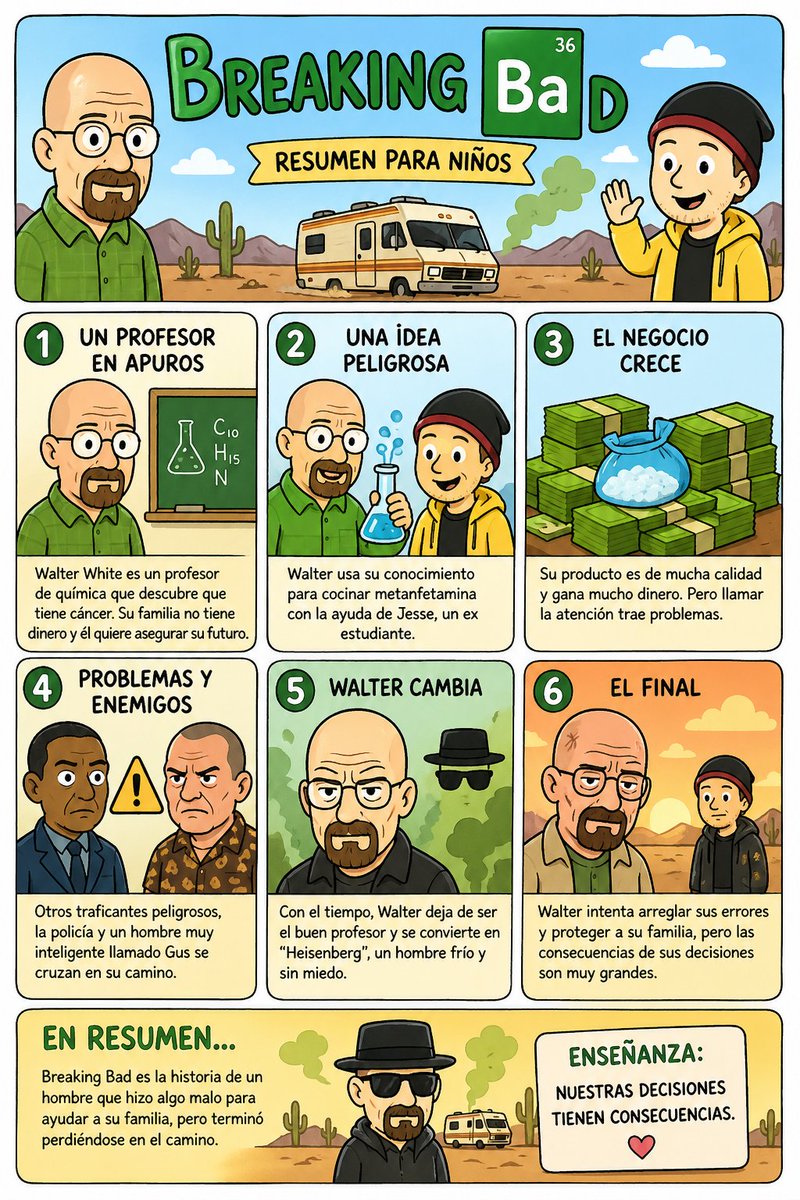
Kids' Breaking Bad Summary Poster — AI 画像プロンプト
A colorful Spanish comic-style poster that retells Breaking Bad for children in six simple panels with a final moral, ideal for humorous educational or social media graphics. - AIPinMaker
プロンプト
{"type":"children's educational comic poster","style":"cute cartoon, simplified and family-friendly parody of an adult TV drama, clean black outlines, flat bright colors, rounded shapes, playful illustrated infographic layout, Spanish text, portrait orientation","theme":"a kid-friendly summary of Breaking Bad with a final moral lesson","layout":{"background":"light cream poster with rounded black border","sections":[{"title":"header","position":"top full width","count":1,"labels":["BREAKING BaD","RESUMEN PARA NIÑOS"]},{"title":"story panels","position":"middle grid","count":6,"labels":["1 UN PROFESOR EN APUROS","2 UNA IDEA PELIGROSA","3 EL NEGOCIO CRECE","4 PROBLEMAS Y ENEMIGOS","5 WALTER CAMBIA","6 EL FINAL"]},{"title":"bottom summary","position":"bottom full width split in 2 boxes","count":2,"labels":["EN RESUMEN...","ENSEÑANZA:"]}],"grid":"two rows of three rounded rectangular comic panels beneath the header, plus a bottom band with a summary box on the left and a moral box on the right"},"header":{"title_text":"{argument name=\"headline text\" default=\"BREAKING BaD\"}","subtitle_text":"{argument name=\"subtitle text\" default=\"RESUMEN PARA NIÑOS\"}","left_character":"bald middle-aged man in a green shirt, simplified cartoon version of Walter White","right_character":"teen boy in a yellow hoodie and black beanie, simplified cartoon version of Jesse Pinkman","center_scene":"cream RV in a desert with cacti, mountains, blue sky, clouds, and a puff of green smoke","title_style":"large hand-drawn green letters, the 'Ba' inside a dark green chemistry-style square with small number 36 in the corner and the 'D' continuing after it"},"panels":[{"number":1,"title":"UN PROFESOR EN APUROS","scene":"Walter standing beside a classroom chalkboard with a chemistry flask drawing and the formula C10 H15 N","text":"Walter White es un profesor de química que descubre que tiene cáncer. Su familia no tiene dinero y él quiere asegurar su futuro.","palette":"green and beige classroom tones"},{"number":2,"title":"UNA IDEA PELIGROSA","scene":"Walter and Jesse together, Walter in green shirt and Jesse in yellow hoodie, holding a blue bubbling flask","text":"Walter usa su conocimiento para cocinar metanfetamina con la ayuda de Jesse, un ex estudiante.","palette":"light blue science-lab tones"},{"number":3,"title":"EL NEGOCIO CRECE","scene":"stacks of green cash bundles filling the panel with a blue bag full of white crystals in front","text":"Su producto es de mucha calidad y gana mucho dinero. Pero llamar la atención trae problemas.","palette":"green money-focused tones"},{"number":4,"title":"PROBLEMAS Y ENEMIGOS","scene":"two dangerous men facing forward with a yellow warning triangle between them","text":"Otros traficantes peligrosos, la policía y un hombre muy inteligente llamado Gus se cruzan en su camino.","palette":"muted blue and brown tones with warning yellow accent"},{"number":5,"title":"WALTER CAMBIA","scene":"Walter transformed into Heisenberg, bald with black shirt, in front of green smoke, with black hat and sunglasses floating symbolically behind him","text":"Con el tiempo, Walter deja de ser el buen profesor y se convierte en \"Heisenberg\", un hombre frío y sin miedo.","palette":"green smoky background and black clothing for menace"},{"number":6,"title":"EL FINAL","scene":"sunset desert with Walter on the left and Jesse on the right, separated and facing away emotionally","text":"Walter intenta arreglar sus errores y proteger a su familia, pero las consecuencias de sus decisiones son muy grandes.","palette":"warm orange sunset tones"}],"bottom":{"summary_box":{"title":"EN RESUMEN...","text":"Breaking Bad es la historia de un hombre que hizo algo malo para ayudar a su familia, pero terminó perdiéndose en el camino.","decoration":"desert ground, small cacti, distant RV, green smoke"},"center_character":"small Heisenberg figure with black hat and dark clothes standing between the bottom boxes","moral_box":{"title":"ENSEÑANZA:","text":"{argument name=\"moral text\" default=\"NUESTRAS DECISIONES TIENEN CONSECUENCIAS.\"}","icon":"small pink heart beneath the text"}},"text_style":"bold hand-lettered comic font for titles, uppercase Spanish headings, smaller neat rounded sans-serif body text","rendering":"high-resolution poster illustration, symmetrical spacing, thick outlines, kid-safe educational comic aesthetic, humorous but clean and readable"}3a:T114d,{"t参照画像
このAI画像プロンプトテンプレートの使い方
 1
1プロンプトをコピー — テンプレートのプロンプトとネガティブプロンプトを取得。  2
2モデルを選ぶ — 最適な推奨AIモデルを選択。  3
3生成 — ワンクリックでスタジオを開いて作成。
関連テンプレート
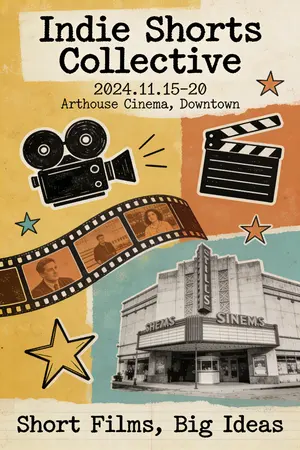
Quirky Independent Short Film Festival Poster
A quirky and independent-style poster for a short film festival. The design is a collage of hand-drawn doodles, film strips, and vintage photographs. The typography is a mix of different typewriter and handwritten fonts, giving it a DIY, zine-like feel. The color palette is limited and has a retro vibe. The poster should look creative, unconventional, and appeal to an arthouse audience. –ar 2:3
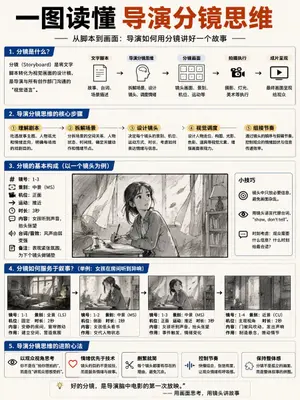
Storyboard Director Infographic
{ "type": "educational infographic poster", "header": { "title": "{argument name=\"main title\" default=\"一图读懂 导演分镜思维\"}", "subtitle": "{argument name=\"subtitle\" default=\"从脚本到画面:导演如何用分镜讲好一个故事\"}" }, "layout": { "sections": [ { "title": "1. 分镜是什么?", "components": [ "definition text box", { "type": "flowchart", "count": 5, "labels": ["文字脚本", "导演分镜思维", "分镜画面", "拍摄执行", "成片呈现"] } ] }, { "title": "2. 导演分镜思维的核心步骤", "count": 5, "labels": ["① 理解剧本", "② 拆解场景", "③ 设计镜头", "④ 视觉调度", "⑤ 组接节奏"] }, { "title": "3. 分镜的基本构成(以一个镜头为例)", "columns": [ { "position": "left", "count": 8, "labels": ["镜号", "景别", "机位", "运动", "时长", "内容", "台词/音效", "备注"] }, { "position": "center", "image": "{argument name=\"character subject\" default=\"anime girl reading in a room\"}" }, { "position": "right", "title": "小技巧", "count": 3, "description": "icon bullet points" } ] }, { "title": "4. 分镜如何服务于叙事?", "subtitle": "{argument name=\"example scenario\" default=\"举例:女孩在房间听到异响\"}", "count": 4, "panels": ["wide shot room", "medium shot girl reading", "medium shot girl looking up", "close up door opening"], "caption_labels": ["镜号", "景别", "机位", "时长", "内容", "作用"] }, { "title": "5. 导演分镜思维的进阶心法", "count": 5, "labels": ["以观众视角思考", "情绪优先于技术", "删繁就简", "控制节奏", "保持整体感"] } ], "footer": "{argument name=\"footer quote\" default=\"好的分镜,是导演脑中电影的第一次放映。\"}" }, "style": "clean corporate infographic, blue and white palette, structured grid" }

Fun Educational Children's Science Fair Poster
A fun and educational poster for a children’s science fair. The design is a colorful cartoon illustration featuring kids dressed as scientists, looking at bubbling beakers, telescopes, and robots. The typography is playful and kid-friendly. The poster should make science look exciting and accessible, encouraging kids to participate. –ar 2:3

AI CTO Types Infographic
{"type":"Chinese infographic poster","style":"clean vector editorial infographic, sharp readable Chinese typography, white background, thin colored panel borders, cartoon business/tech characters, small icons, charts, laptops, code screens, speech bubbles","canvas":"square 1:1 poster","headline":"{argument name=\"headline text\" default=\"AI时代的残酷真相:CTO/技术总监四种类型\"}","subtitle":"写不写代码不重要,拥抱AI并亲手重度参与才重要!否则,你正在变成技术界的文科生。","main_layout":{"structure":"2x2 quadrant matrix divided by thick black horizontal and vertical arrows crossing at center","vertical_axis":{"top":"拥抱 AI(亲手重度参与)","bottom":"不拥抱 AI(缺乏一线AI工程经验)"},"horizontal_axis":{"left":"写代码(亲自下场)","right":"不写代码(脱离一线)"},"quadrants_count":4,"quadrants":[{"number":1,"title":"AI工程指挥官 👑","position":"top-left","border_color":"green","summary":"既懂技术深度,又掌握AI生产力的顶级玩家","character":"hoodie-wearing engineer at laptop, code editor on screen, cute AI robot mascot, tool labels Copilot and Claude Code, speech bubble saying 让我改改prompt,5分钟验证一下!","labels":{"features_title":"特点:","features_count":4,"features":["天天下场做AI工程","深度理解能力边界","能快速验证想法","用AI放大团队战斗力"],"team_state_title":"团队状态:","team_state":"人均AI战斗力爆表,小团队打出大效果","catchphrase":"口头禅:‘先做个最小可行Demo验证一下’","result":"结果:真正的技术领导者,带团队进化"}},{"number":2,"title":"AI PPT 战略家 📈","position":"top-right","border_color":"orange","summary":"想象中的AI很美好,现实中的落地一地鸡毛","character":"executive pointing beside a presentation slide titled AI Transformation 2026 with rising bar chart and labels Agent, MCP, Multi-modal, Autonomous, AGI Ready; stacks of documents labeled AI新范式, 未来主义, 行业颠覆; speech bubble says AI会改变一切!我们要All in AI!","labels":{"features_title":"特点:","features_count":4,"features":["PPT能力MAX","道听途说懂AI","夸大AI能力上限","低估工程复杂度"],"team_state_title":"团队状态:","team_state":"Roadmap很激进,Demo很震撼,落地很痛苦","catchphrase":"口头禅:‘我觉得AI应该可以…’","result":"结果:用想象中的AI,指挥真实世界的工程(高危!)"}},{"number":3,"title":"传统黑客(老派匠人) >_","position":"bottom-left","border_color":"blue","summary":"技术功底深厚,但拒绝AI带来的范式革命","character":"long-haired programmer in black t-shirt typing at large monitor full of green code, coffee mug marked No AI Just Code, speech bubble says AI生成的代码?那叫屎山快捷键!","labels":{"features_title":"特点:","features_count":4,"features":["基本功扎实","debug能力恐怖","看不起AI工具","效率提升有限"],"team_state_title":"团队状态:","team_state":"质量很高,速度很慢,逐渐被生产力差距拉开","catchphrase":"口头禅:‘真正的工程师自己写’","result":"结果:成为数字时代的手工匠人,逐渐边缘化"}},{"number":4,"title":"流程型技术管理者 📋","position":"bottom-right","border_color":"gray","summary":"不懂技术,不懂AI,只剩流程和KPI","character":"manager in blue shirt with badge seated at desk with laptop, Jira/OKR/周报 stack, checklist poster titled 本周重点工作, document folders, speech bubble says 这个需求让下面评估一下…顺便写个周报。","labels":{"features_title":"特点:","features_count":4,"features":["KPI/流程驱动","技术隔离","对AI没感觉","安全第一,创新靠后"],"team_state_title":"团队状态:","team_state":"组织稳定,效率一般,创新基本靠撞大运","catchphrase":"口头禅:‘让下面的人评估一下’","result":"结果:最适合转职业经理人,别再顶技术帽子了"}}]},"footer":{"boxes_count":4,"boxes":[{"title":"AI时代的残酷现实:","items_count":4,"items":["AI不是新工具,是新的工程认知层","不亲手下场 = 失去技术判断力","想象力不能替代一行行打出来的经验","懂过滤一泡沫化,会被时代无情淘汰"]},{"title":"核心结论","text":"是否亲手重度参与AI工程,决定你是进化,还是退化。","emphasis":"进化 or 退化"},{"title":"给技术管理者的建议:","items_count":4,"items":["至少每周亲手做AI工程(不是看看)","把AI用到真实业务场景里","建立对AI能力边界的第一手经验","否则,最早被埋掉的是经理人角色"]},{"title":"警告!","icon":"skull and crossbones","text":"技术界最危险的状态就是:用想象指挥现实,用流程掩盖无知。这在AI时代会害死团队!"}],"note":"记住:AI不会淘汰你,但会用AI的人会淘汰你。现在开始亲手做AI工程,别再当技术界的文科生!"},"generation_notes":"Make all Chinese text crisp and legible, preserve the exact labels and quadrant numbering, use a balanced poster composition with clear arrows and color-coded panels."}

Propaganda School Trip Schedule Poster
Using REFERENCE_0 as the source document, transform the plain school trip timetable into a dramatic vintage socialist-propaganda style poster while preserving the original 2-night/3-day schedule contents and Japanese itinerary structure. Replace the clean worksheet layout with aged beige paper, heavy black ink, distressed halftone texture, bold red-and-black typography, diagonal banners, and revolutionary poster composition. Add a large top headline reading 修学旅行 (headline text) with the subheading タイムスケジュール (subheading text), plus a black banner for 関西方面 2泊3日 (region label). Split the itinerary into exactly 3 visible schedule panels labeled DAY 1 京都, DAY 2 奈良・大阪, and DAY 3 大阪, keeping the times and activities from the reference legible in each panel. Add propaganda-style supporting imagery not present in the reference: crowds of uniformed students/workers, raised fists, red flags, industrial smokestacks, dramatic city silhouettes, castle illustrations, and a red fist emblem in a star at the lower right. Add exactly 3 slogan areas: a red speech-banner at the upper right reading 学ぶことは変えること!団結する者が、未来をつくる!われらの力で、歴史をすすめよ! (top slogan), a large lower-left slogan block reading 労働する者は団結せよ!学び、考え、行動せよ!未来はわれらの手にある! (bottom slogan), and a bottom notice box titled 注意事項 with concise school-trip rules. Make the poster look like a scanned, worn, high-contrast risograph/woodblock propaganda print, with red as the dominant accent color and black borders separating the 3 day panels.3a:T728,Using REFERENCE_0 as the source document, transform the plain school trip timetable into a dramatic vintage socialist-propaganda style poster while preserving the original 2-night/3-day schedule contents an

Korean Paper Airplane Folding Poster
{"type":"origami instruction poster","topic":"paper airplane folding guide","language":"Korean","style":{"overall":"clean educational infographic, simple vector line art, friendly classroom worksheet aesthetic","palette":{"background":"white","primary":"dark navy","accent":"light sky blue","line":"black","shadow":"soft light gray"},"rendering":"flat 2D layout with crisp outlines and minimal shading"},"canvas":{"orientation":"portrait","margin":"generous white margins"},"header":{"title":"{argument name=\"headline text\" default=\"비행기 접기 도안\"}","subtitle":"{argument name=\"subtitle text\" default=\"차례대로 따라 접어 보세요\"}","decorations":{"paper_airplanes":2,"dashed_flight_paths":2,"blue_accent_marks":2}},"layout":{"grid":{"columns":4,"rows":2,"step_cards":8},"sections":[{"title":"steps row 1","position":"upper middle","count":4,"labels":["1 반으로 접었다 펴기","2 위쪽 두 모서리를 가운데로 접기","3 다시 가운데로 모아 접기","4 세로로 반 접기"]},{"title":"steps row 2","position":"middle","count":4,"labels":["5 한쪽 날개 접기","6 반대쪽 날개 접기","7 날개를 펼쳐 모양 잡기","8 완성!"]},{"title":"finished airplane display","position":"bottom","count":1,"labels":["완성된 비행기"]}]},"step_cards":[{"step":1,"badge":"1","text":"반으로 접었다 펴기","diagram":"vertical rectangle sheet with a centered vertical dashed fold line and a curved double-headed arrow indicating folding inward and reopening"},{"step":2,"badge":"2","text":"위쪽 두 모서리를 가운데로 접기","diagram":"paper with pointed top, both upper corners folded to the center line, dashed diagonal guide lines, two inward arrows"},{"step":3,"badge":"3","text":"다시 가운데로 모아 접기","diagram":"narrower pointed shape, side edges folded again toward the center line, dashed diagonal guides, two inward arrows near the lower middle"},{"step":4,"badge":"4","text":"세로로 반 접기","diagram":"side-view folded shape with a vertical dashed center line and one large curved arrow showing the model folded in half lengthwise"},{"step":5,"badge":"5","text":"한쪽 날개 접기","diagram":"triangular side-view airplane body with one wing folded downward, dashed horizontal guide near the top edge and a curved arrow"},{"step":6,"badge":"6","text":"반대쪽 날개 접기","diagram":"same side-view as step 5, folding the opposite wing downward with matching dashed guide and curved arrow"},{"step":7,"badge":"7","text":"날개를 펼쳐 모양 잡기","diagram":"3D paper airplane opening into shape, two curved arrows pointing downward and outward on each side"},{"step":8,"badge":"8","text":"완성!","diagram":"completed paper airplane in simple perspective, light blue top faces, black outline, no arrows"}],"bottom_panel":{"container":"large rounded rectangle with light blue dashed border","label":"완성된 비행기","main_object":"large completed paper airplane angled from lower left to upper right, pale blue surfaces with black outline and subtle gray shadow beneath","decorations":{"clouds":3,"swirl_arrow":1}},"text_style":{"title":"bold rounded Korean display font in dark navy","subtitle":"smaller bold Korean text","step_labels":"bold black Korean text","number_badges":"white numbers inside blue circles"}}3b:Td01,{"type":"origami instruction poster","topic":"paper airplane folding guide","language":"Korean","style":{"overall":"clean educational infographic, simple vector line art, friendly classroom worksheet aesthetic","palette":{"background":"white","primary":"dark navy","accent":"light sky blue","line
他のプロンプトを探す
カテゴリ別にAI画像・動画プロンプトをもっと見る。