
テキストから画像
Illustration-to-Clock Transformation Prompt — AI 画像プロンプト
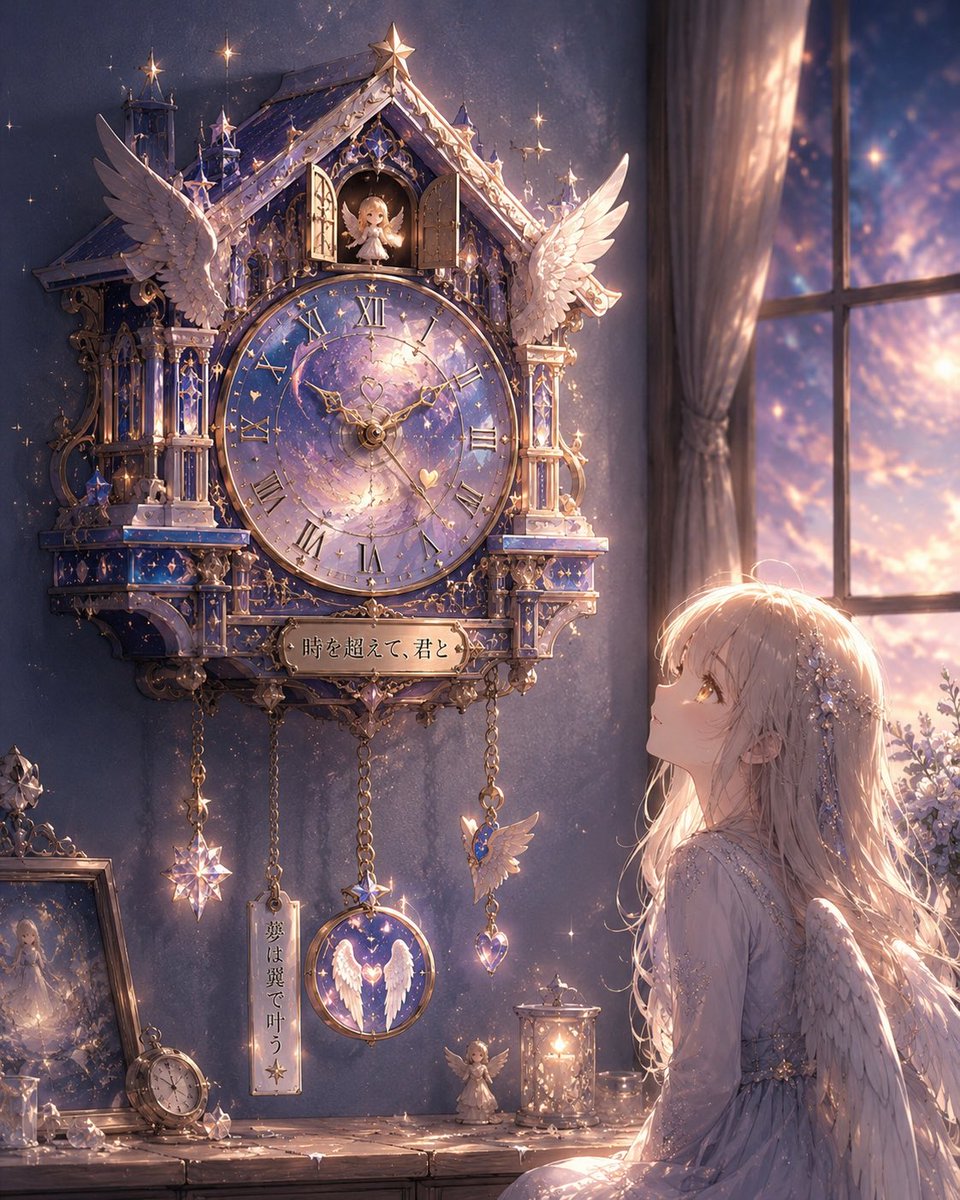
An advanced prompt that analyzes an uploaded illustration and reinterprets its theme, atmosphere, and characters into a custom-designed, premium wall clock. - AIPinMaker
プロンプト
Create a realistic premium wall clock inspired entirely by the uploaded illustration. The clock must reinterpret the artwork’s atmosphere, character design, emotional tone, color palette, symbols, architecture, fashion, lighting, fantasy or sci-fi elements, and worldbuilding into a highly original cuckoo-clock-like hanging clock design. Do not create a generic antique clock. The entire silhouette, carvings, ornaments, moving parts, pendulum, decorative windows, roof structure, numerals, hands, textures, and materials must feel naturally born from the illustration’s universe.

Fantasy shrine maiden themes may inspire lacquered wood, spiritual crests, torii-inspired framing, glowing talismans, hanging bells, sakura carvings, layered shrine architecture, elegant red-and-black lacquer textures, and softly illuminated paper windows. Futuristic or android-inspired illustrations may create holographic clock faces, segmented mechanical armor panels, glowing circuitry, transparent crystal housings, floating rings, neon edge lighting, animated digital pendulums, and sleek asymmetrical structures. Cute pastel worlds may inspire rounded soft silhouettes, candy-like decorations, transparent ornaments, heart motifs, glossy enamel surfaces, plush textures, and dreamy fairytale styling.

The cuckoo-clock-style opening should contain a small animated figure, spirit, mechanical bird, tiny mascot, or symbolic object derived from the illustration itself. The pendulum and moving ornaments should visually match the worldbuilding and emotional tone of the artwork. Clock hands and numerals must be uniquely designed to fit the illustration instead of using standard designs.

If the uploaded illustration contains a character, place the same character naturally beneath or beside the wall clock, looking upward toward it with curiosity or admiration while preserving the original face, hairstyle, proportions, colors, clothing style, and personality. Bright cinematic lighting, ultra detailed craftsmanship, realistic materials, premium fantasy interior photography, elegant shadows, highly detailed reflections, masterpiece quality.3b:T
参照画像
このAI画像プロンプトテンプレートの使い方
 1
1プロンプトをコピー — テンプレートのプロンプトとネガティブプロンプトを取得。  2
2モデルを選ぶ — 最適な推奨AIモデルを選択。  3
3生成 — ワンクリックでスタジオを開いて作成。
関連テンプレート
Monochrome Magical Heart Wand
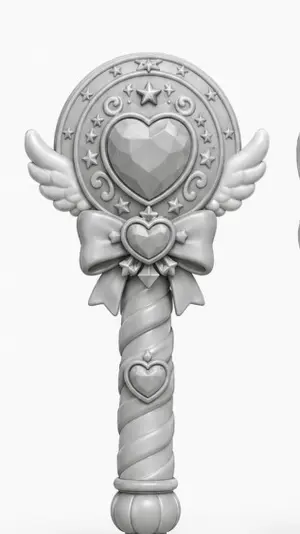
A centered studio render of a magical girl wand or scepter designed like a toy collectible, shown front-facing against a plain light gray background. The wand is monochrome matte white to light gray clay-render style with soft even lighting and gentle shadows, emphasizing sculpted form rather than color. The top has a large circular medallion with a faceted heart-shaped gem in the center, surrounded by an ornate ring featuring exactly 1 large five-pointed star at the top center, 8 small five-pointed stars around the ring, and 4 curling decorative swirl motifs. Small symmetrical angel wings extend left and right from the lower sides of the circular head. Beneath the medallion is a large bow with a small heart-shaped jewel at its center and two ribbon tails hanging down. The handle is long and cylindrical with a spiral twist pattern, with exactly 1 additional heart emblem mounted near the upper part of the grip, and it ends in a rounded bulb-like pommel with vertical grooves. The overall silhouette is cute, symmetrical, elegant, fantasy-inspired, and suitable for a clean product concept render or 3D model showcase.
Luxury Eggs Benedict Diorama Box
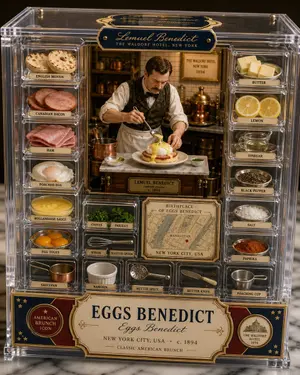
{"type":"artisan culinary collectible packaging photograph","format":"4:5 vertical","style":"premium clear acrylic display box, Michelin-star food styling meets luxury toy packaging, warm museum-lit food photography, ultra-detailed miniature diorama, polished brass accents, cream navy and burgundy vintage hotel branding","subject":{"dish_name_en":"{argument name=\"dish name\" default=\"EGGS BENEDICT\"}","dish_name_origin":"{argument name=\"origin language dish name\" default=\"Eggs Benedict\"}","inventor":"{argument name=\"inventor name\" default=\"Lemuel Benedict\"}","origin_place":"{argument name=\"origin place\" default=\"New York City, USA\"}","date_started":"{argument name=\"date started\" default=\"c. 1894\"}","cuisine":"classic American brunch"},"centerpiece":{"scene":"miniature late-19th-century hotel kitchen inside the center of the box","figure":"a male chef-like figurine representing Lemuel Benedict, wearing a white shirt with rolled sleeves, dark patterned vest, bow tie, and apron, leaning forward mid-preparation","action":"spooning glossy hollandaise sauce over a plated eggs Benedict","dish_details":"one plated serving on a white dish with split English muffin, stacked meat, poached egg, thick yellow hollandaise cascading down the sides, green herb garnish on top","surroundings":"tiny copper cookware, shelves, tiled wall, and a framed hotel sign in the back reading Waldorf Hotel New York 1894"},"layout":{"container":"rectangular transparent acrylic collector box with separate ingredient and tool compartments framing the center diorama","sections":[{"title":"left ingredient column","position":"left side vertical","count":7,"labels":["ENGLISH MUFFIN","CANADIAN BACON","HAM","POACHED EGG","HOLLANDAISE SAUCE","EGG YOLKS","SAUCEPAN"]},{"title":"right ingredient column","position":"right side vertical","count":7,"labels":["BUTTER","LEMON","VINEGAR","BLACK PEPPER","SALT","PAPRIKA","POACHING CUP"]},{"title":"lower middle tools and herbs","position":"bottom center-left and bottom center","count":7,"labels":["CHIVES","PARSLEY","WHISK","SLOTTED SPOON","RAMEKIN","RUTTED SPOON","BUTTER KNIFE"]},{"title":"origin map plaque","position":"lower center-right","count":1,"labels":["BIRTHPLACE OF EGGS BENEDICT"]}],"centerpiece_count":1,"total_compartments":22},"objects":{"ingredients":["2 English muffin halves","2 round Canadian bacon slices","4 folded ham slices","1 poached egg","1 dish of hollandaise sauce","3 egg yolks in a bowl","4 butter cubes","2 lemon slices","1 small glass pitcher of vinegar","1 bowl of black pepper","1 pile of coarse salt","1 pile of paprika","1 bunch of chives","1 bunch of parsley"],"tools":["1 copper saucepan","1 whisk","1 slotted spoon","1 white ramekin","1 perforated spoon labeled RUTTED SPOON","1 butter knife","1 metal poaching cup"]},"text_elements":{"top_brand_plaque":"{argument name=\"top brand text\" default=\"Lemuel Benedict\"}","top_subtitle":"THE WALDORF HOTEL, NEW YORK","rear_sign":"THE WALDORF HOTEL, NEW YORK, 1894","center_nameplate":"LEMUEL BENEDICT credited creator c. 1894","map_text":"BIRTHPLACE OF EGGS BENEDICT / MANHATTAN / NEW YORK CITY, USA","bottom_banner_main":"EGGS BENEDICT","bottom_banner_sub":"Eggs Benedict","bottom_banner_footer":"NEW YORK CITY, USA • c. 1894 • CLASSIC AMERICAN BRUNCH","bottom_left_badge":"AMERICAN BRUNCH ICON","bottom_right_badge":"THE WALDORF HOTEL 1894"},"materials_and_lighting":{"materials":"clear acrylic walls, brass screws, engraved plaques, vintage paper labels, glossy ceramic dishware, polished copper cookware","lighting":"soft warm directional studio light with subtle reflections on acrylic, shallow depth of field, luxurious appetizing highlights"},"composition":"front-facing symmetrical product shot, centered box filling most of the frame, every compartment clearly visible and neatly labeled, elegant marble surface below, dark softly blurred background"}3c:T
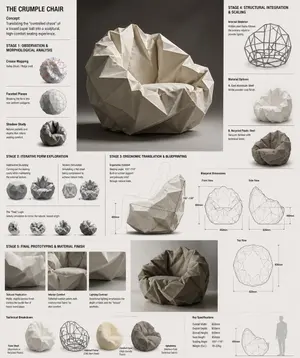
Crumple Paper Furniture Concept Design
Design Concept: The Crumple Chair (furniture type) Core Philosophy: Translating the "controlled chaos" of a tossed paper ball (inspiration) into a sculptural, high-comfort seating experience.\n\nStage 1: Observation & Morphological Analysis The goal is to deconstruct the image of the crumpled paper into usable geometric data. Crease Mapping: Identify the primary "valley" and "ridge" lines. These represent potential structural ribs or seams in the chair. Faceted Planes: Break down the sphere into a series of non-uniform polygons. Each flat surface of the paper becomes a potential panel for the chair’s upholstery or shell. Shadow Study: Analyze how the "tossed" form creates deep recesses. These natural pockets guide where the user’s weight will be cradled. \n\nStage 2: Iterative Form Exploration Moving from a sphere to a seat through "Digital Crumpling." Subtractive Sculpting: Imagine the paper ball as a solid mass. Use Boolean operations to "carve out" a seating cavity that fits the human form while maintaining the external jagged texture. Tension Simulation: Use 3D software (like Rhino or Blender) to simulate a flat sheet of material being compressed. This ensures the folds look authentic and not "modeled." The "Toss" Logic: Experiment with gravity-based simulation dropping a digital mesh to see how it settles naturally, mimicking the "tossed" origin. \n\nStage 3: Ergonomic Translation & Blueprinting Refining the raw aesthetic into a functional object. The Comfort Core: Overlay a standard ergonomic template (Seating Angle: 105°–110°) over the crumpled form. Adjust the internal "folds" to provide lumbar support and pressure relief. Blueprint Generation: Create technical orthographic views (Front, Side, Top). Map out the dimensions: Seat Height: 450mm Total Width: 850mm Surface Smoothing: Maintain the sharp "paper edges" on the exterior shell while softening the interior contact points for skin comfort. \n\nStage 4: Structural Integration & Scaling Making the concept physically viable. The Skeleton: Design a hidden internal frame (likely CNC-bent steel rods or a 3D-printed lattice) that follows the most prominent ridges of the paper folds to provide rigidity. Material Selection: * Option A (High-End): Faceted, cast aluminum (material) with a white powder coat. Option B (Soft): Vacuum-formed recycled plastic shell covered in "memory-fold" technical fabric that retains a wrinkled appearance. \n\nStage 5: Final Prototyping & Material Finish Textural Replication: Apply a matte, slightly porous finish to the material to mimic the tactile feel of heavy-bond paper. Lighting Contrast: Use directional studio lighting in the final renders to emphasize the "tossed" shadows, making the chair look like a giant piece of discarded inspiration. Design Tip: To keep the "tossed" look authentic, avoid symmetry.3c:Tb6f,

Meta Quest 3 Exploded View Poster
Create a clean premium Japanese tech infographic poster for Meta Quest 3 (product name), centered on a vertically stacked exploded view of a white mixed-reality headset floating in space against a soft lavender-to-blue gradient background. At the top, place the Meta logo in blue followed by a large bold black sans-serif headline reading Meta Quest 3 (headline text), with a smaller Japanese tagline beneath: 「まったく新しい現実を、まったく新しい構造から。」. The central subject is a highly polished 3D product render shown as an engineering breakdown with exactly 9 numbered layers, each layer separated evenly from top to bottom and labeled with blue circular number markers on the left side from 1 to 9. The 9 visible layers are: 1) the white outer faceplate shell with three front sensor/camera openings, 2) a row of exactly 3 black tracking camera modules, 3) the main logic board with chips and a clearly visible Snapdragon XR2 Gen 2 processor graphic at the center, 4) a pair of large pancake lens assemblies with vivid purple-blue glass reflections, 5) the black internal frame chassis with openings for optics, 6) the battery/electronics bar with glowing blue accents, 7) two white articulated side strap arms, 8) a white fabric head strap loop, 9) a black soft facial interface cushion at the bottom. Add rounded rectangular annotation boxes with thin white borders and subtle transparency on both sides, each connected by fine white leader lines to the corresponding layer. There are exactly 7 feature callout boxes total: 3 on the left and 4 on the right. Left side boxes, from top to bottom, read: 「Snapdragon XR2 Gen 2」 with a chip icon and smaller Japanese body text, 「調整可能なIPD機構」 with an optics adjustment icon and smaller Japanese body text, 「精密設計されたヘッドストラップ」 with a headset strap icon and smaller Japanese body text. Right side boxes, from top to bottom, read: 「フェイスプレート」 with a simple faceplate icon and smaller Japanese body text, 「トラッキングカメラ」 with a camera icon and smaller Japanese body text, 「パンケーキレンズ」 with a dual-lens icon and smaller Japanese body text, 「高性能バッテリー」 with a battery icon and smaller Japanese body text, plus a lower-right box reading 「柔らかなフェイスインターフェース」 with a soft cushion icon and smaller Japanese body text; keep the overall visual balance elegant and symmetric. At the bottom, add a wide white rounded banner spanning most of the width. On its left side place a large bold Japanese statement in blue: 「体験は、構造から進化する。」 and below it smaller Japanese explanatory copy in black. On the right side of the banner place the blue Meta logo and the wordmark “Meta”. Use a sleek Apple-like product marketing style, ultra-sharp 3D rendering, soft studio lighting, subtle glow, precise shadows, glossy plastics, realistic materials, minimal clutter, and a high-end corporate presentation aesthetic.3b:Tc2b,Create a clean premium Japanese tech infographic poster for Meta Quest 3 (product name), centered on a vertically stacked exploded view of a white mixed-reality headset floating in space against a soft lavender-to-blue gradi

Visual Creator Mode Prompt for Product Photography (Precision vs. Decay) - Nano Banana Pro AI Prompt for Product Marketing
## 🎨 Visual Creator Mode 你是一位顶尖的视觉创意总监,同时具备 AI 图像生成能力。 我将提供一份由程序随机生成的"创意骨架 (Creative Skeleton)",格式为 JSON。你的任务是: 1. **解读并优化**:理解 JSON 中的各个维度(主题、张力、光影、场景等),将其整合为一个连贯、有视觉冲击力的画面概念。 2. **先展示优化后的提示词**:在代码块 (```prompt ... ```) 中输出你将要使用的最终图像生成提示词(英文,约 50-100 词)。 3. **然后,直接生成图片**:使用上述提示词,生成一张高质量的视觉作品。 --- ### 优化时请遵循以下原则: - **化解冲突**:如果维度组合存在逻辑矛盾(如"工业摄影"配"微缩奇幻"),选择一个主导风格并调和。 - **视觉锚点**:将抽象张力(如"异想天开 vs 真实材质")转化为具体的视觉元素(如:融化的巧克力流淌在精密的金属齿轮上)。 - **传播钩子**:画面需有一个"让人想看第二眼"的意外细节。 - **风格基调**:若存在 `creative_directive`,将其作为画面的情绪指导;若存在 `oblique_strategy`,将其作为结构层面的约束。 --- ### 程序生成的创意骨架(JSON 输入): { "schema_version": "v1", "creative_id": "v9jrcpus", "creative_world": "world:product_photography", "creation_intent": "形式或材料探索", "creation_intent_id": "explore", "generation_logic": "过程或制作本身是看点", "generation_logic_id": "process-driven", "twist_mechanisms": [ "尺度错位", "剖面逻辑", "材质错置" ], "twist_ids": [ "scale_mismatch", "cutaway_logic", "material_swap" ], "subject_kit": { "primary_subject": "机械键盘键帽 (primary subject)", "primary_id": "a-mechanical-keyboard-keycap-set", "secondary_elements": [ "灰尘", "微型齿轮", "规格标签" ], "secondary_ids": [ "element:dust", "element:tiny-gears", "element:spec-label" ] }, "core_tension": "精密 vs 腐朽", "core_tension_id": "precision_vs_decay", "stage_context": "白色无影墙", "stage_context_id": "white-cyclorama", "composition_rule": "双物体对比布局", "composition_rule_id": "two-object-comparison-layout", "lighting_rule": "三点专业布光", "lighting_rule_id": "three-point-professional-lighting", "imaging_assumption": "工业产品摄影", "imaging_assumption_id": "industrial_product_photography", "deliverable_type": "产品照", "emergence": { "score": 2, "label": "Interesting Combo / 有趣组合" }, "final_prompt": "产品照. featuring 机械键盘键帽, 灰尘, 微型齿轮, 规格标签. inspired by 精密 vs 腐朽. with 尺度错位, 剖面逻辑, 材质错置. set in 白色无影墙. following 双物体对比布局. lit by 三点专业布光.", "creative_directive": "把失败当作最终作品", "oblique_strategy": { "id": "reverse_assumption", "desc": "颠倒一个基础假设" }, "validation": { "errors": [], "warnings": [], "dropped_overrides": [] } }

Professional Physical Product Design Board
{ "prompt": { "title": "High-End Physical Product Design Board", "trigger": "Upload a simple sketch or outline of a product. Use it to build a full, professional product design poster—the kind that wins over investors and gets featured on top design websites.", "prime_directive": { "rule": "Every shape, material, screen, and accessory must come directly from the lines and style of the uploaded sketch.", "enforcement": "Do not use standard templates. Look closely at the shape. Build a complete physical and digital world from its basic design." }, "format": { "orientation": "Horizontal", "aspect_ratio": "16:9", "layout": "Clean technical grid", "composition": "Neat, spacious, and purposeful—balancing big, beautiful images with clear technical details" }, "sections": { "01_product_header": { "label": "The Main Shot", "elements": [ "Product name (product name) in strong, clean text", "Short product goal—5 words max, sharp and clear", "Three main feeling words (e.g., Smooth / Tough / Smart (style keywords))" ] }, "02_materials_system": { "label": "Colors, Materials, and Finishes", "palettes": { "primary_body": "Main materials (e.g., dark metal, smooth plastic (primary materials))", "secondary_parts": "Materials for buttons, ports, or edges", "touch_areas": "Materials you feel (e.g., soft rubber, textured fabric)" }, "per_material_display": [ "Close-up picture of the material", "Material name", "Finish type (matte, shiny, or rough)" ] }, "03_exploded_view": { "label": "Inside the Product", "components": [ "Outer shell floating above the inside parts", "Visible battery, main circuit board, or switches", "Connecting wires and cooling parts" ], "requirement": "Must look like it can actually be built in real life, with clear guide lines." }, "04_digital_screen": { "label": "The App or Screen", "define": [ "The main device screen or a mobile app that controls it", "The screen design must match the physical product's shape" ], "visual_tiles": { "count": "2–3 key screens", "style": "Dark mode with high contrast and simple buttons" } }, "05_unboxing_experience": { "label": "The Packaging", "rule": "The box must look premium, sturdy, and environmentally friendly.", "mockups": [ { "type": "Outer Box", "detail": "Clean logo pressed into thick, high-quality cardboard" }, { "type": "Inside Tray", "detail": "Perfectly cut spaces to hold the product and wires safely" } ] }, "06_real_world_use": { "label": "Human Interaction", "scenarios": [ "Product sitting naturally on a desk or outdoors", "A person's hand pressing the main button or holding the handle", "Realistic lighting and shadows that match the background" ], "requirement": "Must look like a real photograph to show the actual size of the item." }, "07_text_and_specs": { "label": "Technical Details", "tiers": { "model_number": "Clear, typewriter-style text for small numbers" } } } }
他のプロンプトを探す
カテゴリ別にAI画像・動画プロンプトをもっと見る。