
テキストから画像
Exploded View Smartphone Infographic Prompt — AI 画像プロンプト
A two-part prompt for generating a motion sequence and two images related to a smartphone. The motion prompt describes the phone lifting apart into an exploded view. Image 1 is a premium product photograph, and Image 2 is a hyper-realistic vertical infographic showing the deconstructed internal components (screen, battery, logic board, etc.) against a white background. - AIPinMaker

プロンプト
Create a infographic image of Exploded View Smartphone Infographic Prompt. Style: photorealistic. Composition: balanced and well-framed. Lighting: natural with cinematic mood. Category: illustration. Reference: exploded-view-smartphone-infographic-prompt-6101.
参照画像

このAI画像プロンプトテンプレートの使い方
 1
1プロンプトをコピー — テンプレートのプロンプトとネガティブプロンプトを取得。  2
2モデルを選ぶ — 最適な推奨AIモデルを選択。  3
3生成 — ワンクリックでスタジオを開いて作成。
関連テンプレート
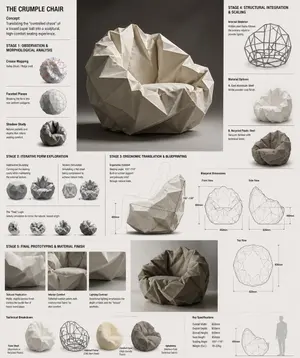
Crumple Paper Furniture Concept Design
Design Concept: The Crumple Chair (furniture type) Core Philosophy: Translating the "controlled chaos" of a tossed paper ball (inspiration) into a sculptural, high-comfort seating experience.\n\nStage 1: Observation & Morphological Analysis The goal is to deconstruct the image of the crumpled paper into usable geometric data. Crease Mapping: Identify the primary "valley" and "ridge" lines. These represent potential structural ribs or seams in the chair. Faceted Planes: Break down the sphere into a series of non-uniform polygons. Each flat surface of the paper becomes a potential panel for the chair’s upholstery or shell. Shadow Study: Analyze how the "tossed" form creates deep recesses. These natural pockets guide where the user’s weight will be cradled. \n\nStage 2: Iterative Form Exploration Moving from a sphere to a seat through "Digital Crumpling." Subtractive Sculpting: Imagine the paper ball as a solid mass. Use Boolean operations to "carve out" a seating cavity that fits the human form while maintaining the external jagged texture. Tension Simulation: Use 3D software (like Rhino or Blender) to simulate a flat sheet of material being compressed. This ensures the folds look authentic and not "modeled." The "Toss" Logic: Experiment with gravity-based simulation dropping a digital mesh to see how it settles naturally, mimicking the "tossed" origin. \n\nStage 3: Ergonomic Translation & Blueprinting Refining the raw aesthetic into a functional object. The Comfort Core: Overlay a standard ergonomic template (Seating Angle: 105°–110°) over the crumpled form. Adjust the internal "folds" to provide lumbar support and pressure relief. Blueprint Generation: Create technical orthographic views (Front, Side, Top). Map out the dimensions: Seat Height: 450mm Total Width: 850mm Surface Smoothing: Maintain the sharp "paper edges" on the exterior shell while softening the interior contact points for skin comfort. \n\nStage 4: Structural Integration & Scaling Making the concept physically viable. The Skeleton: Design a hidden internal frame (likely CNC-bent steel rods or a 3D-printed lattice) that follows the most prominent ridges of the paper folds to provide rigidity. Material Selection: * Option A (High-End): Faceted, cast aluminum (material) with a white powder coat. Option B (Soft): Vacuum-formed recycled plastic shell covered in "memory-fold" technical fabric that retains a wrinkled appearance. \n\nStage 5: Final Prototyping & Material Finish Textural Replication: Apply a matte, slightly porous finish to the material to mimic the tactile feel of heavy-bond paper. Lighting Contrast: Use directional studio lighting in the final renders to emphasize the "tossed" shadows, making the chair look like a giant piece of discarded inspiration. Design Tip: To keep the "tossed" look authentic, avoid symmetry.3c:Tb6f,

Meta Quest 3 Exploded View Poster
Create a clean premium Japanese tech infographic poster for Meta Quest 3 (product name), centered on a vertically stacked exploded view of a white mixed-reality headset floating in space against a soft lavender-to-blue gradient background. At the top, place the Meta logo in blue followed by a large bold black sans-serif headline reading Meta Quest 3 (headline text), with a smaller Japanese tagline beneath: 「まったく新しい現実を、まったく新しい構造から。」. The central subject is a highly polished 3D product render shown as an engineering breakdown with exactly 9 numbered layers, each layer separated evenly from top to bottom and labeled with blue circular number markers on the left side from 1 to 9. The 9 visible layers are: 1) the white outer faceplate shell with three front sensor/camera openings, 2) a row of exactly 3 black tracking camera modules, 3) the main logic board with chips and a clearly visible Snapdragon XR2 Gen 2 processor graphic at the center, 4) a pair of large pancake lens assemblies with vivid purple-blue glass reflections, 5) the black internal frame chassis with openings for optics, 6) the battery/electronics bar with glowing blue accents, 7) two white articulated side strap arms, 8) a white fabric head strap loop, 9) a black soft facial interface cushion at the bottom. Add rounded rectangular annotation boxes with thin white borders and subtle transparency on both sides, each connected by fine white leader lines to the corresponding layer. There are exactly 7 feature callout boxes total: 3 on the left and 4 on the right. Left side boxes, from top to bottom, read: 「Snapdragon XR2 Gen 2」 with a chip icon and smaller Japanese body text, 「調整可能なIPD機構」 with an optics adjustment icon and smaller Japanese body text, 「精密設計されたヘッドストラップ」 with a headset strap icon and smaller Japanese body text. Right side boxes, from top to bottom, read: 「フェイスプレート」 with a simple faceplate icon and smaller Japanese body text, 「トラッキングカメラ」 with a camera icon and smaller Japanese body text, 「パンケーキレンズ」 with a dual-lens icon and smaller Japanese body text, 「高性能バッテリー」 with a battery icon and smaller Japanese body text, plus a lower-right box reading 「柔らかなフェイスインターフェース」 with a soft cushion icon and smaller Japanese body text; keep the overall visual balance elegant and symmetric. At the bottom, add a wide white rounded banner spanning most of the width. On its left side place a large bold Japanese statement in blue: 「体験は、構造から進化する。」 and below it smaller Japanese explanatory copy in black. On the right side of the banner place the blue Meta logo and the wordmark “Meta”. Use a sleek Apple-like product marketing style, ultra-sharp 3D rendering, soft studio lighting, subtle glow, precise shadows, glossy plastics, realistic materials, minimal clutter, and a high-end corporate presentation aesthetic.3b:Tc2b,Create a clean premium Japanese tech infographic poster for Meta Quest 3 (product name), centered on a vertically stacked exploded view of a white mixed-reality headset floating in space against a soft lavender-to-blue gradi

Professional Physical Product Design Board
{ "prompt": { "title": "High-End Physical Product Design Board", "trigger": "Upload a simple sketch or outline of a product. Use it to build a full, professional product design poster—the kind that wins over investors and gets featured on top design websites.", "prime_directive": { "rule": "Every shape, material, screen, and accessory must come directly from the lines and style of the uploaded sketch.", "enforcement": "Do not use standard templates. Look closely at the shape. Build a complete physical and digital world from its basic design." }, "format": { "orientation": "Horizontal", "aspect_ratio": "16:9", "layout": "Clean technical grid", "composition": "Neat, spacious, and purposeful—balancing big, beautiful images with clear technical details" }, "sections": { "01_product_header": { "label": "The Main Shot", "elements": [ "Product name (product name) in strong, clean text", "Short product goal—5 words max, sharp and clear", "Three main feeling words (e.g., Smooth / Tough / Smart (style keywords))" ] }, "02_materials_system": { "label": "Colors, Materials, and Finishes", "palettes": { "primary_body": "Main materials (e.g., dark metal, smooth plastic (primary materials))", "secondary_parts": "Materials for buttons, ports, or edges", "touch_areas": "Materials you feel (e.g., soft rubber, textured fabric)" }, "per_material_display": [ "Close-up picture of the material", "Material name", "Finish type (matte, shiny, or rough)" ] }, "03_exploded_view": { "label": "Inside the Product", "components": [ "Outer shell floating above the inside parts", "Visible battery, main circuit board, or switches", "Connecting wires and cooling parts" ], "requirement": "Must look like it can actually be built in real life, with clear guide lines." }, "04_digital_screen": { "label": "The App or Screen", "define": [ "The main device screen or a mobile app that controls it", "The screen design must match the physical product's shape" ], "visual_tiles": { "count": "2–3 key screens", "style": "Dark mode with high contrast and simple buttons" } }, "05_unboxing_experience": { "label": "The Packaging", "rule": "The box must look premium, sturdy, and environmentally friendly.", "mockups": [ { "type": "Outer Box", "detail": "Clean logo pressed into thick, high-quality cardboard" }, { "type": "Inside Tray", "detail": "Perfectly cut spaces to hold the product and wires safely" } ] }, "06_real_world_use": { "label": "Human Interaction", "scenarios": [ "Product sitting naturally on a desk or outdoors", "A person's hand pressing the main button or holding the handle", "Realistic lighting and shadows that match the background" ], "requirement": "Must look like a real photograph to show the actual size of the item." }, "07_text_and_specs": { "label": "Technical Details", "tiers": { "model_number": "Clear, typewriter-style text for small numbers" } } } }

Exploded View Visualization of a Drip Coffee Maker - Nano Banana Pro AI Prompt for Product Marketing
A photorealistic premium exploded view visualization of a Scarlett (appliance brand) drip coffee maker. The coffee machine, featuring a black plastic body with metal accents, is completely disassembled with all components floating in mid-air, arranged in a strict vertical composition along a central axis Floating Components (Top to Bottom) Render Style & Camera: Photorealistic 3D render, high-end appliance advertising photography level (Octane / Cinema 4D style), PBR materials, extremely high detail on plastic, glass, and metal textures. Frontal view with a slight downward tilt. Vertical aspect ratio (9:16). The object occupies approximately 70% of the frame. The mood conveys premium quality, cleanliness, engineering precision, and the concept of "seeing how coffee works Render Style & Camera: Photorealistic 3D render, high-end appliance advertising photography level (Octane / Cinema 4D style), PBR materials, extremely high detail on plastic, glass, and metal textures. Frontal view with a slight downward tilt. Vertical aspect ratio (9:16). The object occupies approximately 70% of the frame. The mood conveys premium quality, cleanliness, engineering precision, and the concept of "seeing how coffee works.

Luxury Perfume Bottle in Mystical Forest Product Shot
Create a ecommerce image of Luxury Perfume Bottle In Mystical Forest Product Shot. Style: photorealistic. Composition: balanced and well-framed. Lighting: natural with cinematic mood. Category: product. Reference: luxury-perfume-bottle-in-mystical-forest-product-shot-11500.

Two-Phase Prompt for Absurd Product Fusion Concepts
Create a ecommerce image of Two Phase Prompt For Absurd Product Fusion Concepts. Style: photorealistic. Composition: balanced and well-framed. Lighting: natural with cinematic mood. Category: product. Reference: two-phase-prompt-for-absurd-product-fusion-concepts-2069.
他のプロンプトを探す
カテゴリ別にAI画像・動画プロンプトをもっと見る。