
テキストから画像
Educational Commodity Universe Diorama Prompt - Nano Banana Pro AI Prompt for Infographic / Edu Visual — AI 画像プロンプト
An educational, highly structured prompt template designed to generate an isometric tabletop photography image of a 'Commodity Universe' diorama. It instructs the AI to deconstruct a chosen commodity (like coffee or gold) into its core, varieties, and historical transit methods, arranging them in a detailed museum-style display on a polished wooden board. - AIPinMaker
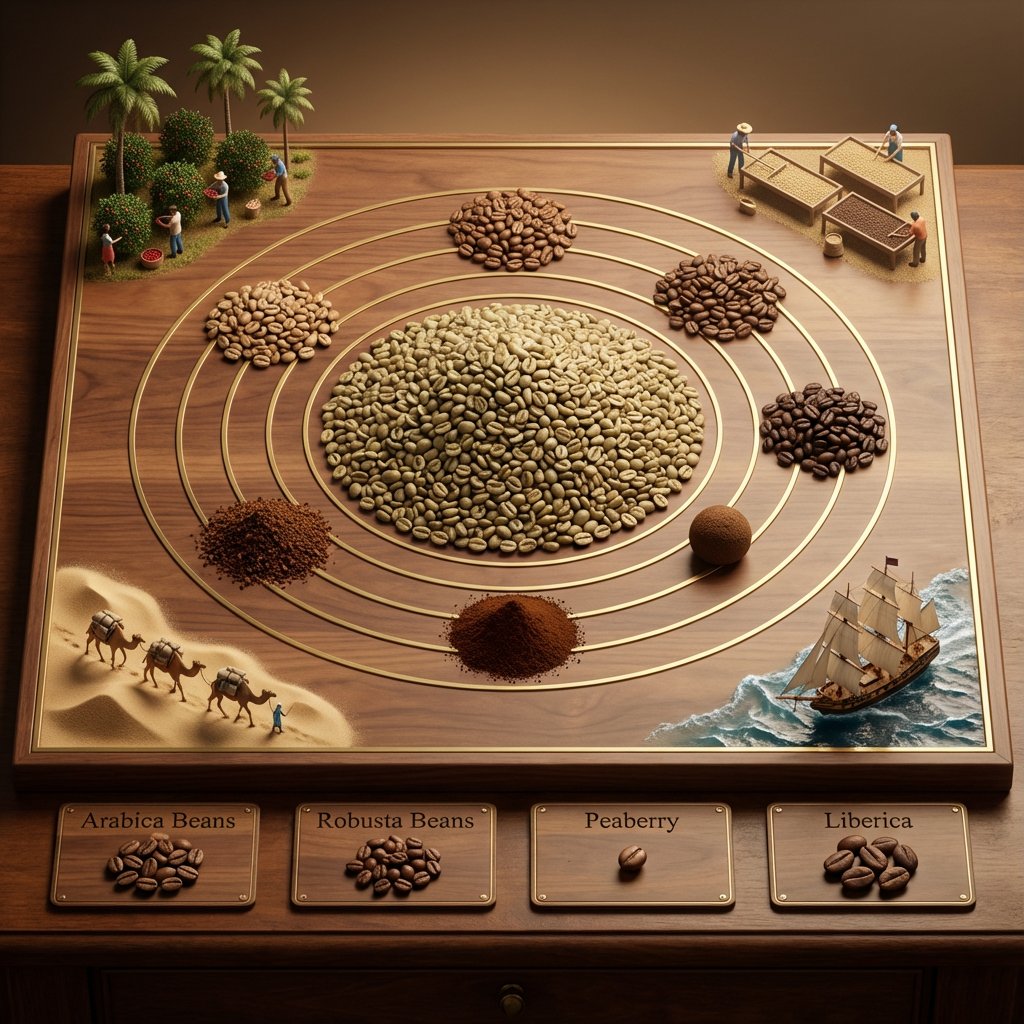
プロンプト
<instruction> for {argument name="commodity" default="Coffee"}

Input A is a Historic Commodity or Resource (e.g., Spices, Tea, Silk, Coffee, Gold).
Deconstruct the commodity into 3 Educational Assets:
     The Core :  Identify the most common or valuable raw form.
         (e.g., Spices -> A pile of Black Peppercorns. Tea -> A mound of Black Tea leaves. Gold -> A large Nugget).
     The Varieties:  Identify 4-5 distinct variations or colors.
         (e.g., Spices -> Red Paprika, Yellow Turmeric, Brown Cinnamon. Tea -> Green, White, Oolong, Matcha).
     The Transit :  Identify the historical method of transport.
         (e.g., Camel Caravans, East Indiaman Ships, Steam Trains).

  2. Container
Goal: "Commodity Universe" Educational Diorama.
     The Base:  A large, square   Polished Walnut or Oak Board   sitting on a library table.
     The Layout:  A radial/circular design in the center, flanked by narrative vignettes in the corners.

  3. The Centerpiece
     The Metaphor:  The commodity is the center of the world.
     The Sun:  A massive, textured pile of the "Core" material (Step 1) sits in the exact center.
     The Orbit:  Inlaid gold or brass rings ripple out from the center.
     The Planets:  Smaller mounds or spheres of the "Varieties" (Step 1) orbit the center, creating a colorful spectrum of textures (powders, grains, solids).

  4. Narrative Corners
     The Origin (Top Corners):  Miniature dioramas sculpted directly onto the board showing the harvesting process (e.g., tiny figures picking tea leaves, mining gold, or shaking spice trees).
     The Journey (Bottom Corners):  Miniature dioramas showing the "Transit" (Step 1).
         Detail:  Use   Resin   for water (ships) or   Sand   for deserts (camels).

  5. The Footer:
     Placement:  Along the bottom edge of the board.
     Format:  Three or four rectangular   Wooden Plaques   embedded in the table.
     Content:  The name of a specific variety (e.g., "Cinnamon") engraved in serif text, with a physical sample of that ingredient piled on the plaque.

  Output:   ONE image, 1:1 Aspect Ratio, Isometric Tabletop Photography, "Museum Display" aesthetic, Warm Tones.
</instruction>参照画像
このAI画像プロンプトテンプレートの使い方
 1
1プロンプトをコピー — テンプレートのプロンプトとネガティブプロンプトを取得。  2
2モデルを選ぶ — 最適な推奨AIモデルを選択。  3
3生成 — ワンクリックでスタジオを開いて作成。
関連テンプレート

Fantasy Auto-Battler Gameplay UI
Goal: Create a polished 2D fantasy auto-battler gameplay mockup for round 3-2 (game title or mode), shown from an isometric top-down perspective, with a stone-tile battle arena, UI overlays, characters, shop cards, traits, and player leaderboard. Canvas: 16:9 widescreen game screenshot, 1152×768 style composition, crisp hand-painted fantasy game art with high readability, saturated colors, soft ambient lighting, and League-of-Legends/TFT-inspired interface design. Layout: The center is a square stone battlefield grid on a floating forest platform. The arena has worn beige tiles, mossy edges, stairs and stone railings, evergreen trees, cliffs, water at the right edge, purple banners, glowing blue crystals on the left, and four flaming braziers placed near the arena corners. At the top center, place a dark ornate HUD bar showing “3-2”, small trait/item icons, a gold counter “26”, and a long cyan progress bar beneath it. At top right, add three rounded menu buttons with icons: helmet, book, and gear. Battlefield units: Show exactly 11 visible characters on the board: 5 enemy units on the upper half with red health bars, and 6 allied units on the lower half with green health bars and yellow star ratings. Enemy units: 1 skeleton swordsman, 1 large horned beast warrior with axe, 1 purple mage holding glowing magic, 1 small dark rogue with axe, and 1 armored skeleton fighter. Allied units: 1 blue-and-brown knight with sword and shield, 1 green elf archer/swordsman, 1 blue-armored mage or knight with staff, 1 blonde cleric holding a golden staff, 1 massive horned tank warrior with shield, and 1 small blue gnome engineer/warrior. Add a small bench character standing at the lower-left edge of the board. Left trait panel: Create a vertical synergy list with exactly 6 rows, each with a bronze/dark icon, class name, current count, and thresholds. The visible French text should be preserved: “Guerrier” with “4” and “2 / 4 / 6”; “Mage” with “3” and “3 / 6 / 9”; “Assassin” with “2” and “2 / 4 / 6”; “Gardien” with “2” and “2 / 4 / 6”; “Elfe” with “1 / 2”; “Nécromancien” with “1 / 2”. Right leaderboard: Add a vertical player list with exactly 8 players, each in a dark horizontal nameplate with circular avatar on the right and health number. Use these names and values: “Lunaire 100”, “Ragnar 89”, “Akira 78”, “Zorvath 64”, “Nyméria 56”, “Scarn 42”, “Yuki 34”, “Kaldrin 21”. Use varied colorful fantasy portraits: purple mage orb, blue creature, dark red portrait, green orc, pink-haired character, cyan creature, orange-haired character, blue masked character. Bottom shop and controls: Along the bottom, create a wide shop UI panel. On the left, show a level box reading “NIV. 6” with XP “12/36” and a small cyan progress bar. Under it, exactly 2 control buttons: “Acheter XP” with coin cost “4” and blue double-up arrow icon, and “Actualiser” with coin cost “2” and circular refresh arrow. In the center, show exactly 5 purchasable champion cards with portrait art, class/trait icons, French names and traits, and gold costs: “Chevalier” / “Guerrier” cost 1; “Archer sylvestre” / “Elfe” cost 2; “Mage de givre” / “Mage” cost 3; “Assassin des ombres” / “Assassin” cost 2; “Clerc lumineux” / “Gardien” cost 1. On the bottom right, place a large ornate gold-bordered button labeled “Fin du tour” with coin cost “5”. Visual style: Painterly fantasy game UI, clean bevels, dark teal and bronze interface frames, readable small text, glowing magic effects, warm firelight, cyan highlights, and compact mobile/PC strategy-game presentation. Keep the mockup as a single in-game screenshot, not a poster or concept sheet. Avoid photorealism, avoid extra panels, avoid watermarks, and do not add more units, shop cards, trait rows, or players than specified.37:Tf90,Goal: Create a polished 2D fantasy auto-battler gameplay mockup for round 3-2 (game title or mode), shown from an isometric top-down perspective,
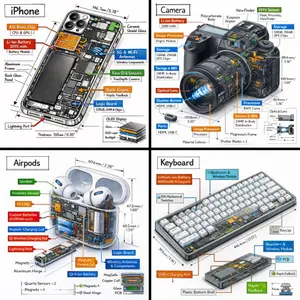
Technical Isometric Teardown Infographic
Generate a technical infographic of OBJECT (object) rendered from a 45-degree isometric 3D viewpoint (viewpoint), with the object slightly tilted to expose depth and three-dimensional structure. Blend a photorealistic render of the object with hand-drawn black ink technical annotations on a clean pure-white background. Include: - Color-coded callout boxes labeling each key component - Transparent / cutaway sections that reveal internal parts - Precise measurements, dimensions, and scale markers - Material descriptions and quantity counts - Color-coded directional arrows for function and flow: RED for power/battery, BLUE for data/connectivity, ORANGE for thermal/processor, GREEN for sensors/haptics - Simple schematics or cross-section diagrams where useful Place the "OBJECT (object)" title inside a hand-sketched technical frame in the top-left corner. Style: black architectural-pen linework, sketchy yet precise; the object remains fully visible; vibe of a professional engineering teardown or museum exhibit. Clean layout with balanced negative space. Perspective: 45-degree isometric tilt that dramatically reveals depth, dimension, and internal architecture, like a product engineering manual. Color usage: roughly 10-15% accent density, black dominant, white background. Output: 1080x1080, ultra-crisp, optimized for social feeds.
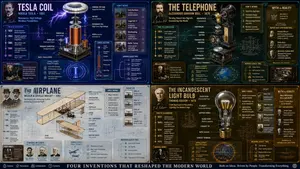
Exploded View Invention Infographic
2x2 grid, do this for tesla coil (invention) and 3 other famous inventions. 16:9 inventor_content = ( patent_drawing_recreation_in_isometric_exploded_view_of_[invention (invention placeholder)]_by_[inventor (inventor placeholder)] * 1.7 ) + ( historical_context_timeline_of_scientific_breakthroughs_leading_to_[invention] * 1.5 ) + ( failure_log_and_iteration_cards_showing_[inventor]_s_failed_prototypes_with_annotations * 1.6 ) + ( cross_section_and_mechanics_diagram_of_[invention]_with_material_callouts * 1.4 ) + ( economic_and_cultural_impact_ripple_map_of_[invention]_on_society * 1.3 ) + ( quirky_personal_habit_or_workshop_inserts_from_[inventor]_s_biography * 1.2 ) + ( modern_day_derivative_technologies_tree_from_[invention] * 1.1 ) + ( common_misconception_busting_panel_about_who_really_invented_[invention] * 1.0 ) - ( romanticized_lone_genius_cliché_without_team_context / 3.0 ) - ( boring_textbook_engraving_style_instead_of_dynamic_infographic / 2.9 ) - ( eurocentric_filter_if_invention_originated_elsewhere / 3.2 )3
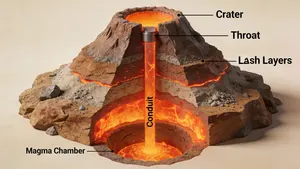
3D Cutaway Volcano Diagram
A 3D cutaway diagram of a volcano, showing its internal structure. The diagram should clearly label the magma chamber, conduit, throat, crater, and layers of ash and lava. The style should be a clean, technical illustration, with realistic textures for the rock and magma. This demonstrates the ability to generate accurate, science-based visuals for educational purposes, requiring strong spatial and scientific reasoning. –ar 16:9
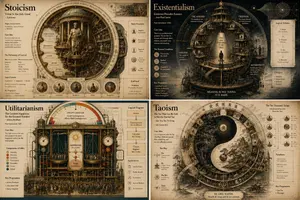
Philosophical Infographic Machine Generator
2x2 grid, 16:9, do this for 4 famous philosophies: class Philosophical_Idea_Machine_DNA: def __init__(self): self.subject = "[PHILOSOPHY / CONCEPT / PARADOX] (subject)" self.parents = { "composition_parent": "Renaissance memory theatre — wheels within wheels, concentric knowledge rings, symbolic emblems", "atmosphere_parent": "Alchemical manuscript — cryptic imagery, lunar light, sepia and oxidized copper tones", "graphic_parent": "Bauhaus conceptualism — elemental shapes as thought-forms, clean lines, primary colour logic", "detail_parent": "Encyclopédie plate — mechanical cross-sections of ideas, gears of dialectic, part numbering" } self.mutations = { "medium_mutation": "Printed layers of translucent vellum overlays that build the idea when viewed together", "information_mutation": "Logical syllogisms as circuit diagrams, historical proponents as constellation maps, glossary of terms", "semantic_mutation": "The abstract idea becomes a physical, inhabitable clockwork universe", "scale_mutation": "A single logical step unfolds into a complete microcosmic city where the idea is lived reality" } self. style_mix = { "composition_parent": 0.25, "atmosphere_parent": 0.20, "graphic_parent": 0.30, "detail_parent": 0.15, "mutations": 0.10 } def generate_subject(self): subject = """ Create a vertical luxury infographic poster that gives physical form to [SUBJECT]. Invent a magnificent symbolic machine, diagram, or architecture that represents the idea. Explode its layers to show internal logic, historical influences, counterarguments, and real-world manifestations. The design must feel like a transmission from a library that exists outside time. Semantic inference should render the intangible tangible with intellectual rigour. """ return render( subject, style_mix=self. style_mix, format="vertical poster, conceptual infographic", typography=""" Large title: [CONCEPT NAME] (concept name) Subtitle: [ORIGIN / PHILOSOPHER / MAXIM] Microtext: [LOGICAL FORMULA / CITATION / FIRST USE DATE / LATIN TERM] """, composition=""" Mandala-like symmetry or dynamic tension depending on concept nature. Clear visual hierarchy, meditative spacing. """, lighting=""" Illumination from unseen source — like a page from a sacred text held to candlelight. """, constraints=""" No trite symbols (lightbulbs for ideas, etc.). No pseudo-profound emptiness. """ )3a:Tb97,2x2

Hidden Duck in Chibi Venice
A highly detailed isometric miniature diorama of Venice in a whimsical chibi style, designed as a busy hidden-character puzzle scene. The setting is a sunlit Venetian canal district packed with tiny cute travelers and locals, viewed from a slightly elevated angle so the canal, bridges, piazza, storefronts, and upper facades are all visible at once. Warm terracotta buildings with weathered stucco walls, flower boxes, striped awnings, shuttered windows, balconies, rooftop chimneys, and ivy frame both sides of a narrow turquoise canal. In the distance, elegant Venetian architecture includes a large arched bridge, domes, towers, and a clock tower, creating depth and a postcard-like skyline. The streets and canal are extremely crowded with exactly over 150 chibi characters, each with oversized heads, small bodies, glossy eyes, varied skin tones, and distinct outfits, hairstyles, hats, and accessories, posed walking, chatting, shopping, sitting, rowing, or sightseeing. Many wear straw boater hats, striped shirts, dresses, vests, jackets, and travel clothes in cheerful colors. Several gondolas move through the canal, each carrying tiny passengers, with gondoliers in classic Venetian striped attire. Include exactly 3 stone pedestrian bridges crossing the canal, multiple gondolas, many canal posts, ornate green street lamps, café tables, market stands, pigeons on the pavement, and souvenir displays. Add a playful scavenger-hunt mood with a small hanging sign in the upper right that reads Find the duck! (headline text) and shows a cute yellow rubber duck icon. Hide exactly 2 small yellow ducks in the scene, subtly placed among the crowd and canal area so viewers can search for them. Visible shop and street signs should include HOTEL CA' DEL SORRISO on the left building, GELATO on a striped awning storefront, TRATTORIA alla Gondola on the right, SERVIZIO GONDOLE on a green canal sign near the center foreground, VENEZIA MASK on a souvenir stall, and CARNEVALE DI VENEZIA on a poster display at the lower right. Include carnival masks for sale, café seating, a market umbrella, and tiny decorative details everywhere. Render it as ultra-detailed, polished 3D storybook art with toy-like textures, soft global illumination, vibrant Mediterranean colors, crisp focus, and a charming travel-poster atmosphere centered on Venice (city), featuring a hidden mascot search for yellow duck (hidden object), in the playful world of Ruhia (series name).39
他のプロンプトを探す
カテゴリ別にAI画像・動画プロンプトをもっと見る。