
テキストから画像
Chengdu Taikoo Li Line Art Poster — AI 画像プロンプト
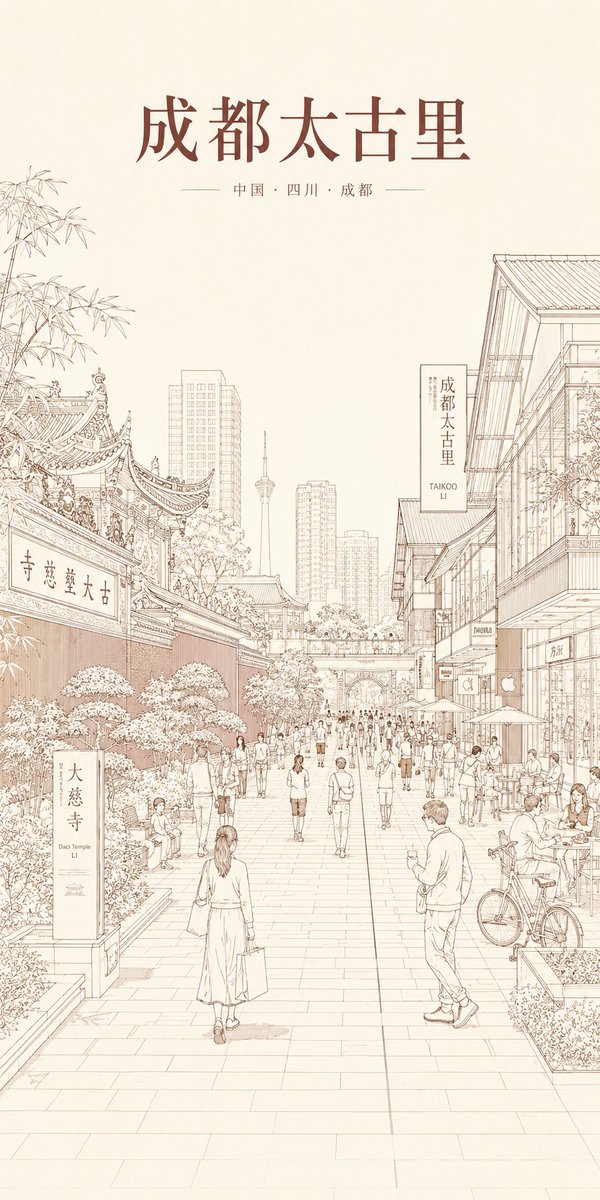
A vertical sepia architectural line-art travel poster of Chengdu Taikoo Li for city branding, editorial covers, or presentation visuals. - AIPinMaker
プロンプト
Create a tall vertical travel poster in a refined monochrome architectural line-art style on warm ivory paper, with delicate sepia-brown ink outlines and very light beige shading. The scene is a pedestrian street in Chengdu Taikoo Li, China, drawn with precise thin lines like a hand-rendered urban sketch: traditional Daci Temple architecture with ornate curved tiled roofs and bamboo on the left, modern glass retail buildings with balconies and storefronts on the right, a long paved promenade receding in one-point perspective, dense but lightly drawn crowds walking and sitting at outdoor café tables, bicycles, planters, trees, umbrellas, and distant high-rise towers with a slender landmark tower centered in the skyline. At the top, place a large elegant Chinese headline {argument name="headline text" default="成都太古里"} in dark reddish-brown serif calligraphy, with a smaller centered subtitle below reading {argument name="subtitle text" default="中国 · 四川 · 成都"} flanked by thin horizontal lines. Include exactly 3 visible sign text elements in the street scene: a vertical stone sign in the lower left reading {argument name="temple sign text" default="大慈寺"} with small English “Daci Temple LI” beneath it, a hanging vertical shop sign on the right reading {argument name="district sign text" default="成都太古里"} with small English “TAIKOO LI” beneath it, and a traditional temple plaque on the left gate reading {argument name="gate plaque text" default="古大慈寺"}. Keep the composition airy with large blank space in the upper half, no heavy colors, no photorealism, no thick outlines, no messy hatching, and no extra title text beyond the specified signs.37:T6b6,Create a tall vertical travel poster in a refined参照画像
このAI画像プロンプトテンプレートの使い方
 1
1プロンプトをコピー — テンプレートのプロンプトとネガティブプロンプトを取得。  2
2モデルを選ぶ — 最適な推奨AIモデルを選択。  3
3生成 — ワンクリックでスタジオを開いて作成。
関連テンプレート
Medical Anatomy Visualization Poster
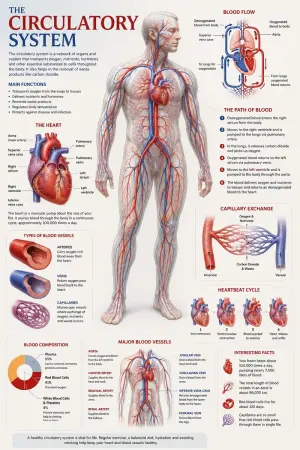
Create a premium educational “scientific anatomical visualization poster” focused on the human circulatory system (subject), designed more like a modern medical museum display and biological atlas page rather than a typical infographic. The composition should feel elegant, immersive, and medically artistic, blending anatomical realism, scientific illustration, and cinematic educational design. Visual Direction: • Vertical poster composition or clean square format • Soft medical-grade background with subtle paper textures, anatomical sketch overlays, and faint scientific grid lines • Refined medical color palette using ivory white, deep crimson red, arterial blue, soft pink tissue tones, muted gray, and subtle gold accents • Clean editorial typography with elegant anatomical labeling • Minimal UI-style information panels — focus more on visual storytelling and anatomical beauty • Thin precision annotation lines with museum-style labels • Soft realistic lighting and premium biological rendering • Highly detailed semi-transparent human body illustration revealing the circulatory network beneath the skin • Realistic vascular textures with glowing arteries and veins flowing throughout the body • Sophisticated educational aesthetic inspired by high-end medical textbooks and anatomy exhibitions Main Subject Presentation: A breathtaking ultra-detailed anatomical render of the human circulatory system placed centrally, featuring: • semi-transparent human anatomy • hyper-detailed arteries and veins • visible heart chambers and aorta • capillary branching networks • realistic blood-flow coloration • glowing oxygenated vs deoxygenated circulation pathways • anatomically accurate vessel placement • subtle organ visibility beneath the vascular system • premium medical illustration realism Surround the anatomy with elegant educational visualization modules such as: • enlarged realistic heart anatomy • pulmonary circulation diagram • systemic circulation flow visualization • artery vs vein comparison • capillary exchange illustration • heartbeat cycle sequence • microscopic blood-cell closeups • blood composition visualization • major vessel identification map • oxygen transport explanation Add sophisticated scientific visual elements like: • blood-flow directional arrows • vascular cross-section diagrams • anatomical side callouts • circulation pathway diagrams • microscopic tissue exchange visuals • transparent organ overlays • ECG/heartbeat waveform accents • subtle medical chart graphics • biological texture overlays • anatomical scale comparisons Style Keywords: “museum-quality anatomical poster” “scientific medical atlas page” “premium biology visualization” “high-end anatomy illustration” “medical education artwork” “editorial anatomical design” “cinematic biological rendering” “ultra-detailed circulatory anatomy” “luxury medical textbook aesthetic3e:Tbe7,Create a premium educational “scientific anatomical visualization poster” focused on the {argument name="subje
Eye Color Analysis Guide
Goal: Create a clean Korean prompt-collection webpage/card showcasing an example GPT Image 2 prompt for a modern ice cream shop interior. Canvas: Vertical 9:16 off-white page, warm cream background, generous margins, editorial web layout. Use crisp black typography and a realistic architectural render as the central visual. Layout: At the top left, show a small breadcrumb with exactly 3 items: "프롬프트", "이미지프롬프트", and "GPT IMAGE 2", separated by chevrons. Below it, place a large bold Korean headline: 모던한 아이스크림 매장 인테리어 (headline text). Under the headline, place one large rounded-corner image frame with a thin dark border, containing a realistic modern ice cream cafe interior. Below the image, add one short Korean description paragraph. At the bottom, add one large bordered prompt box with a header bar and a pale yellow text area. Main image subject: A photorealistic modern minimalist ice cream shop named Some ice (shop name). The interior has warm late-afternoon sunlight casting leaf shadows on the wall, cream plaster walls, gray concrete flooring, gray textured back wall, white square-tile counter, warm wood canopy ceiling, hidden cove lighting, a large gray shop logo above the counter, and a single female employee behind the counter wearing a cream shirt and beige apron. Include exactly 6 round cafe tables: 2 near the left foreground, 2 along the left middle wall, and 2 toward the right side. Include about 10 visible chairs, mostly bentwood chairs with chrome legs, plus one black accent chair on the right. Include exactly 4 small illustrated menu boards behind the counter, one desktop computer on the counter, cream storage boxes and beige shopping bags on shelves to the right, 3 framed ice-cream posters on the left wall, a narrow staircase or corridor receding in the back left, and no customers. Prompt box details: The box has a thick dark outline and slightly rounded corners. The header strip is off-white with the label "프롬프트" on the left. On the right side of the header, include exactly 3 controls: a black button labeled "무료로 이미지 생성" with a right arrow, a white outlined button labeled "번역 전" with a small translation icon, and a small square copy icon button. The large body area is pale yellow and filled with dense Korean paragraph text describing the image prompt. Highlight exactly 4 inline terms with rounded blue selection-style backgrounds: "Some ice", "어플리케이션", "Have Someice Day", and "3:2". Text content: The paragraph under the image should read: 브랜드 간판, 메뉴판, 좌석, 햇살이 어우러진 따뜻하고 미니멀한 아이스크림 카페 인테리어의 사실적인 건축 시각화 프롬프트입니다. (description text) The prompt body should be Korean prose beginning with a request for a warm late-afternoon sunlit modern ice cream shop interior and should mention the shop name, app-style signage, cream plaster walls, gray concrete floor, wood canopy ceiling, 4 menu boards, 6 round tables, 10 chairs, 3 framed posters, and a 3:2 horizontal composition. Visual style: Minimal Korean web UI, high-end prompt gallery aesthetic, black and charcoal text, cream paper background, realistic architectural photography in the image area, subtle shadows, clean alignment, no clutter. Constraints: Use only one main photo, one description paragraph, and one prompt card. Keep all Korean text legible. Do not add watermarks, logos outside the shop sign, extra people, or extra UI panels.6d:Te2e,Goal: Create a clean Korean prompt-collection webpage/card showcasing an example GPT Image 2 prompt for a modern ice cream shop interior. Canvas: Vertical 9:16 off-white page, warm cream ba

Cloisonné Craft PPT Cover
Create a 16:9 widescreen PowerPoint cover slide in an elegant Chinese traditional craft presentation style, with an ivory rice-paper background, dark teal and gold ornamental border, and decorative Chinese corner brackets. The main headline on the left is large dark blue Chinese calligraphy text reading 掐丝珐琅 (headline text), with a smaller gold subtitle underneath reading 火与金线中的东方华彩 (subtitle text). Below it, place a centered rounded label plaque with teal text reading 传统工艺主题分享 (section label), and a small explanatory line near the lower left reading 认识一种以金属胎、细丝与珐琅釉色共同构成的华美工艺 (footer note). In the top-right corner, add a small ornate dark teal page indicator reading 01 / 10 (page indicator). On the right half, feature a highly detailed blue-and-gold cloisonné enamel vase on a dark wooden stand, decorated with lotus flowers, green lotus leaves, curling gold wire patterns, turquoise accents, and ornate gold handles. The tabletop foreground contains exactly 7 discrete craft objects: 1 coil of gold wire, 1 flat cloisonné floral medallion, 1 gold key-shaped ornament, 1 fine metalworking brush or stylus, and 4 small bowls of enamel powder in blue, green, turquoise, and white/gold. Add pale ink-wash mountains, a distant pavilion, soft lotus line art, and floating auspicious cloud motifs in the background. Use a refined museum-course aesthetic, realistic product rendering mixed with delicate Chinese illustration, harmonious cream, deep navy, turquoise, and metallic gold palette, crisp typography, balanced negative space, premium educational PPT title-slide composition.36:T715,Create a 16:9 widescreen PowerPoint cover slide in an elegant Chinese traditional craft
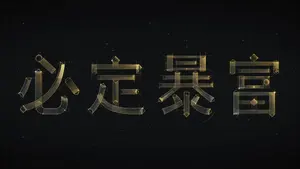
Experimental Chinese Typography Design
Create a creative image of Experimental Chinese Typography Design. Style: photorealistic. Composition: balanced and well-framed. Lighting: natural with cinematic mood. Category: photography. Reference: experimental-chinese-typography-design-23958.

Vintage Hakodate Travel Poster
Create a vintage Japanese travel poster for Hakodate, Japan (destination city) on warm aged cream paper with subtle folds, stains, and worn edges. The composition is vertical and centered, with three main text elements: a large bold black Japanese headline at the top reading 函館 (Japanese headline text), a widely spaced romanized title beneath it reading HAKODATE (romanized title), and a bottom caption between two thin red horizontal rules reading 日本 / HAKODATE, JAPAN (bottom caption). Under the headline, illustrate a detailed retro line-art street scene in muted beige, black ink, and restrained red accents: a straight tram-lined city street receding in one-point perspective, flanked by low Japanese storefronts with vertical shop signs, lanterns, awnings, overhead power lines, traffic lights, a red post box, bicycles, pedestrians, and two cars driving along the road. In the background, show a broad brown mountain rising behind the town, topped by a tall observation tower and a smaller red tower, evoking Mount Hakodate. Use crisp architectural pen-and-ink outlines, minimal flat color, nostalgic Showa-era graphic design, travel-guide poster aesthetics, clean centered layout, and no photorealism.37:T52b,
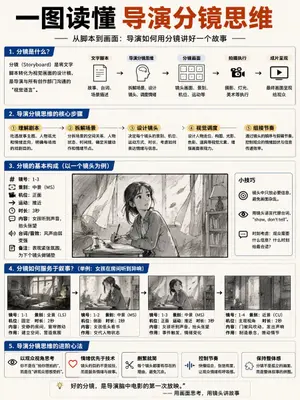
Storyboard Director Infographic
{ "type": "educational infographic poster", "header": { "title": "{argument name=\"main title\" default=\"一图读懂 导演分镜思维\"}", "subtitle": "{argument name=\"subtitle\" default=\"从脚本到画面:导演如何用分镜讲好一个故事\"}" }, "layout": { "sections": [ { "title": "1. 分镜是什么?", "components": [ "definition text box", { "type": "flowchart", "count": 5, "labels": ["文字脚本", "导演分镜思维", "分镜画面", "拍摄执行", "成片呈现"] } ] }, { "title": "2. 导演分镜思维的核心步骤", "count": 5, "labels": ["① 理解剧本", "② 拆解场景", "③ 设计镜头", "④ 视觉调度", "⑤ 组接节奏"] }, { "title": "3. 分镜的基本构成(以一个镜头为例)", "columns": [ { "position": "left", "count": 8, "labels": ["镜号", "景别", "机位", "运动", "时长", "内容", "台词/音效", "备注"] }, { "position": "center", "image": "{argument name=\"character subject\" default=\"anime girl reading in a room\"}" }, { "position": "right", "title": "小技巧", "count": 3, "description": "icon bullet points" } ] }, { "title": "4. 分镜如何服务于叙事?", "subtitle": "{argument name=\"example scenario\" default=\"举例:女孩在房间听到异响\"}", "count": 4, "panels": ["wide shot room", "medium shot girl reading", "medium shot girl looking up", "close up door opening"], "caption_labels": ["镜号", "景别", "机位", "时长", "内容", "作用"] }, { "title": "5. 导演分镜思维的进阶心法", "count": 5, "labels": ["以观众视角思考", "情绪优先于技术", "删繁就简", "控制节奏", "保持整体感"] } ], "footer": "{argument name=\"footer quote\" default=\"好的分镜,是导演脑中电影的第一次放映。\"}" }, "style": "clean corporate infographic, blue and white palette, structured grid" }
他のプロンプトを探す
カテゴリ別にAI画像・動画プロンプトをもっと見る。