
SEEDANCE STORYBOARD
Seedance Storyboard: Copy the Viral 182-Bookmark Workflow
By the AI Pin Maker Editorial Team · Published 2026-07-17
Summarize With AI
A storyboard-to-video post has been climbing X since July 14: a black-and-white kung fu storyboard, a locked character sheet, and a Seedance 2.0 clip that shoots the whole board in one take. By July 17 the original sat at 11,825 impressions, 248 likes and 182 bookmarks, with replica posts appearing within a day. The workflow behind it is two images and one prompt: upload a character sheet and a storyboard page to Seedance 2.0, reference them as @Image1 and @Image2, and tell the model to follow the panels in order.
We reproduced the whole thing with an original character of our own - a cat kung fu master, no borrowed franchises. Below are both input images, the exact prompts, two real runs with their costs and timings, and the two places where the model deviated from the board, so you know what to check before you spend credits.
The workflow everyone is bookmarking
The original post published its image prompt in full ("Create a raw kung fu performance storyboard focused on extreme physical action... 16:9 storyboard sheet, 12 cinematic panels... black and white only"), and a follow-up post in the same wave spelled out the video half: "Use @Image1 as the fixed character sheet reference. Use @Image2 as the storyboard reference." That phrasing is not social-media shorthand - it is the exact reference syntax the Seedance 2.0 workbench inserts when you mention an uploaded asset in the prompt box.
So the whole viral format compresses into three moves: make a character sheet, make a storyboard page, then write one video prompt that pins the character to @Image1 and the shot list to @Image2. Everything else - style, pacing, camera - rides inside that prompt.
Step 1: Make your two input images
You need two images. The character sheet locks who your hero is; the storyboard locks what happens. Ours were generated with an AI image model, but any image tool or a pencil and paper works - Seedance only cares that the panels read clearly. Use characters and drawings you own the rights to.
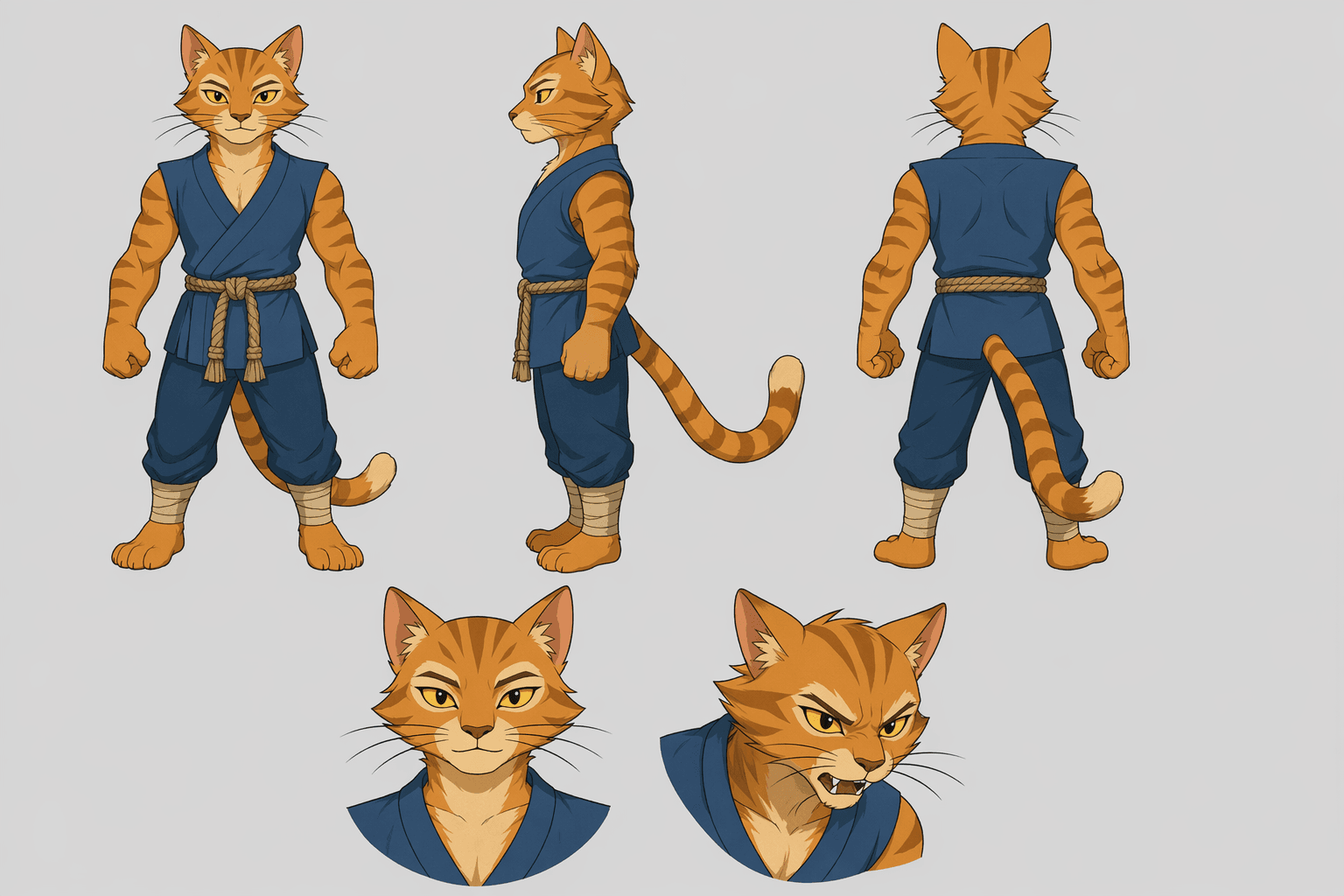
A character sheet that survives animation has three things: multiple angles of the same body (front, side, back), a costume with two or three nameable details you can repeat in the prompt (ours: blue sleeveless robe, rope belt, leg wraps), and a plain background. Here is the exact prompt we used - paste it into whatever image tool you have:
Character reference sheet for an original animated character: an orange tabby cat kung fu master wearing a simple sleeveless blue training robe with a rope belt. Full-body turnaround: front view, side view, back view, plus two head expressions (calm, battle-focused). Clean flat cel-shaded illustration on plain light gray background, model-sheet style, no text labels, no watermark. Original character, not based on any existing franchise.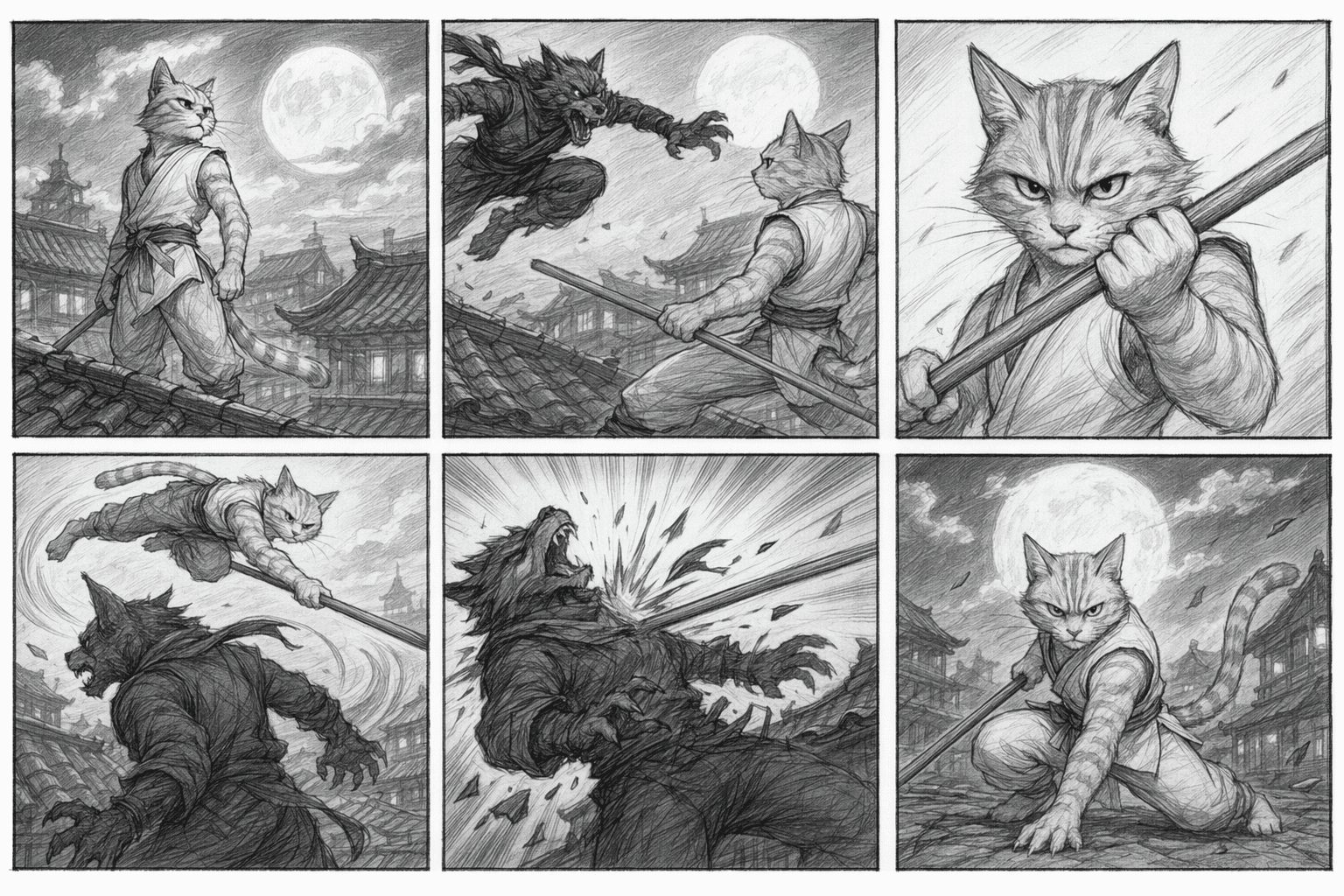
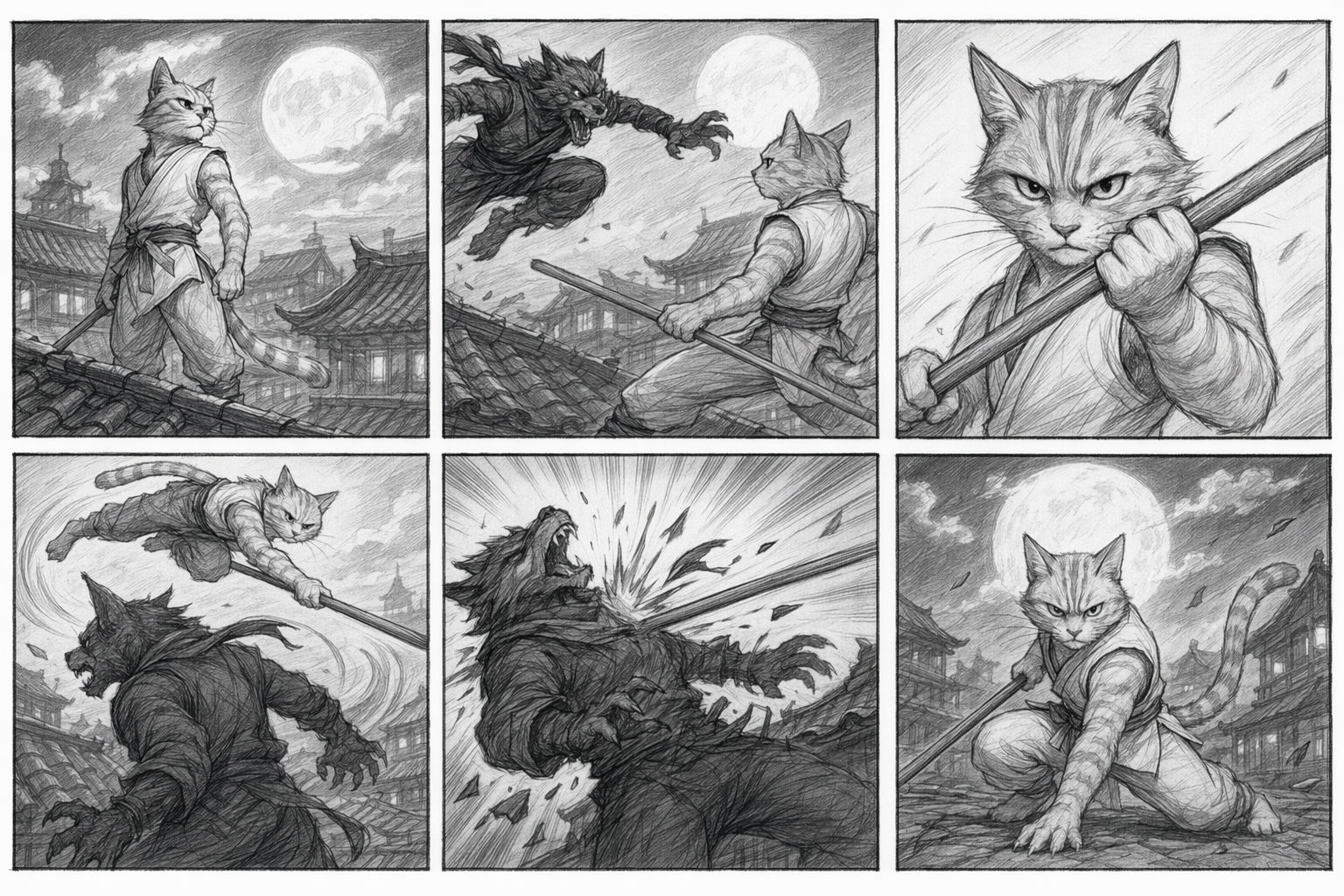
For the storyboard: clear panel borders, one action per panel, readable left-to-right order. The viral wave uses rough black-and-white pencil, and that is worth copying - it keeps the model focused on staging instead of style. We drew six panels instead of the original post's twelve, and that was deliberate: at 10 seconds you get roughly a second and a half per panel, and every extra panel past that budget is a panel the model will skip. The storyboard prompt:
A 6-panel black-and-white storyboard page for a short martial-arts action scene starring an orange tabby cat kung fu master in a sleeveless training robe. Rough pencil sketch style with panel borders in a 3x2 grid. Panel 1: cat stands on a moonlit rooftop, wind in fur. Panel 2: a shadowy wolf bandit leaps in from the left. Panel 3: close-up, cat narrows eyes and raises a wooden staff. Panel 4: dynamic wide shot, cat vaults over the wolf, staff sweeping. Panel 5: impact frame, wolf knocked back with motion lines. Panel 6: cat lands in a low stance, robe settling, moon behind. No dialogue, no captions, no text, no watermark. Original characters only.Step 2: Upload both and reference them with @Image1 / @Image2
Open the Seedance 2.0 studio and add both images as reference assets - the uploader takes up to 10 files and 40 MB combined, so two PNGs fit with room to spare. Upload the character sheet first, then the storyboard: mention numbers follow upload order within each type, so the sheet becomes Image 1 and the board becomes Image 2.
Then, in the prompt box, type @. A picker lists your uploaded assets by number; choosing one inserts @Image1 or @Image2 straight into the text. That inserted token is the reference - no file names, no extra syntax. The prompt box takes up to 2,000 characters, which matters here, because the storyboard workflow spends prompt length like nothing else: you are about to restate every panel in words.
Step 3: The video prompt, copied and explained
Here is the full prompt from our first run, unedited:
Animate the 6-panel storyboard in @Image2 as one continuous martial-arts action sequence, following the panels strictly in order: 1) the hero stands on a moonlit rooftop, wind in his fur; 2) a shadowy wolf bandit leaps in from the left; 3) close-up, the hero narrows his eyes and raises a wooden staff; 4) wide dynamic shot, the hero vaults over the wolf with a sweeping staff strike; 5) impact frame, the wolf is knocked back; 6) the hero lands in a low stance as the moon glows behind him. The hero is the orange tabby cat kung fu master from @Image1 - keep his blue sleeveless robe, rope belt and leg wraps consistent in every shot. Cinematic ink-and-wash martial arts style, dynamic camera moves, no text, no captions.The structure earns its length. Restating all six panels as a numbered list looks redundant - the board is right there in @Image2 - but the model does not reliably read panel order off the image alone; the written list is what turns "inspired by your storyboard" into "shoots your storyboard". The character line does the same job the henshin trend's "keep his face identical" line does (see our henshin prompts breakdown): naming the three costume details gives the model something concrete to hold between shots. And the style line stays generic - "cinematic ink-and-wash martial arts" - because genre words are safe where franchise names are not.
Duration follows the panel count: six panels fit 10 seconds. If you only want the climax, do what we did in run 2 - animate a slice ("panels 4 to 6") and give it slow motion:
Animate only panels 4 to 6 of the storyboard in @Image2 as a slow-motion martial-arts finale: the hero vaults over the wolf bandit with a sweeping staff strike, the strike connects and the wolf is knocked back, then the hero lands in a low stance with his robe settling while the full moon glows behind him. The hero must match the orange tabby cat kung fu master from @Image1 exactly - same blue sleeveless robe, rope belt, leg wraps. Moonlit rooftop, cinematic wuxia atmosphere, slow motion emphasis on the staff impact, no text.Two real runs, panel by panel
Run 1, 10 seconds, all six panels:
Panel by panel against the board: panels 2 through 6 all landed in order - the wolf's leap, the staff close-up, the vault, the impact frame, the landing stance - and the character held his robe, belt and leg wraps through every cut. The one deviation: panel 1 asked for the hero standing on the rooftop, and the model opened on a bare moon establishing shot instead. Models love inventing establishing shots; if you need your hero in frame one, say so explicitly ("open on the hero, no empty establishing shot").
Run 2, the 5-second slow-motion finale:
The staff impact and the landing both delivered, with real slow-motion weight. The miss is instructive too: in the opening shot the robe drifted from blue to grey-white before correcting itself. Character drift concentrates at shot boundaries - which is exactly why the costume details belong in the prompt and not just in the sheet.
Costs and timings, so you can budget before you run: these two clips took 253 and 220 seconds from submit to finished file. Across 15 fast-tier runs we have archived on this site, per-run cost ranged from 94 to 303 credits (average about 170) depending on length and settings - the composer shows a live estimate before you commit, so check that number rather than ours.
When it breaks: drift and skipped panels
Three failure modes cover almost everything this workflow throws at you, and two of them showed up in our own runs:
- Skipped panels. More panels than seconds means the model edits your board for you. Keep a budget of roughly 1.5 seconds per panel: six panels for 10 seconds, three or four for 5 seconds. If a panel vanished, cut panels or add seconds - and keep the numbered list in the prompt, because it is the only panel order the model reliably follows.
- Character drift. Our run 2 opened with a grey robe. The fix is redundancy: put the costume details in the character sheet and repeat them in the prompt ("keep his blue sleeveless robe, rope belt and leg wraps consistent in every shot"). Drift clusters in the first and last shots, so scrub those first when you review.
- Invented establishing shots. Our run 1 replaced the hero's intro panel with a moon shot. If panel 1 is a character pose, the model may treat it as skippable scene-setting. Make panel 1 an action, or pin it: "open on the hero standing on the rooftop, no empty establishing shot."
FAQ
How many panels should the storyboard have?
Budget about 1.5 seconds per panel. Six panels for a 10-second clip is the comfortable ceiling; the original viral board had twelve panels, which is why its runs were partial slices rather than the full board in one take. Fewer, clearer panels beat more, denser ones.
Can I hand-draw the storyboard instead of generating it?
Yes. The model needs clear panel borders, one action per panel, and readable order - it does not care whether the pencil was real or simulated. A phone photo of a paper storyboard works if the grid is clean and evenly lit.
Does upload order matter for @Image1 and @Image2?
Yes. Mention numbers follow upload order within each asset type, so upload the character sheet first and the storyboard second to match the prompts on this page. If you get them backwards, either re-upload in the right order or swap the two references in your prompt.
How much does one run cost?
Across the 15 fast-tier runs we have archived, 94 to 303 credits per run, averaging about 170, depending on duration and settings. The composer shows a live estimate for your exact configuration before you generate - trust that number over any article, including this one.
Where does the @Image1 syntax come from?
It is the native reference syntax of the Seedance 2.0 workbench: type @ in the prompt box and pick an uploaded asset, and the token is inserted for you. The viral posts use the same phrasing because that is what the tool produces - you never type file names.
Your turn
The workflow is two images and one prompt, and every piece of it on this page is copyable: the character sheet prompt, the storyboard prompt, the video prompt, and the fill-in-the-blank template below. Draw a different hero, board a different fight - the panel budget and the costume-lock line carry over unchanged.
Animate the [N]-panel storyboard in @Image2 as one continuous [GENRE] sequence,
following the panels strictly in order:
1) [panel 1 - one action]; 2) [panel 2]; 3) [panel 3]; ... N) [last panel].
The hero is the [CHARACTER - species, costume] from @Image1 - keep
[costume detail 1], [costume detail 2] and [costume detail 3] consistent
in every shot.
[STYLE - e.g. cinematic ink-and-wash martial arts], dynamic camera,
no text, no captions.
Start in the Seedance 2.0 studio - upload your two images, mention them with @, and paste your version of the prompt. If you want a starting point instead of a blank page, the prompt gallery is full of seedance prompts you can open pre-filled and edit from there.
Related reading
Seedance 2.0 Henshin Prompts: 3 Tested Transformations
Three seedance 2.0 henshin prompts we actually ran: knight armor, anime style flip, sorcerer reveal. Copy the exact prompts, see the real outputs and timings, then transform your own selfie.
Seedance 2.0 Fast: A Real 5-Second Video and Pre-Publish Check
Follow one real AI Pin Maker text-to-video run: copy the prompt, watch the 5-second 720p Seedance 2.0 Fast output, and check it before you publish or rerun.